Introducció
The Logitech Trackman Marble Trackball is a wired USB ergonomic mouse designed for comfortable and precise cursor control. Its ambidextrous design and advanced optical technology provide smooth tracking and superior precision, making it suitable for extended use and various computing tasks.
This manual provides instructions for setting up, operating, maintaining, and troubleshooting your Trackman Marble Trackball.
Contingut del paquet
- Logitech Trackman Marble Trackball Mouse (Wired, Dark Gray)
- Guia d'informació del producte
Configuració
Requisits del sistema
- Windows Vista, Windows 7, Windows 8, Windows 10
- Mac OS X 10.4 o posterior
- Port USB disponible
- CD-ROM drive (for optional software installation, though plug-and-play functionality is standard)
Connecting Your Trackball
The Logitech Trackman Marble Trackball features flexible wired connectivity, supporting both USB and PS/2 ports. It is designed for plug-and-play operation, meaning it works right out of the box without requiring additional driver installation for basic functionality.
- Localitzeu un port USB disponible al vostre ordinador.
- Insert the USB connector of the Trackman Marble Trackball into the USB port.
- El vostre sistema operatiu hauria de detectar i instal·lar automàticament els controladors necessaris. Aquest procés pot trigar uns instants.
- Once installation is complete, the trackball is ready for use.
For advanced customization of the programmable buttons, you may download and install the Logitech Options software from the official Logitech weblloc.
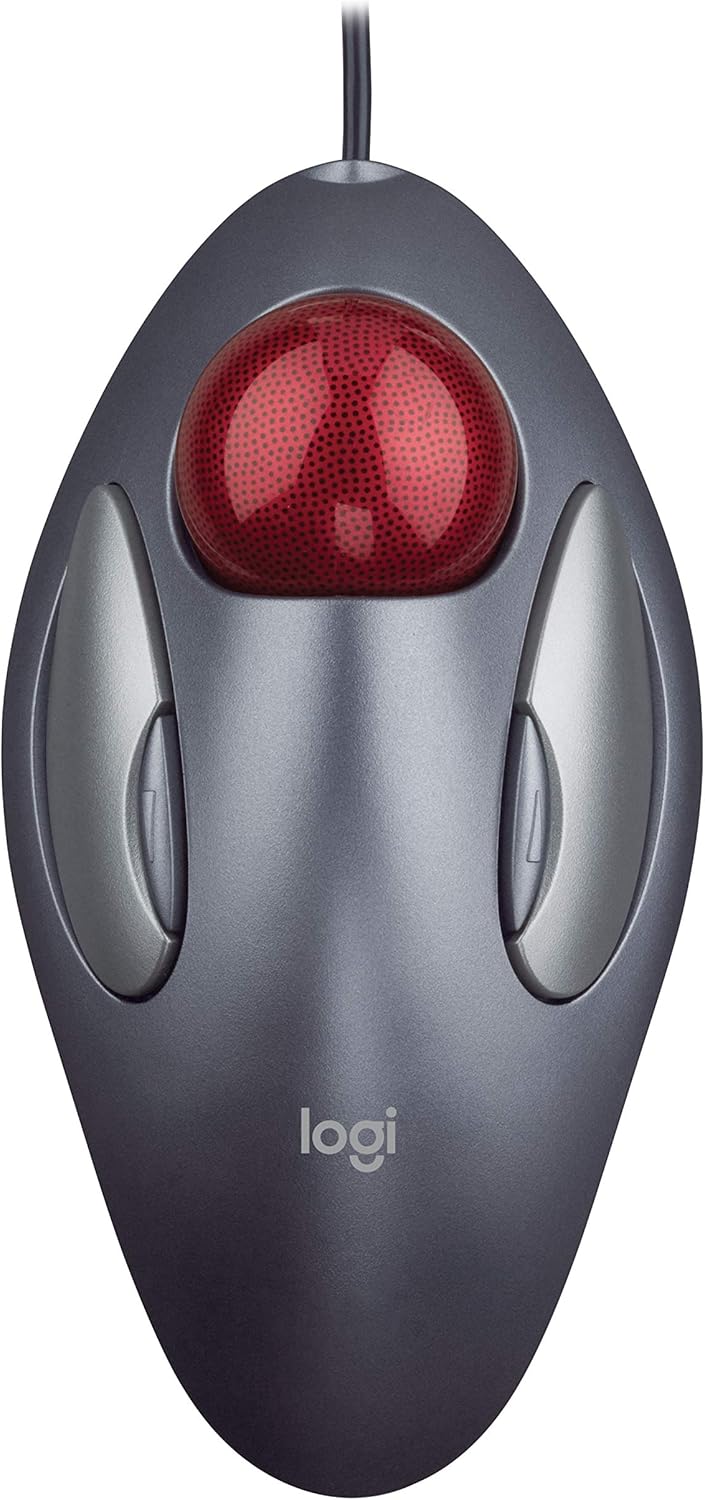
Figura 1: De dalt a baix view of the Logitech Trackman Marble Trackball.
Instruccions de funcionament
Funcionalitat bàsica
- Trackball: Use your fingers (typically index, middle, or ring finger) to roll the red trackball to move the cursor on the screen. The trackball remains stationary, allowing cursor movement without moving your arm or wrist.
- Botó esquerre de clic: The large silver button on the left side of the trackball. Used for selecting items, opening files, and primary interactions.
- Botó dret: The large silver button on the right side of the trackball. Used for accessing context menus and secondary interactions.
Botons programables
The Trackman Marble features four programmable buttons. The two main large buttons function as left and right click by default. The two smaller, inner silver buttons (often referred to as Back/Forward buttons) can be customized using Logitech Options software.
- Default Functionality: The smaller inner buttons typically function as "Back" and "Forward" for web browsing or navigating folders.
- Personalització: With Logitech Options software, you can configure these buttons to perform various functions, such as:
- Canvi d'aplicacions
- Opening browser windows
- Jumping to full screen mode in videos
- Copy/Paste functions
- And many more, depending on your needs.
To download Logitech Options software, visit Logitech's official weblloc.

Figure 2: Ergonomic use of the Trackman Marble Trackball.
Producte acabatview Vídeo
Vídeo 1: Presentació oficial del producte en vídeoasing the Logitech Trackman Marble Trackball from various angles, highlighting its design and features.
Manteniment
Regular cleaning of your Trackman Marble Trackball ensures optimal performance and longevity. Dust and debris can accumulate around the trackball, affecting its smooth movement.
Neteja del trackball
- Remove the Trackball: Gently push the trackball from the underside of the device through the opening. The trackball should pop out easily.
- Clean the Trackball: Wipe the red trackball with a soft, lint-free cloth. If necessary, dampen the cloth slightly with water or a mild, non-abrasive cleaner. Ensure the trackball is completely dry before reinserting.
- Clean the Sensor Area: Inside the trackball cavity, you will see three small white support points and the optical sensor. Use a dry cotton swab or a can of compressed air to carefully remove any dust, lint, or debris from these points and the sensor. Avoid touching the sensor directly with your fingers.
- Reinsert the Trackball: Place the clean trackball back into its cavity, ensuring it sits securely and can roll freely.
Perform this cleaning routine periodically, or whenever you notice the cursor movement becoming less smooth or erratic.
Resolució de problemes
| Problema | Causa possible | Solució |
|---|---|---|
| El cursor no es mou o es mou de manera erràtica. |
|
|
| Els botons no responen. |
|
|
| Programmable buttons not working as expected. |
|
|
Especificacions
| Característica | Detall |
|---|---|
| Marca | Logitech |
| Número de model | 910-000806 |
| Tecnologia de connectivitat | Wired (USB / PS/2 compatible) |
| Tecnologia de detecció de moviment | Trackball òptic |
| Nombre de botons | 4 (programable) |
| Disseny ergonòmic | Ambidextre |
| Color | Dark Gray with Red Trackball |
| Dimensions del producte | 9 x 3 x 8 polzades |
| Pes de l'article | 3.14 unces |
| Data de primera disponibilitat | 13 de desembre de 2006 |
Garantia i Suport
For information regarding product warranty, technical support, and additional resources, please visit the official Logitech support weblloc.
Assistència de Logitech: https://support.logi.com/
També podeu consultar el Manual d'usuari (PDF) per a més detalls.


