1. Introducció
This manual provides detailed instructions for the installation, operation, and maintenance of your Thermaltake Spedo VI9001N2Z Full Tower Gaming Case. Please read this manual thoroughly before beginning installation to ensure proper setup and to maximize the performance and longevity of your system components.
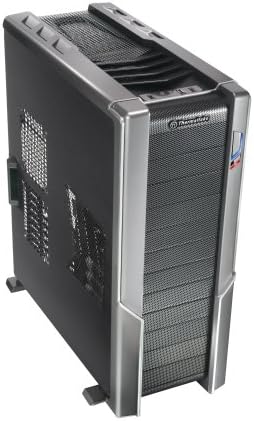
Un angle view of the Thermaltake Spedo VI9001N2Z Full Tower Gaming Case, showcasing its black and silver design with mesh front and top panels for optimal airflow.
2. Informació de seguretat
Observeu les següents precaucions de seguretat durant la instal·lació i el funcionament:
- Desconnecteu sempre l'alimentació de la presa de corrent abans d'instal·lar o treure qualsevol component.
- Porteu una polsera antiestàtica per evitar danys per descàrrega electrostàtica (ESD) als components sensibles.
- Handle components carefully to avoid physical damage.
- Ensure all cables are routed properly and do not obstruct airflow or fan blades.
- Keep the case in a well-ventilated area to prevent overheating.
3. Contingut del paquet
Verifiqueu que tots els elements siguin presents al vostre paquet:
- Thermaltake Spedo VI9001N2Z Full Tower Gaming Case
- Accessory box (containing screws, standoffs, cable ties, etc.)
- Manual d'usuari (aquest document)
Note: Specific quantities of screws and accessories may vary. Refer to the accessory box for exact contents.
4. Característiques clau
The Thermaltake Spedo VI9001N2Z case is designed for high-performance gaming systems with a focus on superior airflow and user-friendly installation:
- Max Airflow Design: Engineered for superior air circulation, supporting up to 8 fans. Includes five standard fans, with two oversized 230mm ultra-quiet fans for efficient cooling.
- Easy Drive Installation: Features user-friendly mechanisms for optical disk drive (ODD) and hard disk drive (HDD) installation.
- Advanced Cable Management (CRM3): Proporciona ample space behind the motherboard tray for routing and storing excessive cables, significantly improving internal airflow and thermal efficiency.
- Wireless Plug & Play Side-Panel Fan: A 230mm side-panel fan simplifies cable management and enhances cooling without complex wiring.
- HDD Relocation Canister: Offers flexibility in drive placement.
5. Configuració i instal·lació
Follow these steps for proper component installation:
5.1. Preinstal·lació
- Desembaleu la caixa i traieu tots els materials d'embalatge.
- Col·loqueu la caixa sobre una superfície plana i estable.
- Remove the side panels by unscrewing the thumbscrews at the rear and sliding them backward.
5.2. Instal·lació de la placa base
- Install the I/O shield into the opening at the rear of the case.
- Align the motherboard with the pre-installed standoffs. If necessary, install additional standoffs according to your motherboard's form factor.
- Col·loqueu amb cura la placa base sobre els separadors.
- Secure the motherboard with the appropriate screws from the accessory box.
5.3. Drive Installation (Optical and Hard Drives)
The case features tool-less installation mechanisms for drives:
- Optical Disk Drives (ODD): Remove the desired 5.25-inch bay cover from the front panel. Slide the ODD into the bay until it clicks into place.
- Hard Disk Drives (HDD): Utilize the HDD relocation canister. Slide the 3.5-inch HDD into a drive bay. Secure it using the provided tool-less clips or screws if preferred.
5.4. Instal·lació de la font d'alimentació
- Position the power supply unit (PSU) in its designated bay, typically at the bottom rear of the case.
- Fixeu la font d'alimentació amb els cargols de la part posterior de la carcassa.
5.5. Expansion Card Installation (e.g., Graphics Cards)
- Traieu les cobertes de les ranures d'expansió necessàries de la part posterior de la carcassa.
- Insert the expansion card into the appropriate PCIe or PCI slot on the motherboard.
- Secure the card with the retention clip or screw.
5.6. Fan Installation and Configuration
The case supports up to 8 fans. Five fans are pre-installed, including two 230mm ultra-quiet fans. The 230mm side-panel fan features a wireless plug & play design.
- Connect all fan power cables to the appropriate headers on your motherboard or a fan controller.
- Ensure fans are oriented to provide optimal airflow (intake for front/side, exhaust for rear/top).
5.7. Gestió de cables
Utilize the CRM3 system by routing cables through the cutouts and behind the motherboard tray. Use cable ties to bundle and secure cables, preventing obstruction of airflow.
5.8. Assemblea Final
- Connect all front panel cables (USB, audio, power/reset switches, LEDs) to the motherboard headers according to your motherboard manual.
- Replace the side panels and secure them with the thumbscrews.
6. Funcionament
After completing the installation, connect your monitor, keyboard, mouse, and power cable to the system. Press the power button on the front panel to start your computer. Monitor system temperatures and fan noise during initial operation to ensure all components are functioning correctly and airflow is adequate.
7. Manteniment
Un manteniment regular ajuda a garantir un rendiment òptim i una llarga vida útil del sistema:
- Neteja de pols: Periodically clean dust filters (if present) and internal components using compressed air. Ensure the system is powered off and unplugged before cleaning.
- Inspecció del ventilador: Check fans for dust buildup or unusual noise. Clean or replace fans as necessary.
- Comprovació de la gestió de cables: Occasionally verify that cables remain neatly routed and do not impede airflow.
8. Solució De Problemes
Si teniu problemes, tingueu en compte els passos habituals següents per resoldre'ls:
- Sense energia: Ensure the power supply is properly connected to the wall outlet and the motherboard. Check all power cables inside the case.
- Els ventiladors no giren: Verify that all fan power cables are securely connected to the motherboard or fan controller.
- Sobreescalfament: Check for proper fan orientation and ensure no cables or dust are obstructing airflow. Consider adding more fans if temperatures remain high.
- Problemes del panell frontal: Double-check the connections of the front panel headers (power switch, reset switch, USB, audio) to the motherboard.
9. Especificacions
| Característica | Especificació |
|---|---|
| Marca | Thermaltake |
| Nom del model | VI9001N2Z |
| Tipus de cas | Torre plena |
| Color | Negre |
| Material | Acer d'aliatge |
| Mètode de refrigeració | Aire |
| Usos recomanats | Jocs |
| Característica especial | Flux d'aire elevat |
| Factor de forma del disc dur | 3.5 polzades |
| Dimensions del producte (L x A x A) | 13 x 25 x 27 polzades |
| Pes de l'article | 32 lliures |
10. Garantia i Suport
For warranty information and technical support, please refer to the official Thermaltake weblloc web o poseu-vos en contacte amb el seu departament d'atenció al client. Conserveu el rebut de compra com a comprovant de compra.
Oficial de Thermaltake Weblloc: www.thermaltake.com


