1. Introducció
This manual provides comprehensive instructions for the operation and maintenance of your Behringer EURODESK SX2442FX Ultra-Low Noise Design 24-Input 4-Bus Studio/Live Mixer. Please read this manual thoroughly to ensure proper usage and to maximize the performance of your mixer.
The EURODESK SX2442FX is a versatile audio mixing console designed for both studio recording and live sound applications. It features 24 inputs, 4 bus outputs, XENYX microphone preamplifiers, "British" style EQs, and dual multi-effects processors.
2. Instruccions de seguretat importants
Always follow these basic safety precautions when using your mixer:
- Font d'alimentació: Connecteu la unitat només a la font d'alimentació especificada del voltage.
- Posada a terra: Ensure the power cord has a protective grounding conductor.
- Humitat: No exposeu la unitat a la pluja o la humitat.
- Ventilació: Assegureu-vos que hi hagi una ventilació adequada. No bloquegeu les obertures de ventilació.
- Calor: Eviteu col·locar la unitat a prop de fonts de calor.
- Neteja: Netegeu només amb un drap sec.
- Manteniment: No intenteu atendre aquest producte vosaltres mateixos. Consulteu tots els serveis a personal de servei qualificat.
3. Configuració
3.1 Desembalatge
Carefully unpack your EURODESK SX2442FX mixer. Inspect the unit for any signs of damage that may have occurred during transit. Retain the original packaging for future transport or storage.
3.2 Connexió d'alimentació
Connect the supplied power cable to the mixer's power inlet and then to a suitable AC power outlet. Ensure the power switch is in the OFF position before connecting. The mixer operates on standard AC power.

Figura 3.1: Rear panel of the SX2442FX, illustrating the power connection point.
3.3 Connexions bàsiques
The SX2442FX offers a variety of input and output options. Below are common connection types:
- Entrades de micròfon (XLR): Connect microphones to the XLR inputs on channels 1-16. These inputs feature XENYX mic preampaixecadors.
- Line Inputs (1/4" TRS): Connect line-level sources such as keyboards, drum machines, or other audio devices to the 1/4" TRS inputs.
- Stereo Line Inputs (1/4" TRS/TS): Channels 17/18, 19/20, 21/22, and 23/24 are designed for stereo line-level sources.
- Main Outputs (XLR/1/4" TRS): Connect these to your main PA system or studio monitors.
- Subgroup Outputs (1/4" TRS): Use these to route groups of channels to external processors or specific destinations.
- Aux Sends (1/4" TS): Connect to external effects processors or monitor wedges.
- FX Returns (1/4" TS): Connect the outputs of external effects processors here.

Figura 3.2: Acabatview of the SX2442FX control surface, highlighting various input and output sections.
4. Funcionament del mesclador
4.1 Channel Strip Overview
Each mono input channel (1-16) and stereo input channel (17/18 - 23/24) features a dedicated channel strip with various controls:
- Control GAIN: Adjusts the input sensitivity for microphones or line-level signals.
- Secció EQ: "British" style 3-band equalizer with a semi-parametric mid-band for precise tone shaping.
- Enviaments AUX: Controls for sending signal to external effects or monitor mixes.
- PAN/BAL Control: Positions the signal in the stereo field (mono channels) or adjusts balance (stereo channels).
- Botó MUTE: Silencia el canal.
- SOLO Button: Isolates the channel for monitoring.
- SUB 1-4 Buttons: Assigns the channel to one or more of the four subgroups.
- MAIN Button: Assigns the channel directly to the main stereo mix.
- Fader del canal: Adjusts the output level of the channel.
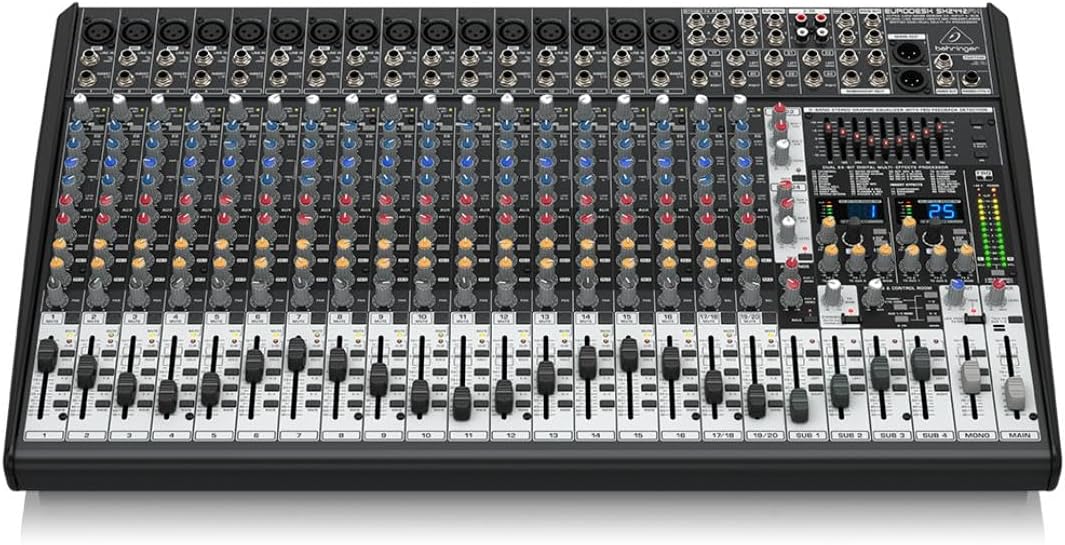
Figura 4.1: A closer look at the channel strip controls, including GAIN, EQ, AUX sends, and routing buttons.
4.2 Subgroup Operation
The SX2442FX features four subgroups (SUB 1-4) which allow you to group multiple channels and control their overall level with a single fader. This is useful for managing drums, vocals, or other instrument sections.
- Assign desired channels to a subgroup using the SUB 1-4 buttons on each channel strip.
- Adjust the overall level of the subgroup using its dedicated fader.
- Subgroups can be routed to the main mix using their respective PRINCIPAL botons.
4.3 Main Mix Operation
The main stereo mix is controlled by the MIXLE PRINCIPAL faders. All channels and subgroups routed to the main mix will be combined here. The main mix also features a 9-band stereo graphic equalizer for overall frequency adjustment and a feedback detection system.
4.4 Dual Multi-FX Processor Usage
The mixer includes two independent 24-bit stereo FX processors with 99 presets. These can be assigned to channels via the FX send controls on each channel strip.
- Select a desired effect preset using the program selector on the FX section.
- Utilitza el ENVIAR FX controls on individual channels to send signal to the internal effects processor.
- Ajusteu el RETORN FX faders to control the overall level of the processed signal in the main mix or monitor sends.
4.5 Monitoring and Talkback
The mixer provides various monitoring options, including headphone output and control room outputs. A dedicated REPLICAR microphone input and control allow for communication with musicians on stage or in a separate room.
5. Manteniment
5.1 Neteja
Regularly clean the mixer's surface with a soft, dry, lint-free cloth. Avoid using abrasive cleaners, solvents, or waxes, as these can damage the finish and controls. For stubborn dirt, a slightly damp es pot fer servir un drap, seguit d'un drap sec.
5.2 Emmagatzematge
When not in use for extended periods, store the mixer in a cool, dry environment, away from direct sunlight and extreme temperatures. It is recommended to use the original packaging or a protective case to prevent dust accumulation and physical damage.
6. Solució De Problemes
This section addresses common issues you might encounter with your EURODESK SX2442FX mixer.
| Problema | Causa possible | Solució |
|---|---|---|
| Sense sortida de so |
|
|
| Àudio distorsionat |
|
|
| Els efectes no funcionen |
|
|
7. Especificacions tècniques
Below are the key technical specifications for the Behringer EURODESK SX2442FX mixer:
- Pes de l'article: 18.96 lliures
- Dimensions del producte: 26.85 x 3.94 x 16.14 polzades
- Marca: Behringer
- Nombre de canals: 24
- Font d'alimentació: Elèctric amb cable
- Wattage: 50 watts
- Tecnologia de connectivitat: Auxiliar
- Número de model: SX2442FX
8. Garantia i Suport
Per obtenir informació detallada sobre la garantia i assistència tècnica, consulteu la pàgina oficial de Behringer. weblloc web o poseu-vos en contacte amb el vostre distribuïdor local autoritzat de Behringer. Conserveu el rebut de compra com a comprovant de compra per a qualsevol reclamació de garantia.
Behringer is committed to providing high-quality products and customer satisfaction. Should you encounter any issues not covered in this manual, professional assistance is available.


