1. Introducció
This manual provides detailed instructions for the safe and efficient operation of your Samsung Glyde U940 mobile phone. Please read this manual thoroughly before using your device to ensure proper functionality and to understand all features.
2. Contingut del paquet
Verifiqueu que el paquet del producte conté els elements següents:
- Samsung Glyde U940 Mobile Phone
- Bateria estàndard
- Travel Adapter/Charger
- Manual d'usuari (aquest document)
- Nota: Els accessoris específics poden variar segons la regió o el distribuïdor.
3. Dispositiu acabatview
The Samsung Glyde U940 features a large touch-sensitive display and a slide-out QWERTY keyboard for versatile input.
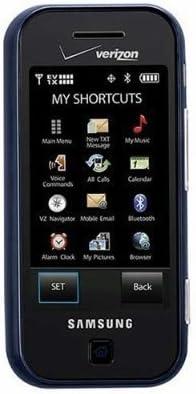
Figura 3.1: Davant view of the Samsung Glyde U940, showing the 2.8-inch display and navigation buttons. The screen displays "MY SHORTCUTS" with icons for various functions like Main Menu, New TXT Message, My Music, Voice Commands, All Calls, Calendar, Mobile Email, Bluetooth, Alarm Clock, My Pictures, and Browser. "SET" and "Back" buttons are visible below the screen.
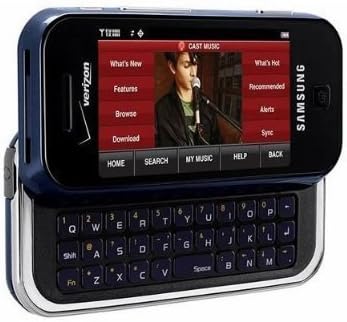
Figura 3.2: Samsung Glyde U940 with its full QWERTY keyboard extended. The phone is oriented horizontally, displaying a media interface on the screen with options like "What's New", "Features", "Browse", "Download", "What's Hot", "Recommended", "Alerts", and "Sync". Navigation buttons for "HOME", "SEARCH", "MY MUSIC", "HELP", and "BACK" are visible below the screen.
Característiques principals:
- Large 2.8" Display
- Slide-out QWERTY Keyboard
- Interfície de pantalla tàctil
- Full HTML Browser
- 2.0 MP Camera and Camcorder
4. Configuració
4.1. Instal·lació de la bateria
- Locate the battery cover on the back of the phone.
- Gently remove the battery cover by sliding or lifting it.
- Align the battery's gold contacts with the contacts in the battery compartment.
- Insert the battery firmly into place.
- Replace the battery cover, ensuring it clicks securely.
4.2. Carregant la bateria
- Connect the travel adapter to the charging port on your phone.
- Plug the other end of the travel adapter into a standard electrical outlet.
- Allow the phone to charge completely before initial use. The battery indicator on the screen will show charging status.
- Desconnecteu el carregador un cop la bateria estigui completament carregada.
4.3. Encès / apagat
- Per encendre: Press and hold the Power/End key until the screen lights up.
- Per apagar: Press and hold the Power/End key until the power-off options appear, then select "Power off".
5. Instruccions de funcionament
5.1. Ús de la pantalla tàctil
The Samsung Glyde U940 features a resistive touch screen. Use your fingertip or a stylus (if provided) to interact with the display.
- Toca: Lightly touch the screen once to select an item or open an application.
- Arrossega: Touch and hold an item, then move your finger across the screen to reposition it.
- Desplaçament: Slide your finger up or down on the screen to navigate through lists or web pàgines.
5.2. Using the QWERTY Keyboard
Slide the screen horizontally to reveal the full QWERTY keyboard. This keyboard is ideal for typing messages, emails, and web adreces.
- Press individual keys to input characters.
- Utilitza el Canvi key for uppercase letters and symbols.
- El Fn key provides access to additional functions or symbols.
5.3. Fer i rebre trucades
- Fer una trucada: From the home screen, tap the Phone icon or dial the number using the keypad and press the Call key.
- Recepció d'una trucada: When a call comes in, tap the "Answer" button on the screen.
- Finalització d'una trucada: Tap the "End" button on the screen or press the Power/End key.
5.4. Missatgeria (SMS/MMS)
To send a text or multimedia message:
- From the main menu, select "Messages" or "New TXT Message".
- Introduïu el número de telèfon del destinatari o seleccioneu-lo dels vostres contactes.
- Type your message using either the touch screen or the QWERTY keyboard.
- To add multimedia (pictures, videos, audio), select the attachment option.
- Tap "Send".
5.5. Camera and Camcorder Functions
The Glyde U940 is equipped with a 2.0 MP camera.
- Fent fotos: Open the Camera application, frame your shot, and press the dedicated camera button or tap the capture icon on the screen.
- Gravació de vídeos: Switch to camcorder mode within the Camera application, press the record button to start, and press again to stop.
- Access your captured media in the "My Pictures" or "Gallery" application.
5.6. Web Navegador
Utilize the full HTML browser to access the internet.
- From the main menu, select "Browser".
- Introduïu el desitjat web adreça a la URL bar.
- Use the touch screen to navigate pages, zoom in/out, and click links.
6. Manteniment
6.1. Cura de la bateria
- Eviteu exposar la bateria a temperatures extremes.
- No perforeu ni danyeu la bateria.
- For optimal battery life, avoid frequent partial discharges and charges.
- Si no heu d'utilitzar el telèfon durant un període prolongat, guardeu-lo amb la bateria parcialment carregada.
6.2. Neteja del dispositiu
- Use a soft, lint-free cloth to clean the screen and exterior of the phone.
- Do not use harsh chemicals, cleaning sprays, or abrasive materials.
- Ensure no moisture enters openings such as the charging port or headphone jack.
6.3. Actualitzacions de programari
Periodically check for available software updates to improve performance and add new features. Consult your service provider or the Samsung weblloc web per als procediments d'actualització.
7. Solució De Problemes
This section addresses common issues you might encounter with your Samsung Glyde U940.
| Problema | Possible solució |
|---|---|
| El telèfon no s'encén. | Assegureu-vos que la bateria estigui correctament instal·lada i completament carregada. Connecteu el carregador i intenteu engegar-la. |
| Touch screen is unresponsive or erratic. |
|
| La bateria s'esgota ràpidament. |
|
| No es poden fer ni rebre trucades. | Check network signal strength. Ensure "Airplane Mode" is not enabled. Contact your service provider if network issues persist. |
| QWERTY keyboard input is incorrect. | Ensure the keyboard is fully extended and locked into position. Restart the device if keys are unresponsive. |
8. Especificacions
| Característica | Detall |
|---|---|
| Número de model | U940 |
| Mostra | 2.8 Inches, Touch Screen |
| Mètode d'entrada | Touch Screen, Slide-out QWERTY Keyboard |
| Càmera | 2.0 MP (Camera and Camcorder) |
| Navegador | Full HTML Browser |
| Pes de l'article | 11.2 unces |
| Dimensions | 8.1 x 5.4 x 2.2 polzades (dimensions del paquet) |
| Connectivitat | Wireless, USB 2.0 |
| Fabricant | Samsung |
9. Garantia i Suport
Per obtenir informació sobre la garantia, consulteu la targeta de garantia inclosa amb el producte o visiteu el lloc web oficial de Samsung. website. For technical support, contact your service provider or Samsung customer service.
Samsung Customer Service: www.samsung.com/us/support/


