Producte acabatview
The Primera AP360 Label Applicator is designed for efficient and accurate application of labels to cylindrical and many tapered containers. It streamlines the labeling process, making it faster and more consistent than manual application, ensuring a professional finish for your products.
- Quick set-up and easy operation.
- Accurately applies one label to a container.
- Fast - labels are applied at 5.3" (135mm) per second - up to 1200 containers per hour.
- Great for labeling cylindrical containers as well as many tapered containers including bottles, cans, jars and tubes.

Image: The Primera AP360 Label Applicator, a grey and black device designed for applying labels to cylindrical containers. A bottle with a "Hot Sauce" label is shown in the labeling position.
Instruccions de configuració
- Desembalatge: Traieu amb cura tots els components de l'embalatge. Assegureu-vos que totes les peces hi són i no estan danyades.
- Col·locació: Place the AP360 on a stable, flat surface that provides adequate space for operation and access to power.
- Connexió d'alimentació: Connect the power adapter to the unit's power input and then plug it into a suitable electrical outlet.
- Connexió del pedal: Connect the foot pedal to the designated port on the applicator. The foot pedal controls the label application process.
- Carregant etiquetes:
- Refer to the "Label Path Diagram" sticker, typically located on the side of the unit, for correct label roll placement and threading.
- Place your label roll onto the magnetic supports, ensuring it spins freely.
- Feed the label web through the designated path, making sure it passes smoothly under the tension bar and over the application roller.
- Adjust the side guides to match the width of your label roll, ensuring the labels feed straight and without obstruction.
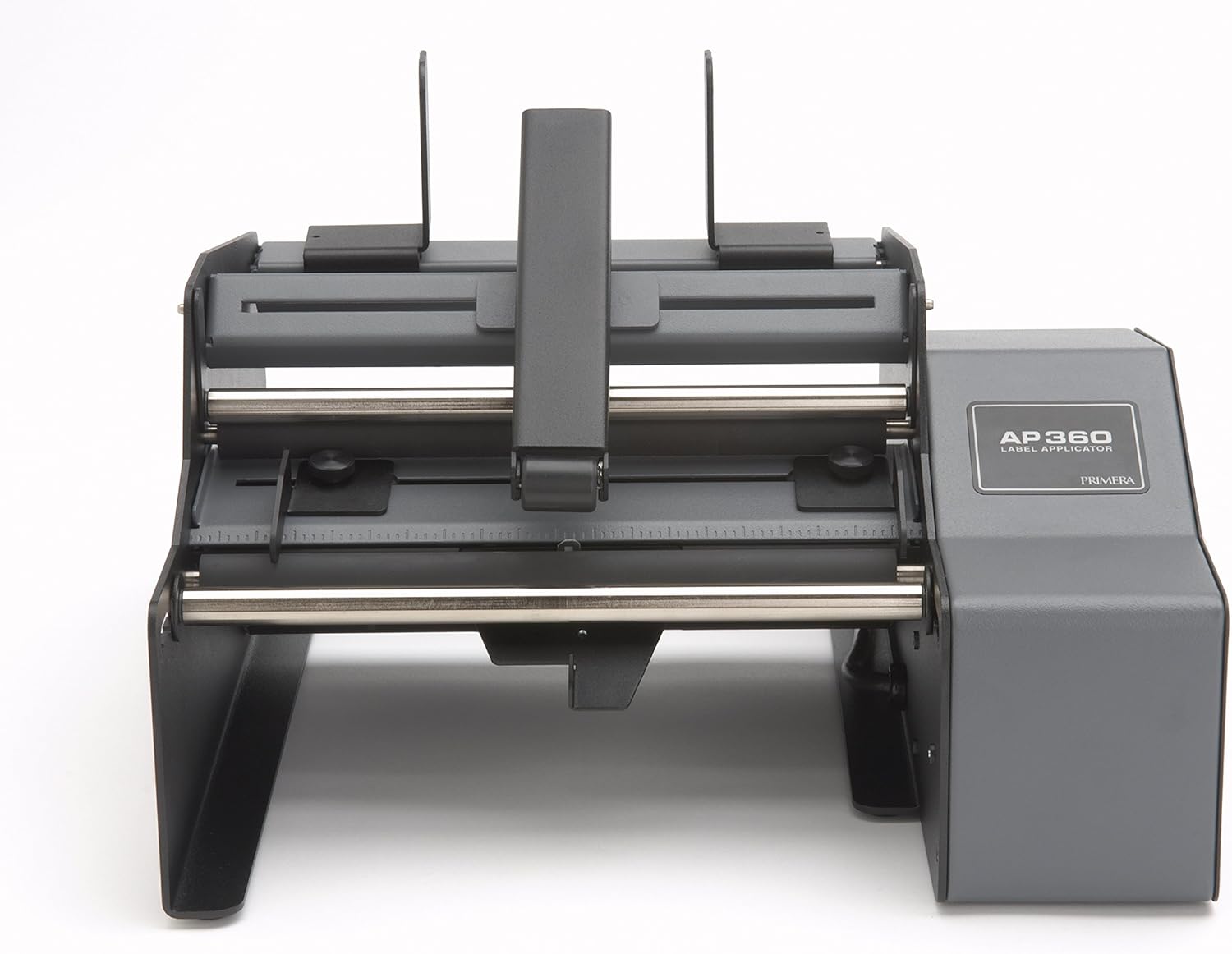
Imatge: Vista de dalt a baix view of the AP360 Label Applicator, highlighting the label roll placement area and the various rollers involved in the label path.
Instruccions de funcionament
- Col·locació del contenidor: Place your cylindrical or tapered container onto the rollers. Ensure it is seated firmly and aligned with the label path. The machine is designed to accommodate a wide range of container sizes.
- Aplicació de pressió: Gently lower the top arm to provide slight, consistent pressure on the container. This helps to keep the container stable and ensures proper label adhesion during rotation.
- Aplicació de l'etiqueta: Press the foot pedal to initiate the label application. The machine will automatically apply one label as the container rotates. Release the pedal once the label is fully applied.
- Ajust de velocitat: The foot pedal can also be used to adjust application speed. Holding the pedal down for an extended period may cycle through different speed settings, allowing you to optimize for various container types and label materials.
- Tipus d'etiquetes: The AP360 is compatible with various label types, including clear labels, ensuring versatility for different product packaging needs.
For a visual demonstration of the AP360 in operation, please watch the official product video below:
Video Description: This video demonstrates the Primera AP360 and AP362 Label Applicators in action, showcasing their ability to apply labels smoothly and without wrinkles at speeds up to 1200 labels per hour. It highlights the ease of use and the professional finish achieved on various container types.

Image: The AP360 Label Applicator set up with various bottles, illustrating its versatility for different container sizes and shapes.
Manteniment
Regular maintenance ensures the longevity and optimal performance of your AP360 Label Applicator. Performing these simple steps will help prevent issues and maintain labeling quality.
- Neteja: Periodically clean the rollers and the label path with a soft, damp cloth to remove any adhesive residue or dust. Ensure the machine is unplugged from the power source before cleaning.
- Inspecció de rodets: Inspect the rollers for any signs of wear, cracking, or damage. Worn rollers can negatively affect label application quality, leading to misalignment or bubbles.
- Inspecció general: Check all moving parts for smooth operation. Ensure all screws and fasteners are secure. Do not attempt to lubricate internal components unless specifically instructed by Primera support.
Resolució de problemes comuns
- Labels not lining up correctly or appearing with bubbles/wrinkles:
- Ensure the container is properly seated and aligned on the rollers. Adjust the side guides to fit the container snugly but not too tightly. Check that the label roll is loaded correctly and the label web is taut but not over-tensioned. For soft containers, applying consistent, gentle pressure with the top arm can help. Uneven pressure or container movement during application can cause these issues.
- La màquina no s'encén:
- Verify that the power adapter is securely connected to both the unit and a working electrical outlet. Check the power switch on the unit. If using a power strip, ensure it is turned on and functioning.
- Labels continuously applying without stopping:
- This may indicate an issue with the label sensor. Ensure the sensor area is clean and free from any debris or adhesive residue that might obstruct its function. If the problem persists after cleaning, contact customer support for further assistance.
- Difficulty with very narrow containers:
- The AP360 is primarily designed for wider jars and bottles. While it can handle some narrower containers, very narrow items might not achieve optimal or consistent label application due to the design of the rollers and guides. Consider alternative labeling methods for extremely narrow containers.
Especificacions del producte
| Característica | Detall |
|---|---|
| Marca | Primera |
| Nom del model | AP360 |
| Número de model de l'article | 74291 |
| Pes de l'article | 1 lliures |
| Dimensions del producte | 18.7 x 18.6 x 16.4 polzades |
| Tipus de material | Metall |
| Tecnologia de connectivitat | USB |
| Mètode de control | Tàctil, prémer el botó |
| Mida màxima del suport | 6.7" |
| Còpies màximes per execució | 1200 |
| Mitjans impresos | Etiquetes |
| Components inclosos | Etiquetes |
| Tipus de garantia | garantia limitada |
Garantia i assistència al client
The Primera AP360 Label Applicator comes with a limited warranty. For specific warranty terms and conditions, including coverage details and duration, please refer to the documentation included with your product or visit the official Primera Technology, Inc. weblloc.
For technical assistance, troubleshooting, parts inquiries, or any other support needs, please contact Primera customer support. They can provide expert guidance and solutions for your label applicator.
- Assistència en línia: Visit the Primera Technology, Inc. website for comprehensive FAQs, user guides, and support resources.
- Suport telefònic: Refer to your product packaging or the official Primera website for the most current customer service contact numbers and operating hours.


