1. Introducció
This manual provides comprehensive instructions for the installation, operation, and maintenance of your Chieftec BT-02B-U3 Mesh Mini-ITX PC Case. Please read this manual thoroughly before beginning any installation or operation to ensure proper usage and to prevent damage to the product or other components. Keep this manual for future reference.
2. Informació de seguretat
- Desconnecteu sempre l'alimentació de la presa de corrent abans d'instal·lar o treure qualsevol component.
- Handle all components with care to avoid electrostatic discharge (ESD) damage. Consider using an anti-static wrist strap.
- Assegureu-vos que hi hagi una ventilació adequada al voltant de la carcassa de l'ordinador per evitar el sobreescalfament.
- Do not expose the product to moisture or extreme temperatures.
- Mantingueu les peces petites i els materials d'embalatge fora de l'abast dels nens.
3. Producte acabatview
The Chieftec BT-02B-U3 is a compact Mini-ITX PC case designed for standard, cost-effective components. It includes a powerful 250W SFX power supply, making it suitable for ITX motherboards with desktop CPUs. Its mesh design aids in ventilation.

Figura 3.1: Davant i lateral view of the Chieftec BT-02B-U3 Mesh Mini-ITX PC Case. This image displays the compact form factor, the optical drive bay, and the front panel controls including power and USB ports.

Figura 3.2: Part superior frontal view of the Chieftec BT-02B-U3 PC Case. This perspective highlights the horizontal orientation, the optical drive slot, and the front panel buttons and indicators.
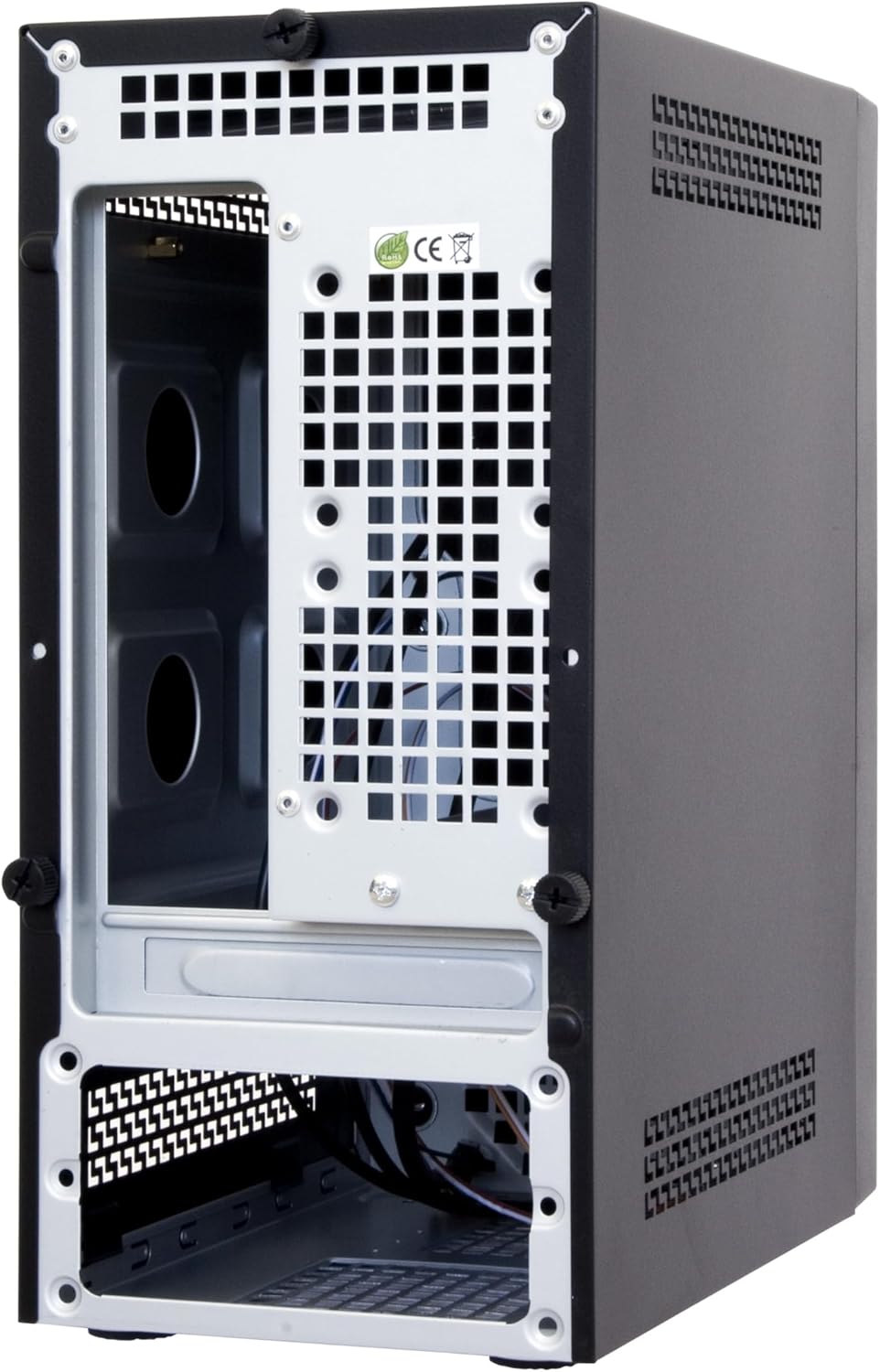
Figura 3.3: Rear and internal view of the Chieftec BT-02B-U3 PC Case. This image shows the internal structure, including the motherboard tray area, expansion slots, and the bottom-mounted power supply bay.
4. Configuració i instal·lació
Follow these general steps for installing components into your Chieftec BT-02B-U3 PC case. Specific component installation instructions should be referenced from their respective manuals.
- Preparar el cas: Remove the side panel(s) by unscrewing the thumbscrews at the rear of the case.
- Instal·leu la placa base: Secure your Mini-ITX motherboard onto the standoffs provided in the case. Ensure the I/O shield is properly seated.
- Install Storage Drives: Mount your 2.5-inch or 3.5-inch storage drives into the designated bays.
- Install Optical Drive (Optional): If using, install a slim optical drive into the front bay.
- Connecteu els cables del panell frontal: Connect the power switch, reset switch, USB ports (2x USB 2.0, 2x USB 3.0), and audio jacks to the corresponding headers on your motherboard.
- Connecteu la font d'alimentació: Connect the 24-pin ATX power connector, 4/8-pin CPU power connector, and SATA power connectors to your components. The case includes a pre-installed 250W SFX power supply.
- Gestió de cables: Col·loca els cables amb cura per millorar la circulació del flux i l'estètica.
- Tanca el cas: Reattach the side panel(s) and secure them with the thumbscrews.
5. Instruccions de funcionament
- Encès: Connect the power cable to the power supply and a wall outlet. Press the power button located on the front panel of the case.
- Apagar: Shut down your operating system normally. The system will power off automatically. Alternatively, press and hold the power button for 4 seconds to force a shutdown (not recommended for regular use).
- Connexió de perifèrics: Use the available USB ports (2x USB 2.0, 2x USB 3.0) on the front panel and the rear I/O panel of your motherboard to connect keyboards, mice, and other devices.
6. Manteniment
- Neteja: Regularly clean the exterior of the case with a soft, dry cloth. For dust accumulation inside, use compressed air to gently clear vents and components. Ensure the system is powered off and unplugged before cleaning.
- Ventilació: Ensure that the case's ventilation openings are not obstructed to maintain optimal airflow and cooling performance.
7. Solució De Problemes
If you encounter issues with your PC build, consider the following general troubleshooting steps:
- Sense energia:
- Check if the power cable is securely connected to both the power supply and the wall outlet.
- Ensure the power supply switch (if present) is in the 'ON' position.
- Verify that the front panel power switch cable is correctly connected to the motherboard.
- Sense pantalla:
- Ensure your monitor is connected to the correct video output port (either on the motherboard or a dedicated graphics card).
- Check that all internal power cables (24-pin ATX, CPU power) are firmly seated.
- Reseat RAM modules and any graphics cards.
- Soroll excessiu:
- Identify the source of the noise (e.g., CPU fan, case fan, PSU fan).
- Assegureu-vos que no hi hagi cables que obstrueixin les aspes del ventilador.
- Netegeu la pols dels ventiladors i dels dissipadors de calor.
8. Especificacions
| Característica | Detall |
|---|---|
| Marca | Chieftec |
| Número de model | BT-02B-U3 |
| Tipus de cas | Minitorre (Mini-ITX) |
| Compatibilitat amb la placa base | Mini ITX |
| Font d'alimentació | Integrated 250W SFX Power Supply |
| Material | Acer d'aliatge |
| Color | Negre |
| Dimensions del producte (LxWxH) | 9.45 x 5.31 x 11.61 polzades (24 x 13.5 x 29.5 cm) |
| Pes de l'article | 7.22 lliures (3.28 kg) |
| Ports USB 2.0 | 2 |
| Ports USB 3.0 | 2 |
| Mètode de refrigeració | Aire |
| Tipus de muntatge de la font d'alimentació | Muntatge inferior |
9. Garantia i Suport
For warranty information or technical support, please refer to the official Chieftec weblloc web o poseu-vos en contacte amb el vostre distribuïdor local. Conserveu el comprovant de compra per a reclamacions de garantia.
For further assistance, you may visit the Chieftec official weblloc: www.chieftec.eu


