1. Introducció
The Extel WEMR 81001 is a reliable AC/DC voltage tester designed for electrical professionals and DIY enthusiasts. This device provides clear indications of voltage levels and polarity, ensuring safe and accurate electrical measurements. It operates without the need for batteries, drawing power directly from the circuit being tested.
Les característiques clau inclouen:
- Voltage testing with up to 7 distinct indication levels.
- Polarity detection for DC circuits.
- Clear visual indication via light.
- Battery-free operation.
- Includes a durable test cable.
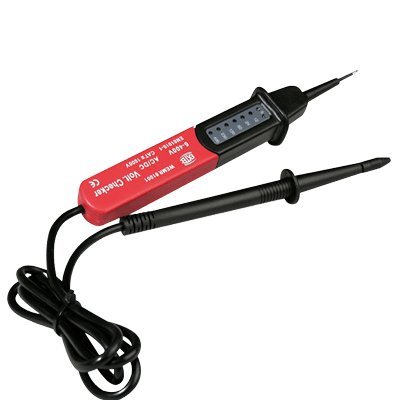
Figure 1: Extel WEMR 81001 AC/DC Voltage Tester. This image displays the compact and robust design of the voltage tester, featuring its main body and test probes.
2. Informació de seguretat
Prioritzeu sempre la seguretat quan treballeu amb electricitat. Llegiu i enteneu tots els avisos de seguretat abans d'utilitzar aquest dispositiu.
- No utilitzar the tester if it appears damaged or if the test leads are frayed or broken.
- Suposa sempre that any circuit is live until proven otherwise with a reliable voltage provador.
- Wear appropriate Personal Protective Equipment (PPE), such as insulated gloves and safety glasses, when performing electrical tests.
- No excedeixi el volum màximtage ratings specified for this device.
- Keep hands and fingers behind the finger guards on the test probes during use.
- This device is not a substitute for proper electrical training and safety procedures. If you are unsure, consult a qualified electrician.
3. Producte acabatview
The Extel WEMR 81001 consists of a main unit with indicator lights and two integrated test probes connected by a flexible cable.
- Unitat principal: Houses the voltage indicator lights and internal circuitry.
- Sondes de prova: Two insulated probes (typically red and black) used to make contact with the circuit points.
- Llums indicadores: A series of LEDs that illuminate to show the detected voltagnivell i polaritat.
4. Configuració
The Extel WEMR 81001 is designed for immediate use and requires no battery installation or initial charging.
- Inspeccioneu el dispositiu: Before each use, visually inspect the voltage tester and its test leads for any signs of damage, cracks, or exposed wiring. Do not use if damaged.
- Prepareu-vos per al seu ús: Ensure the test probes are clean and free from dirt or moisture.
5. Instruccions de funcionament
Follow these steps to safely and accurately test for AC or DC voltage i polaritat.
- Comprovació de seguretat: Ensure you are wearing appropriate PPE.
- Connectar sondes: Carefully touch the tip of one test probe to the first point of the circuit you wish to test (e.g., live wire or phase).
- Complete Circuit: Touch the tip of the second test probe to the second point of the circuit (e.g., neutral wire or ground).
- Read Indication: Observe the indicator lights on the main unit.
- The lights will illuminate to indicate the detected voltage level (up to 7 levels).
- Per a DC voltage, an additional indicator will show the polarity (positive/negative).
- Interpretar els resultats: The illuminated LEDs correspond to specific voltage ranges. Refer to the markings on the device for exact voltage thresholds. If no lights illuminate, it indicates the absence of voltage o un voltage below the tester's detection threshold.
- Remove Probes: Carefully remove the test probes from the circuit after testing.
Nota: Since the tester operates without batteries, it draws a small amount of current from the circuit to power its indicators. This is normal operation.
6. Manteniment
Proper maintenance ensures the longevity and accuracy of your voltage provador.
- Neteja: Netegeu el dispositiu amb un drap net i sec. No utilitzeu productes de neteja abrasius ni dissolvents.
- Emmagatzematge: Guardeu el provador en un lloc sec i fresc, allunyat de la llum solar directa i de temperatures extremes.
- Inspecció: Regularly inspect the test leads and probes for any signs of wear or damage. Replace the device if any damage is found.
7. Solució De Problemes
| Problema | Causa possible | Solució |
|---|---|---|
| No indication when testing a known live circuit. |
|
|
| Lectures inconsistents. |
|
|
8. Especificacions
| Característica | Detall |
|---|---|
| Número de model | WEMR 81001 (Product ID: 781001) |
| Fabricant | CFIEX |
| Marca | Extel |
| Voltage Tipus | AC/DC |
| Indication Levels | Fins a 7 nivells |
| Indicació de polaritat | Yes (for DC) |
| Font d'alimentació | Battery-free (powered by circuit) |
| Color | Vermell i Negre |
| Dimensions (paquet) | 26.5 x 15 x 4 cm |
| Pes del producte | 160 g |
| Compliment | NF (as per specifications) |
9. Garantia i Suport
For warranty information or technical support, please refer to the documentation included with your purchase or contact Extel customer service through their official weblloc web. Conserveu el comprovant de compra per a reclamacions de garantia.
Fabricant: CFIEX
Marca: Extel


