1. Introducció
The DigiTech RP355 is a versatile modeling guitar processor and USB recording interface designed to provide guitarists with a wide array of tones and effects. This unit integrates amplifier, cabinet, and stompbox modeling with a comprehensive effects suite, a built-in looper, and drum patterns, making it suitable for practice, live performance, and studio recording.
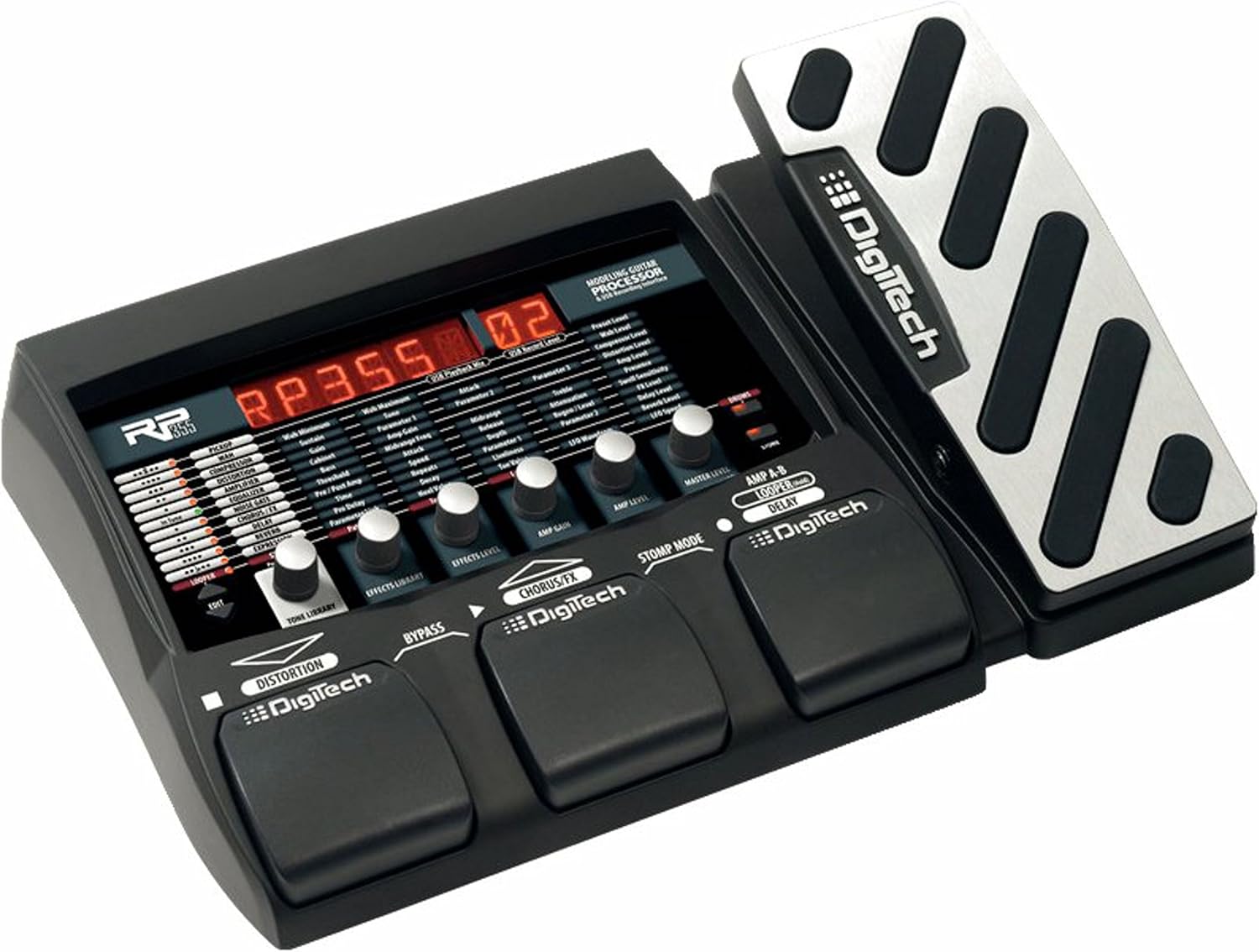
Una sobrecàrrega view of the DigiTech RP355 multi-effects pedal, showing its control panel with a red LED display, various knobs, three footswitches labeled 'Distortion', 'Bypass', and 'Chorus/FX', and an integrated expression pedal on the right side. The unit is black with silver accents on the expression pedal.
2. Característiques clau
- 126 Amps, Cabinets, Stompboxes, and Effects: Access a vast library of tones and effects to shape your sound.
- Built-In Wah, Whammy, and Volume Pedal: Integrated expression pedal for dynamic control over various effects.
- Built-in 20-Second Looper: Record and playback loops for practice, songwriting, or live performance.
- USB Audio Streaming: Connect directly to your computer for recording and playback, compatible with Cubase LE4 (included).
- 60 High-Quality Drum Patterns: Practice with a variety of rhythmic accompaniments.
3. Guia de configuració
Follow these steps to set up your DigiTech RP355 for optimal performance:
- Connexió d'alimentació: Connect the included power adapter to the 9V AC input jack on the rear panel of the RP355 and then to a suitable power outlet.
- Entrada de guitarra: Connecta la teva guitarra al ENTRADA jack (1/4" mono) on the rear panel.
- Audio Output to Ampmés viu: For connecting to a guitar amplifier, use the LEFT (MONO) OUTPUT (1/4" mono) or SORTIDA CORRECTA (1/4" mono) jacks. Adjust the AMP/MIXER switch next to the output to match your amplifier type (AMP for guitar amps, MIXER for full-range systems).
- Audio Output to Mixer/PA: For direct connection to a mixing console or PA system, use the EXCLOSOS i DRET FORA XLR balanced outputs. Ensure the AMP/MIXER switch is set to MIXER.
- Auriculars: Connecteu els auriculars al AURICULARS jack (1/8" stereo) for silent practice.
- Entrada auxiliar: Connecteu un dispositiu d'àudio extern (per exemple, un reproductor MP3) a AUX IN jack (1/8" stereo) to play along with backing tracks.
- Connexió USB: For computer recording and software editing, connect a USB cable from the USB port on the RP355 to an available USB port on your computer. Install necessary drivers and software (e.g., Cubase LE4) as per the instructions provided with the software.
4. Instruccions de funcionament
The RP355 offers intuitive controls for navigating its extensive features:
- Encès/apagat: Once connected, the unit powers on automatically. To power off, disconnect the power adapter.
- Selecció predeterminada: Use the footswitches to scroll through presets. The display will show the current preset number and name.
- Effect Editing: Use the control knobs above the display to adjust parameters for selected effects, amp models, and cabinet models. The display provides visual feedback on current settings.
- Pedal d'expressió: The integrated expression pedal can be assigned to control various effects such as Wah, Whammy, or Volume. Calibrate the pedal if necessary according to the full user manual.
- Looper Function: Activate the looper via its dedicated footswitch or menu option. Record guitar phrases up to 20 seconds, then overdub or playback. Refer to the detailed manual for specific looper controls.
- màquina de tambor: Access and select from 60 built-in drum patterns to practice with. Adjust tempo and volume as needed.
- Gravació USB: When connected to a computer via USB, the RP355 functions as an audio interface. Use your Digital Audio Workstation (DAW) software (e.g., Cubase LE4) to record your guitar tracks with the RP355's processed sound.
5. Manteniment
To ensure the longevity and optimal performance of your DigiTech RP355, follow these maintenance guidelines:
- Neteja: Feu servir un drap suau i sec per netejar l'exterior de la unitat. Eviteu productes de neteja abrasius, dissolvents o ceres.
- Emmagatzematge: Store the RP355 in a cool, dry place away from direct sunlight, extreme temperatures, and high humidity.
- Transport: When transporting the unit, use a padded case to protect it from physical damage.
- Font d'alimentació: Always use the original DigiTech power adapter or a compatible replacement with the correct voltage i especificacions actuals.
- Actualitzacions de firmware: Check the official DigiTech website periodically for any available firmware updates to ensure your unit has the latest features and bug fixes.
6. Solució De Problemes
If you encounter issues with your RP355, try the following troubleshooting steps:
- Sense sortida de so:
- Verify all audio cables are securely connected to the correct input/output jacks.
- Check the volume levels on the RP355, your guitar, and your amplificador/mesclador.
- Assegureu-vos el AMP/MIXER switch is set correctly for your output device.
- Bypass the RP355 (if possible) to determine if the issue lies with the unit or other equipment.
- Soroll distorsionat o no desitjat:
- Comproveu si hi ha guanys adequatstaging; reduce input gain on the RP355 or guitar volume if clipping occurs.
- Assegureu-vos que tots els cables estiguin en bon estat i degudament blindats.
- Try a different power outlet to rule out ground loop issues.
- Problemes de connexió USB:
- Ensure the correct USB drivers are installed on your computer.
- Prova amb un port o cable USB diferent.
- Restart your computer and the RP355.
- Expression Pedal Not Responding:
- Perform a pedal calibration as described in the full user manual.
- Ensure the expression pedal is assigned to an effect within the current preset.
- Unit Freezes or Malfunctions:
- Disconnect and reconnect the power supply to perform a hard reset.
- Consider performing a factory reset (refer to the full manual for instructions, as this will erase user presets).
For persistent issues, consult the complete DigiTech RP355 user manual or contact DigiTech customer support.
7. Especificacions
| Pes de l'article | 5.61 lliures |
| Dimensions del producte | 17.5 x 2.75 x 8.75 polzades |
| Número de model de l'article | RP355 |
| Dispositius compatibles | Ordinador personal |
| Interfície del maquinari | USB |
| Format del senyal | Analògic |
| Sistema operatiu | Windows |
| Font d'alimentació | Elèctric amb cable |
| Voltage | 9 Volts |
| Data de primera disponibilitat | 9 d'abril de 2009 |
8. Garantia i Suport
For detailed information regarding the product warranty, registration, and customer support, please refer to the official DigiTech website or the documentation included with your purchase. DigiTech provides resources for technical assistance and service inquiries.
Recursos en línia: Visit the official DigiTech website for the latest drivers, firmware updates, and comprehensive user manuals.
Atenció al client: Contact DigiTech customer support for any questions or issues not covered in this manual.


