Introducció
The 3Dconnexion SpacePilot Pro is an advanced 3D mouse designed to provide intuitive and precise control over 3D applications. Its patented 6-Degrees-of-Freedom (6DoF) sensor allows for seamless manipulation of digital content and camera positions. By pushing, pulling, twisting, or tilting the controller cap, users can intuitively pan, zoom, and rotate models, freeing the other hand to use a standard mouse for selection, creation, or editing tasks.
This device enhances workflow efficiency by automatically recognizing the active application and environment, assigning relevant commands to its dual-function Intelligent Function Keys. This eliminates the need to constantly switch between the standard mouse or keyboard for common commands, leading to a significantly streamlined design process.
Característiques principals:
- 6-Degrees-of-Freedom (6DoF) Sensor: For precise and intuitive 3D navigation.
- Dual-Function QuickView Tecles de navegació: Provides one-touch access to various useful views for model inspection.
- Intelligent Function Keys: Automatically assigns up to 10 relevant application commands for quick access.
- 31 tecles programables: Offers extensive customization for personalized workflows.
- LCD Workflow Assistant: Displays key information and function assignments.
- Disseny ergonòmic: Features an advanced wrist rest for superior comfort during extended use.
- Connectivitat USB: Standard connection for broad compatibility.

Figure 1: The 3Dconnexion SpacePilot Pro 3D Mouse, showcasing its ergonomic design and control cap.
Configuració
- Requisits del sistema: Ensure your computer meets the minimum system requirements for the 3Dconnexion drivers. Typically, this includes a compatible operating system (Windows, macOS, Linux) and an available USB port.
- Connecteu el dispositiu: Plug the USB cable of the SpacePilot Pro into an available USB port on your computer. The device is designed for plug-and-play functionality, and your operating system may automatically begin installing basic drivers.
- Instal·leu els controladors i el programari: For full functionality and customization, it is highly recommended to download and install the latest drivers and software suite from the official 3Dconnexion website. This software enables advanced features, application-specific settings, and customization of the programmable keys.
- Visit the 3Dconnexion support page.
- Locate the drivers for the SpacePilot Pro (Model: 3DX-700036).
- Baixeu i executeu l'instal·lador, seguint les instruccions que apareixen a la pantalla.
- Reconeixement de programari: Once installed, the 3Dconnexion software will automatically detect compatible 3D applications when they are active, allowing you to configure settings specific to each program.

Figura 2: superior view of the SpacePilot Pro, highlighting the central controller cap and surrounding programmable buttons.
Operating the SpacePilot Pro
6-Degrees-of-Freedom (6DoF) Navigation:
The core of the SpacePilot Pro's functionality lies in its controller cap. This cap allows for simultaneous panning, zooming, and rotating of 3D models or camera views. The sensitivity and direction of movement are directly proportional to the force and direction applied to the cap.
- Empènyer/estirar: Push the cap away from you to zoom in, pull it towards you to zoom out.
- Inclinació: Tilt the cap forward, backward, left, or right to pan the view.
- Torsió: Rotate the cap clockwise or counter-clockwise to rotate the model around its axis.
- Combine Movements: All movements can be combined for complex and fluid navigation.
Programmable Keys and LCD Workflow Assistant:
The SpacePilot Pro features 31 programmable keys, including 10 Intelligent Function Keys and dual-function QuickView Navigation Keys. These keys can be customized through the 3Dconnexion control panel to execute commands, macros, or keyboard shortcuts specific to your active application.
- Intelligent Function Keys: These keys automatically adapt to the active application, providing context-sensitive commands. Their assignments can be viewed and modified via the LCD Workflow Assistant.
- RàpidView Tecles de navegació: Provides instant access to standard views (e.g., top, front, isometric) and custom views, enhancing model inspection.
- Keyboard Modifiers: Dedicated keys for Shift, Ctrl, Alt, and Esc provide convenient access to common keyboard modifiers without moving your hand from the device.
- Pantalla LCD: The integrated LCD screen displays function key assignments, navigation settings, and can even show information from applications like Outlook (mail, calendar, tasks) or RSS feeds, providing a quick overview of your workflow.

Figura 3: Angle view of the SpacePilot Pro, highlighting the LCD screen and surrounding function keys.
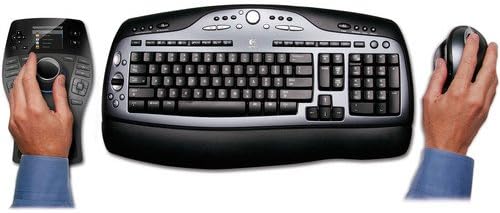
Figure 4: Illustrates the typical two-handed workflow with the SpacePilot Pro and a standard mouse and keyboard.
Manteniment
To ensure the longevity and optimal performance of your 3Dconnexion SpacePilot Pro, follow these simple maintenance guidelines:
- Neteja: Use a soft, dry, lint-free cloth to wipe down the surface of the device. For stubborn smudges, a slightly damp Es pot fer servir un drap amb sabó suau, però assegureu-vos que no entri líquid al dispositiu. Eviteu netejadors o dissolvents abrasius.
- Prevenció de pols: Keep the device in a clean environment to prevent dust and debris from accumulating around the controller cap and buttons, which could affect performance.
- Cura del cable: Avoid sharp bends or kinks in the USB cable. Do not pull the device by its cable.
- Emmagatzematge: When not in use for extended periods, store the device in a safe place away from extreme temperatures, direct sunlight, and excessive moisture.
Resolució de problemes
If you encounter issues with your SpacePilot Pro, try the following troubleshooting steps:
- Dispositiu no reconegut:
- Assegureu-vos que el cable USB estigui connectat correctament tant al dispositiu com a l'ordinador.
- Proveu de connectar el dispositiu a un altre port USB.
- Reinicieu l'ordinador.
- Verify that the 3Dconnexion drivers are correctly installed and up to date. Reinstalling the drivers may resolve recognition issues.
- Unresponsive or Erratic Movement:
- Check for any physical obstructions around the controller cap.
- Recalibrate the device through the 3Dconnexion control panel.
- Assegureu-vos que no hi hagi altres dispositius d'entrada que interfereixin.
- Update or reinstall the 3Dconnexion drivers. Older driver versions or corrupted installations can lead to erratic behavior.
- Si el view drifts constantly, disconnect and reconnect the device. If the issue persists, it may indicate a hardware fault.
- Buttons Not Functioning or Incorrectly Mapped:
- Open the 3Dconnexion control panel and verify the button assignments for the active application.
- Ensure the correct application profile està actiu.
- Some applications may require specific settings within their own preferences to enable full 3D mouse support.
- Problemes de la pantalla LCD:
- Ensure the 3Dconnexion software is running in the background.
- Check display settings within the 3Dconnexion control panel.
For further assistance, refer to the official 3Dconnexion support weblloc o poseu-vos en contacte amb el seu servei d'atenció al client.
Especificacions
| Característica | Detall |
|---|---|
| Número de model | 3DX-700036 |
| Marca | Connexió 3D |
| Tecnologia de connectivitat | USB |
| Tecnologia de detecció de moviment | 6Dof (6-Degrees-of-Freedom) |
| Color | Negre |
| Dimensions del producte | 11.7 x 8.5 x 3.7 polzades (29.7 x 21.6 x 9.4 cm) |
| Pes de l'article | 1.32 lliures (0.6 kg) |
| Característiques especials | Ergonomic Design, Customizable buttons, LCD Workflow Assistant |
| Fabricant | Connexió 3D |
| Què hi ha a la caixa | 3D mouse, Software |
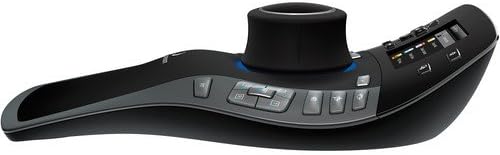
Figura 5: Pro lateralfile of the SpacePilot Pro, illustrating its ergonomic contour.
Garantia i Suport
For detailed warranty information, please refer to the documentation included with your product or visit the official 3Dconnexion weblloc web. Els termes i condicions de la garantia poden variar segons la regió i la data de compra.
Atenció al client: For technical assistance, driver downloads, or further inquiries, please visit the 3Dconnexion support portal. You can typically find FAQs, troubleshooting guides, and contact information for customer service there.
Note: The product information provided indicates a "Legal Disclaimer: No Refunds". This statement pertains to refund policies at the point of sale and does not supersede any statutory warranty rights you may have.
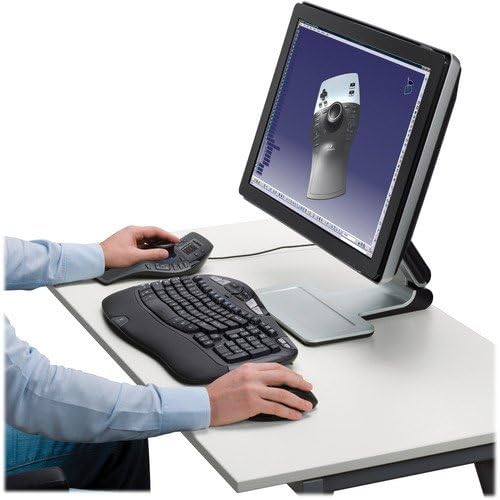
Figure 6: A user engaged in 3D design, utilizing the SpacePilot Pro alongside a standard keyboard and monitor.


