1. Introducció
The Apple 8GB iPod Touch (3rd Generation) is a versatile portable device designed for music, video, applications, and internet browsing. It features a Multi-Touch display and comes with iPhone OS 3.1 software pre-installed, offering a range of functionalities from entertainment to communication.
This manual provides detailed instructions for setting up, operating, maintaining, and troubleshooting your iPod Touch.

Imatge 1.1: Frontal view of the iPod Touch (3rd Generation) in a protective case.

Imatge 1.2: Lateral view of the iPod Touch (3rd Generation), showcasing el seu disseny prim.
2. Configuració
2.1 Càrrega inicial
Before first use, it is important to charge your iPod Touch. Connect the device to a power source using the provided USB cable for at least 2 hours. This ensures the battery is adequately charged for initial setup and operation.2.2 Connecting to iTunes
To manage your music, videos, and other content, connect your iPod Touch to a computer with iTunes installed. iTunes allows you to sync media from your library and perform software updates.
- Install the latest version of iTunes on your Mac or PC.
- Connect your iPod Touch to your computer using the USB 2.0 cable.
- Follow the on-screen instructions in iTunes to complete the initial setup and synchronization process.
3. Instruccions de funcionament
3.1 Navegació general
The iPod Touch features a Multi-Touch display and an accelerometer for intuitive interaction.
- Pantalla multitàctil: Interact with the device by tapping, flicking, pinching, and swiping. This allows for actions like scrolling through lists, zooming in on content, and navigating menus.
- Acceleròmetre: The device automatically detects when you rotate it from portrait to landscape orientation, adjusting the display content accordingly. This is particularly useful for viewing photos, videos, and playing games.
- Botó d'inici: Located at the bottom of the device, a single press of the Home button will always return you to the main Home screen, regardless of the application you are currently using.
- Pantalla d'inici: The Home screen displays your application icons. You can customize the arrangement of icons and create up to 11 Home screens for quick access to your apps and web clips.
- Cerca destacada: From your main Home screen, swipe to the right to access Spotlight Search. This feature allows you to search the entire contents of your iPod Touch, including music, videos, contacts, email, calendars, notes, audiobooks, and podcasts.

Image 3.1: Home screen of the iPod Touch (3rd Generation) with app icons.
3.2 Reproducció de música
The iPod Touch offers various features for enjoying your music library.
- Cover Flow: Turn your iPod Touch on its side to activate Cover Flow, allowing you to browse your music library by album art with a flick of your finger. Tap an album cover to view its track list and tap again to start playback.
- Genius Mixes: After syncing with iTunes, Genius automatically creates multiple mixes of songs from your library that sound great together. These mixes act like personalized radio channels.
- Genius Playlists: While listening to a song, the Genius feature can create a playlist of other songs on your iPod Touch that complement it.
- Shake to Shuffle: With this feature enabled, simply shake your iPod Touch to shuffle to a different song in your music library.
- iTunes Store: Access the iTunes Store over Wi-Fi to purchase and download new music directly to your device. Purchased music will sync to your computer's iTunes library the next time you connect.
- Àudio Bluetooth: Pair your iPod Touch with compatible Bluetooth stereo headphones for wireless audio playback.
3.3 Reproducció de vídeo
Enjoy movies, TV shows, and video podcasts on the 3.5-inch widescreen display.
- Pantalla ampla Viewing: The display is optimized for video content.
- Onscreen Controls: Tap the display during video playback to access controls for play/pause, chapter selection, and volume adjustment. Double-tap to switch between widescreen and full-screen views.
- iTunes Store for Video: Purchase or rent movies and TV shows directly from the iTunes Store over Wi-Fi, or sync them from your computer.
3.4 App Store
Expand the functionality of your iPod Touch by downloading applications from the App Store.
- Browsing Apps: Explore apps by category, view featured apps, check the Top 25, or use the search function to find specific applications.
- Genius Recommendations: The App Store offers Genius recommendations, suggesting apps you might like based on your download history and popular choices.
- Downloading and Updating: Purchase and download apps wirelessly over Wi-Fi. The iPod Touch will notify you when updates are available for your installed apps.
3.5 Fotos
Store and manage up to 90,000 photos on your device.
- ViewCompartint i compartint: Flick to scroll through thumbnails, tap to view full screen, play slideshows with music and transitions. You can email photos to friends or share them in a MobileMe Gallery.
- Saving Photos: Save images received via email directly to your photo library.
- Syncing Photos: Use iTunes to sync photos from iPhoto (Mac) or Adobe Photoshop Elements/Album (PC) to your iPod Touch.
3.6 Safari Web Navegador
Access the internet using the Safari web browser via a Wi-Fi connection.
- Navegació: View web pages as they appear on a computer.
- Cerca: Integrated Google and Yahoo! search. Bookmarks can be synced from your computer.
- Web Clips: Create Home screen icons (web clips) for frequently visited websites for quick access.
- Zoom: Use tap or pinch gestures on the Multi-Touch display to zoom in and out of web pàgines.
3.7 Mail
Manage your email accounts directly on your iPod Touch.
- Rich HTML Email: Supports rich HTML email, displaying images and photos alongside text. View attachments in their original formats (e.g., PDF, Microsoft Word, Excel, PowerPoint, iWork).
- Account Compatibility: Works with popular providers like MobileMe, Google Gmail, Microsoft Exchange, Yahoo! Mail, AOL, and most IMAP/POP systems.
- Smart Typing: The built-in dictionary and intelligent keyboard predict and suggest words as you type. Rotate the device to landscape for a larger keyboard.
- Cerca: A search field allows you to find emails by sender, recipient, subject, or all headers.
3.8 Mapes
Utilize the Maps application with a Wi-Fi connection for navigation and location services.
- Serveis d'ubicació: Finds your location using known Wi-Fi hotspots and allows searching for points of interest by keyword.
- Indicacions: Get turn-by-turn directions for car, public transit, or walking. View highlighted map routes and estimated travel times.
- Mapa Views: Switch between Google map data, satellite images, and a hybrid view.
- Traffic Information: Displays live traffic conditions with color-coded highlights.
3.9 YouTube
Access and explore YouTube videos.
- Navegació: Explore featured, most viewed, most recent, and top-rated videos.
- Search and Share: Cerca specific videos and email links to your favorite clips.
3.10 Nike + iPod Compatibility
The iPod Touch includes built-in support for Nike + iPod for fitness tracking.
- Tracking Workouts: With a separately available Nike + iPod Sensor in your Nike+ shoe, the device tracks your time, distance, and calories burned, providing voice feedback on your progress.
- Cardio Equipment: This feature also works with compatible cardio equipment found in many fitness centers.
- Sync with nikeplus.com: Transfer your exercise data to nikeplus.com via iTunes to track workouts, set goals, and challenge friends.
3.11 Other Built-in Applications
The iPod Touch includes several useful pre-installed applications:
- Calendari: Manage events, set reminders, and subscribe to calendars. Compatible with Yahoo!, Google, Microsoft Outlook, iCal, MobileMe, and Microsoft Exchange ActiveSync.
- Contactes: Store names, email addresses, phone numbers, and more. Sync contacts from your computer or add new ones on the go.
- Notes: Write quick notes and keep important information. Notes can be emailed to yourself or others.
- Stocks: View performance information for selected stocks. Tap the 'Y!' icon for instant access to Yahoo! Finance.
- Temps: Check worldwide weather forecasts. Add cities and flick between them for six-day forecasts. Tap the 'Y!' icon for Yahoo! city guides.
- Calculadora: Functions as a standard calculator in portrait mode and a scientific calculator in landscape mode.
4. Manteniment
4.1 Cura de la bateria
The iPod Touch provides up to 30 hours of music playback or 6 hours of video playback on a full charge. To maximize battery life:
- Eviteu temperatures extremes.
- Perform regular full charge cycles.
- If the device will be stored for an extended period, charge it to about 50% before turning it off.
4.2 Screen and Device Cleaning
The Multi-Touch screen can accumulate fingerprints and smudges. To clean your device:
- Utilitzeu un drap suau i sense pelusses.
- Avoid abrasive materials or harsh cleaning agents.
- Consider using a screen protector to prevent scratches and reduce smudges.
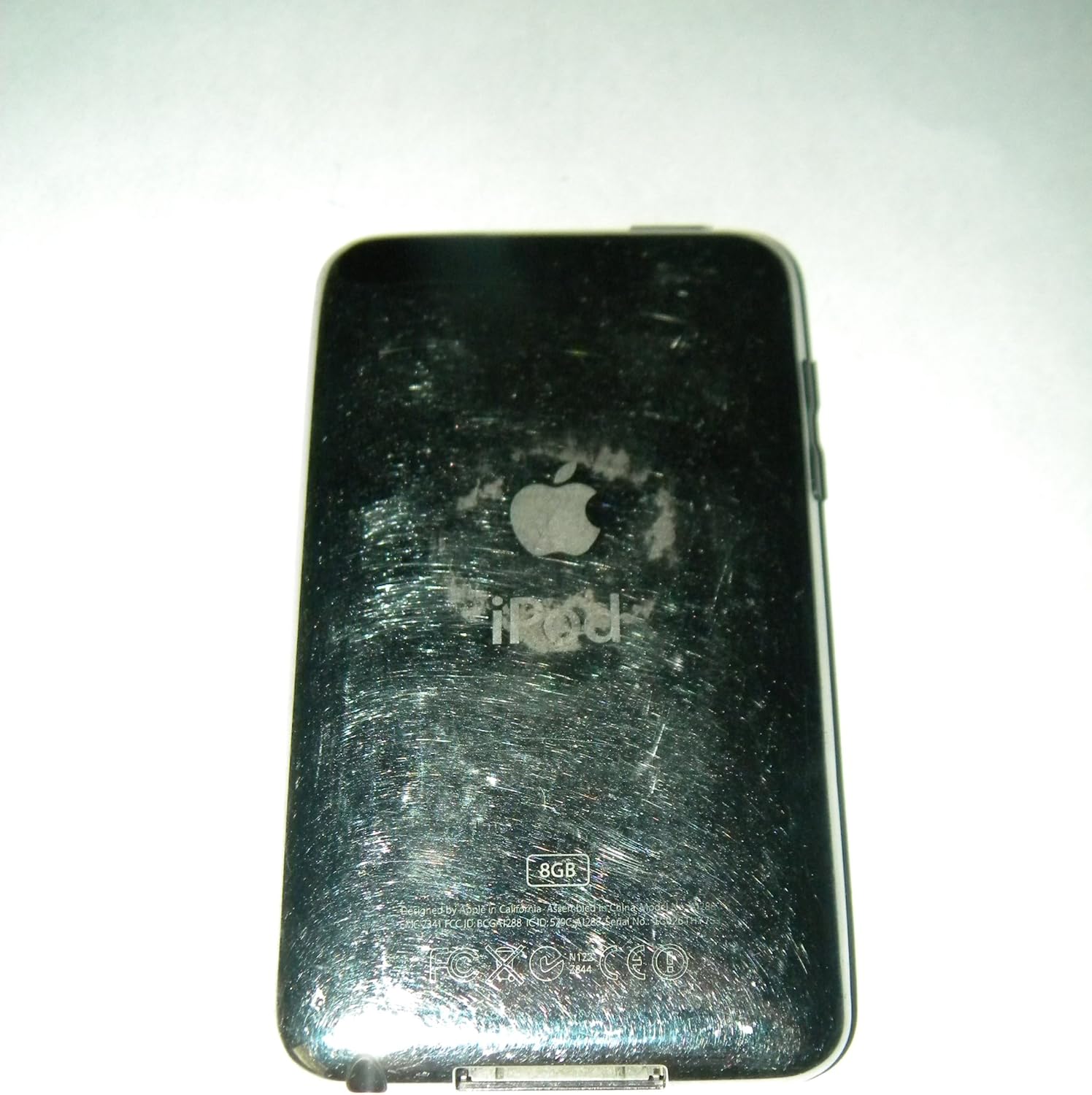
Imatge 4.1: Darrere view of the iPod Touch (3rd Generation).
5. Solució De Problemes
If you encounter issues with your iPod Touch, consider the following steps:
- Reinicieu el dispositiu: Sovint, un simple reinici pot resoldre petits problemes de programari.
- Comproveu les connexions: Ensure the USB cable is securely connected to both the iPod Touch and your computer or power adapter.
- iTunes Recognition: If your computer does not recognize the iPod Touch, ensure iTunes is updated to the latest version and try connecting to a different USB port or computer.
- Connectivitat Wi-Fi: If experiencing Wi-Fi issues, try restarting your Wi-Fi router or forgetting and rejoining the network on your iPod Touch.
- Drenatge de la bateria: If battery life is significantly shorter than expected, check for background applications running or excessive screen brightness.
- Actualització de programari: Ensure your iPod Touch is running the latest compatible software version (iOS 4.2 is the maximum for this model).
6. Especificacions
| Característica | Detall |
|---|---|
| Número de model | A1288 |
| Capacitat d'emmagatzematge | 8 GB (Estimated Free Space 6.5 GB) |
| Mostra | 3.5-inch widescreen Multi-Touch display, 480 x 320 pixel resolution |
| Dimensions (A x A x P) | 4.3 x 2.4 x 0.33 polzades |
| Pes | 3.53 unces |
| Tipus de bateria | 1 bateria de ions de liti |
| Durada de la bateria (música) | Fins a 30 hores |
| Durada de la bateria (vídeo) | Fins a 6 hores |
| Connectivitat | USB, Wi-Fi (802.11b/g), Bluetooth |
| Formats d'àudio compatibles | AAC, Protected AAC, MP3, MP3 VBR, Audible, Apple Lossless, AIFF, WAV |
| Maximum iOS Version | iOS 4.2 |
7. Garantia i Suport
7.1 Garantia limitada
The Apple iPod Touch (3rd Generation) typically includes a one-year limited warranty. This warranty covers manufacturing defects and includes a single incident of complimentary telephone technical support.
For specific terms and conditions of your warranty, please refer to the documentation included with your purchase or visit the official Apple support weblloc.
7.2 Suport tècnic
For further assistance, troubleshooting, or service inquiries, please contact Apple Support through their official channels. Details can be found on the Apple weblloc.


