Introducció
The HP Procurve 1810G-24 Switch (J9450A) is a managed Gigabit Ethernet switch designed for small and medium-sized businesses. It provides reliable network connectivity with advanced features for enhanced performance and security. This manual provides essential information for the setup, operation, maintenance, and troubleshooting of your switch.

Figure 1: HP Procurve 1810G-24 Switch (J9450A) - Front Angled View
This image shows the overall design of the HP Procurve 1810G-24 Switch, highlighting its compact form factor and the arrangement of its ports and indicators.
Contingut del paquet
Verifiqueu que tots els elements siguin presents al paquet:
- HP Procurve 1810G-24 Switch (J9450A)
- Cable d'alimentació
- Kit de muntatge en bastidor
- Cable de la consola
Configuració
1. Instal·lació física
The HP Procurve 1810G-24 Switch can be placed on a desktop or mounted in a standard 19-inch equipment rack using the included rack-mount kit.
- Muntatge en bastidor: Attach the rack-mount brackets to the sides of the switch using the provided screws. Secure the switch into the rack.
- Ubicació d'escriptori: Ensure adequate ventilation around the switch. Do not block any ventilation openings.
2. Connexió d'alimentació
Connect the provided power cable to the power inlet on the rear of the switch and then to a grounded AC power outlet. The switch will power on automatically.

Figure 2: Rear Panel of the Switch
This image displays the rear panel of the HP Procurve 1810G-24 Switch, showing the power input and product labels.
3. Connexions de xarxa
Connect your network devices (computers, servers, other switches) to the RJ45 ports on the front panel of the switch using standard Ethernet cables. The switch supports 10/100/1000 Mbps connections.

Figure 3: Front Panel of the Switch
Aquesta imatge proporciona una clara view of the front panel of the HP Procurve 1810G-24 Switch, detailing the 24 Gigabit Ethernet ports and indicator lights.
The switch also features dual-personality ports (ports 23 and 24) which can function as either 10/100/1000 RJ45 ports or mini-GBIC (SFP) slots for optional fiber connectivity (e.g., Gigabit-SX, -LX, -LH, or 100-FX).

Figure 4: Front Panel Indicators and Controls
This close-up image highlights the power indicator, fault locator, LED mode, and speed indicators on the front panel of the HP Procurve 1810G-24 Switch.
Funcionament de l'interruptor
Web Gestió de la interfície
The HP Procurve 1810G-24 Switch features an intuitive web-based management interface for configuration, monitoring, and administration. To access the web interfície:
- Assegureu-vos que l'ordinador estigui connectat al commutador.
- Obre a web browser and enter the default IP address of the switch (refer to the product documentation or sticker for the default IP).
- Log in using the default credentials (if applicable).
- Des del web interface, you can configure various settings, including:
- VLAN Support and Taggingeig: Configure up to 64 port-based VLANs and dynamic IEEE 802.1Q VLAN tagging for network segmentation and security.
- Configuració del port: Adjust port speed, duplex settings, and enable/disable ports.
- Agregació d'enllaços: Combine multiple ports for increased bandwidth and redundancy.
- Qualitat de servei (QoS): Prioritzar el trànsit de xarxa per a aplicacions crítiques.
Indicadors LED
Els LED del panell frontal proporcionen informació visual sobre l'estat del commutador i els seus ports:
- LED d'alimentació: Indica l'estat d'alimentació.
- Fault Locator LED: Indica errors del sistema.
- LED d'enllaç/activitat (per port):
- Solid Green: Link established.
- Flashing Green: Activity on the port.
- Speed LEDs (per port):
- Off: 10 Mbps
- Flash: 100 Mbps
- On: 1000 Mbps (Gigabit)
Manteniment
The HP Procurve 1810G-24 Switch is designed for low maintenance. It operates without internal fans, contributing to a quiet environment and reduced dust accumulation.
- Actualitzacions de firmware: Periodically check the official HP website for firmware updates to ensure optimal performance and security. Follow the instructions provided with the firmware update package.
- Neteja: Feu servir un drap suau i sec per netejar l'exterior de l'interruptor. No utilitzeu netejadors líquids ni en aerosol.
- Ventilació: Assegureu-vos que les obertures de ventilació no estiguin obstruïdes per evitar el sobreescalfament.
Resolució de problemes
Sense poder
- Verify the power cable is securely connected to both the switch and the power outlet.
- Comproveu que la presa de corrent funcioni provant-la amb un altre dispositiu.
No Link Light on Port
- Check the Ethernet cable connection at both ends (switch and connected device).
- Prova un cable Ethernet diferent.
- Test the port with a known working device.
- Assegureu-vos que el dispositiu connectat estigui encès i funcioni correctament.
Connectivity Issues After Power Failure
In some rare instances, the switch may not fully restore network connectivity to all ports immediately after a power outage. If this occurs:
- Cicle d'alimentació: Disconnect the power cable from the switch, wait for approximately 30 seconds, and then reconnect it.
- Reseat Cables: Physically disconnect and reconnect the Ethernet cables for affected devices.
- Restabliment de fàbrica: If issues persist, a factory reset may be necessary. This will revert all settings to their default values. Consult the detailed product manual for the specific procedure, which often involves using a small pointed object (like a paperclip) to press a reset button.
Web Interface Inaccessible
- Verify your computer's IP address is in the same subnet as the switch's default IP address.
- Esborra la memòria cau i les galetes del navegador.
- Prova una altra web navegador.
- Perform a factory reset if you have forgotten the login credentials or if the interface remains unresponsive.
Especificacions
| Característica | Descripció |
|---|---|
| Número de model | J9450A |
| Tipus de canvi | Commutador Gigabit Ethernet gestionat |
| Nombre de Ports | 24 (22 x 10/100/1000BASE-T, 2 x Dual-Personality 10/100/1000BASE-T or SFP) |
| Velocitat de transferència de dades | 1000 megabits per segon (gigabit) |
| Tipus d'interfície | RJ45, SFP |
| Material de la caixa | Metall |
| Dimensions (L x A x A) | 17 x 7 x 2 polzades (aproximadament) |
| Pes de l'article | 5 lliures |
| Entrada de potència | 100-127V ~ 0.75A (0.75A), 200-240V ~ 0.4A (0.4A) |
| Temperatura de funcionament | De 0 °C a 40 °C (32 °F a 104 °F) |
| Refrigeració | Sense ventilador |
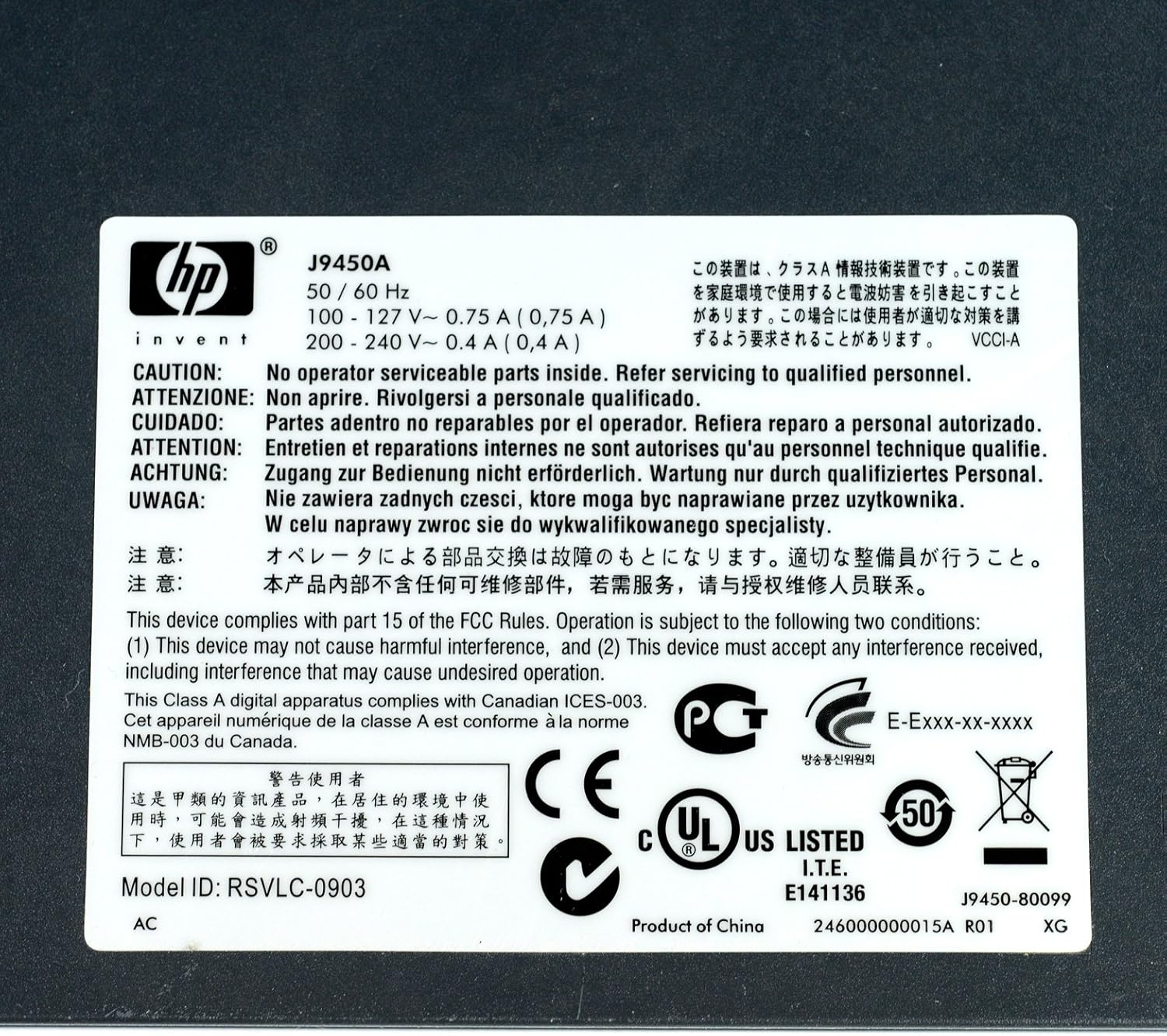
Figure 5: Product Label with Specifications
This image displays the product label, which includes the model number, electrical ratings, and various compliance marks.
Garantia i Suport
Informació de la garantia
The HP Procurve 1810G-24 Switch typically comes with a Garantia de substitució de per vida for the original owner. Please refer to the official HP warranty documentation for complete terms and conditions, as warranty details may vary by region and purchase date.
Suport tècnic
Per obtenir assistència tècnica, registrar el producte o descarregar els controladors i el firmware més recents, visiteu el lloc web de suport oficial d'HP. website. Have your product model number (J9450A) and serial number ready when contacting support.
Normalment podeu trobar recursos de suport a: www.hp.com/support


