1. Introducció
This manual provides detailed instructions for the safe and proper installation and use of the Mount-It! Low-Profile Large TV Mount, model MI-305L. This fixed wall bracket is designed to securely hold large screen displays ranging from 43 to 90 inches, with a maximum weight capacity of 220 lbs. Please read all instructions carefully before beginning installation.
2. Informació de seguretat
- Capacitat de pes: No supereu la capacitat màxima de pes de 100 kg (220 lliures). Superar aquest límit pot provocar lesions greus o danys materials.
- Mida de la pantalla: Aquest suport està dissenyat per a televisors d'entre 43 i 90 polzades. Assegureu-vos que el vostre televisor estigui dins d'aquest rang.
- Compatibilitat VESA: Verify your TV's VESA mounting pattern is compatible with the mount's supported patterns (100x100mm to 800x600mm).
- Estructura de la paret: The mount must be installed into solid wood studs, concrete, or brick walls. Do not install into drywall alone. If unsure about your wall type, consult a qualified professional.
- Eines: Feu servir les eines adequades per a la instal·lació. Porteu sempre ulleres de seguretat.
- Assistència: Due to the size and weight of large TVs, it is highly recommended to have at least two people for installation.
- Gestió de cables: Assegureu-vos que tots els cables estiguin col·locats de manera segura i que no estiguin pinçats ni tensats.
3. Contingut del paquet
Please verify that all components are present and undamaged before installation. If any parts are missing or defective, contact Mount-It! customer support.
- Placa de paret (1)
- Suports de TV (2)
- Mounting Hardware Kit (various screws, washers, spacers, lag bolts, concrete anchors)
- Nivell de bombolla integrat
- Manual d'instruccions
4. Especificacions
| Característica | Especificació |
|---|---|
| Número de model | MI-305L |
| Compatibilitat de la mida del televisor | 43 - 90 polzades |
| Capacitat de pes | 220 lliures (100 kg) |
| Compatibilitat VESA | 100x100, 200x100, 200x200, 300x200, 300x300, 400x200, 400x300, 400x400, 600x200, 600x300, 600x400, 700x400, 750x450, 800x400, 850x450, 800x600 |
| Profile de Wall | Approximately 0.9 inches (Ultra-Slim) |
| Tipus de moviment | Arreglat |
| Material | Acer d'aliatge |
| Dimensions del producte | 37 x 2 x 10 inches (Wall Plate) |
| Espai entre muntants de paret | 8, 16, or 24 inches |
5. Configuració i instal·lació
Follow these steps carefully for a secure installation. Ensure you have all necessary tools and assistance.
5.1. Prepareu el televisor
- Col·loca amb cura el televisor cap per avall sobre una superfície suau i neta per evitar que es faci malbé la pantalla.
- Identifiqueu els forats de muntatge VESA a la part posterior del vostre televisor.
- Attach the two TV brackets to the back of your TV using the appropriate screws, washers, and spacers from the hardware kit. Ensure the brackets are centered and securely fastened. The brackets should be positioned so the hooks face downwards when the TV is upright.
5.2. Prepare the Wall
- Localitza els tacs: For wood stud installation, use a stud finder to locate the edges and center of at least two adjacent wood studs. Mark the center of the studs at your desired TV height. The wall plate is designed to accommodate 8, 16, or 24-inch stud spacing.
- Marca els punts de perforació: Hold the wall plate against the wall at the marked height, ensuring it is level using the integrated bubble level. Mark the drilling points for the lag bolts.
- Perforar forats pilot: Drill pilot holes at the marked locations. For wood studs, use a 7/32 inch (5.5mm) drill bit. For concrete/brick walls, use a 3/8 inch (10mm) masonry drill bit and insert the concrete anchors.
5.3. Muntar la placa de paret
- Align the wall plate with the pilot holes.
- Secure the wall plate to the wall using the lag bolts and washers. Tighten the bolts firmly, but do not overtighten.

Image: The extra-wide wall plate designed for easy installation on 16-inch or 24-inch wood studs, with pre-drilled holes for secure attachment.
5.4. Penja el televisor
- Amb ajuda, aixequeu amb cura el televisor i enganxeu els suports del televisor a la vora superior de la placa de paret.
- Gently lower the TV until the brackets engage with the wall plate. Ensure both brackets are securely seated.

Image: The main components of the Mount-It! MI-305L TV mount, including the wall plate with an integrated level and the two vertical TV brackets.
5.5. Adjust TV Height (Optional)
The TV brackets allow for a maximum of 4 inches of vertical height adjustment after the TV is mounted. This is achieved by selecting different hook positions on the TV brackets before hanging the TV.
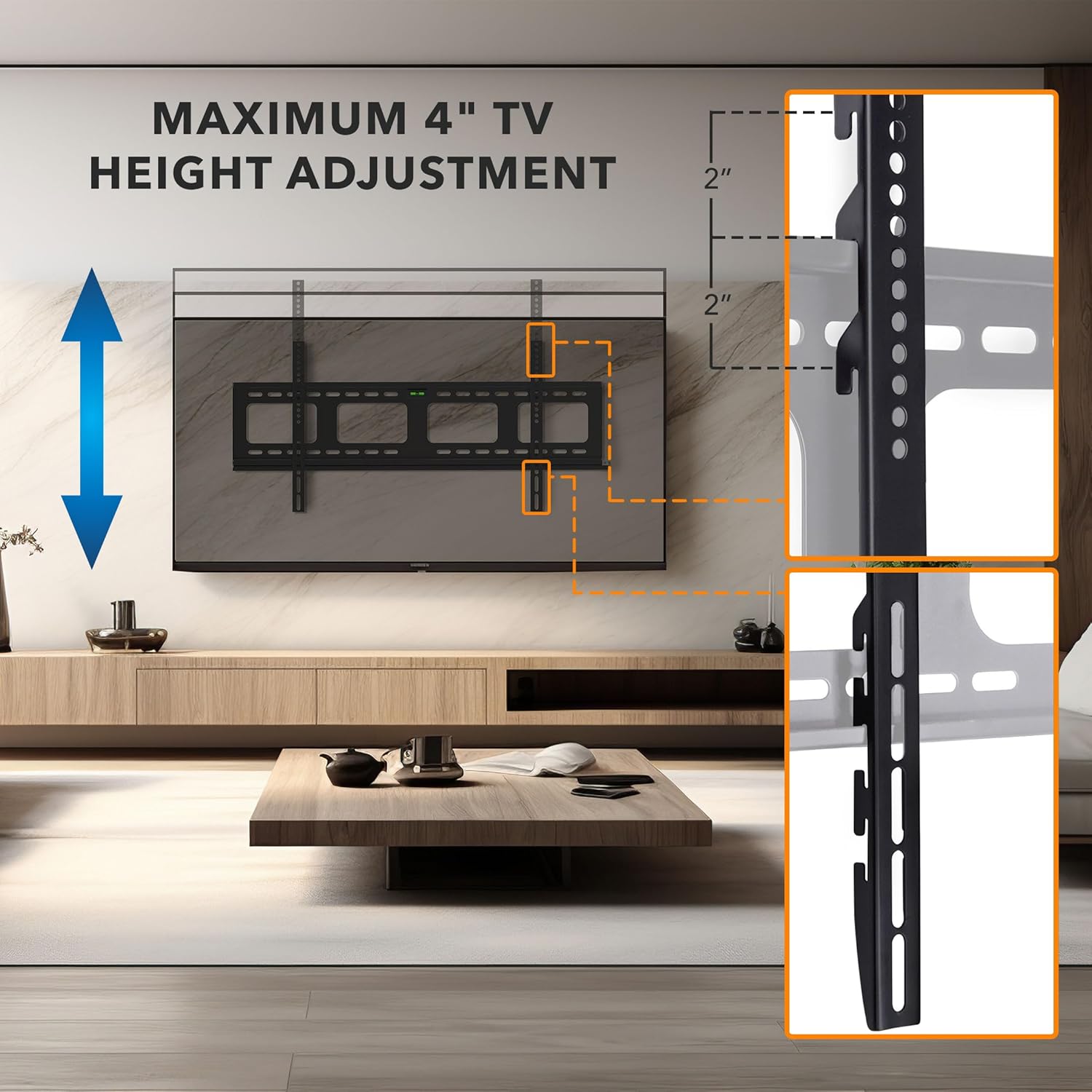
Image: A visual representation of how the TV height can be adjusted by up to 4 inches using the multiple mounting holes on the TV brackets.
5.6. Gestió de cables
The wall plate features large openings to facilitate cable routing. After mounting the TV, carefully route all necessary cables through these openings to maintain a clean and organized appearance. Ensure cables are not kinked or under tension.

Image: The wall plate with large cutouts designed for effortless cable routing, contributing to a clean and neat installation.
6. Funcionament de la muntura
The MI-305L is a fixed TV mount, meaning it holds your TV in a stationary position close to the wall. There are no moving parts for tilt or swivel once installed.
6.1. Anti-Theft Locking Feature
For added security, especially in public or high-traffic areas, the mount includes a provision for an anti-theft locking bar. A padlock (not included) can be used to secure the TV to the wall plate, preventing it from being lifted off the mount.
- Once the TV is mounted and centered, locate the locking bar slot at the bottom of the wall plate.
- Slide the locking bar through the designated holes on the TV brackets and the wall plate.
- Insert a padlock through the hole in the locking bar to secure it in place.

Image: The anti-theft locking feature, showing a sliding bar that can be secured with a padlock (not included) to prevent unauthorized removal of the TV.
7. Manteniment
- Neteja: Wipe the mount with a soft, dry cloth. Avoid abrasive cleaners or solvents.
- Inspecció periòdica: Periodically check all screws and bolts to ensure they remain tight and secure. Over time, vibrations or environmental changes can cause fasteners to loosen.
- Danys: If any part of the mount appears damaged or worn, discontinue use and contact Mount-It! customer support for assistance.
8. Solució De Problemes
- Problema: El televisor no està anivellat després de la instal·lació.
- Solució: While the mount includes an integrated bubble level, it is recommended to use a separate, more accurate level during wall plate installation. If the TV is not level, carefully remove the TV, adjust the wall plate, and re-mount the TV.
- Problem: Difficulty attaching TV brackets to the TV.
- Solució: Ensure you are using the correct size and length of screws for your TV's VESA mounting holes. Refer to your TV's manual for specific screw requirements. Use appropriate spacers if the TV back is uneven or if screws are too long.
- Problema: El televisor sembla inestable al suport.
- Solució: Immediately remove the TV. Re-check all wall plate and TV bracket connections. Ensure lag bolts are securely fastened into studs or concrete anchors. Verify that the TV's weight and VESA pattern are within the mount's specifications. If the issue persists, contact customer support.
9. Garantia i Suport
The Mount-It! MI-305L TV Mount is backed by a multi-year warranty. For warranty claims, technical assistance, or any questions regarding your product, please contact our expert, US-based customer satisfaction team. Contact information can be found on the official Mount-It! weblloc web o l'embalatge del producte.


