Introducció
Gràcies per la compraasing the Discovery Kids Handheld Metal Detector. This device is designed for recreational use, allowing users to explore and discover metallic objects. It features a built-in magnifying lens, compass, and flashlight to enhance the exploration experience. Please read this manual thoroughly before operating the device to ensure proper use and maintenance.
Informació de seguretat
- Seguretat de la bateria: Do not mix old and new batteries. Do not mix alkaline, standard (carbon-zinc), or rechargeable batteries. Remove batteries if the device will not be used for an extended period. Dispose of used batteries properly. Never dispose of batteries in fire, as they may explode or leak.
- Supervisió: Adult supervision is recommended for young users.
- Ús ambiental: Avoid using the metal detector in extreme weather conditions or near sensitive electronic equipment.
- Exposició a l'aigua: The device has an International Protection Rating of IP54, meaning it is protected from limited dust ingress and water spray from any direction. Do not submerge the device in water.
Contingut del paquet
Ensure all items are present before use:
- Discovery Kids Handheld Metal Detector
- Manual d'instruccions
Note: 2 x "AA" size batteries are no inclòs i s'ha de comprar per separat.
Identificació de peces
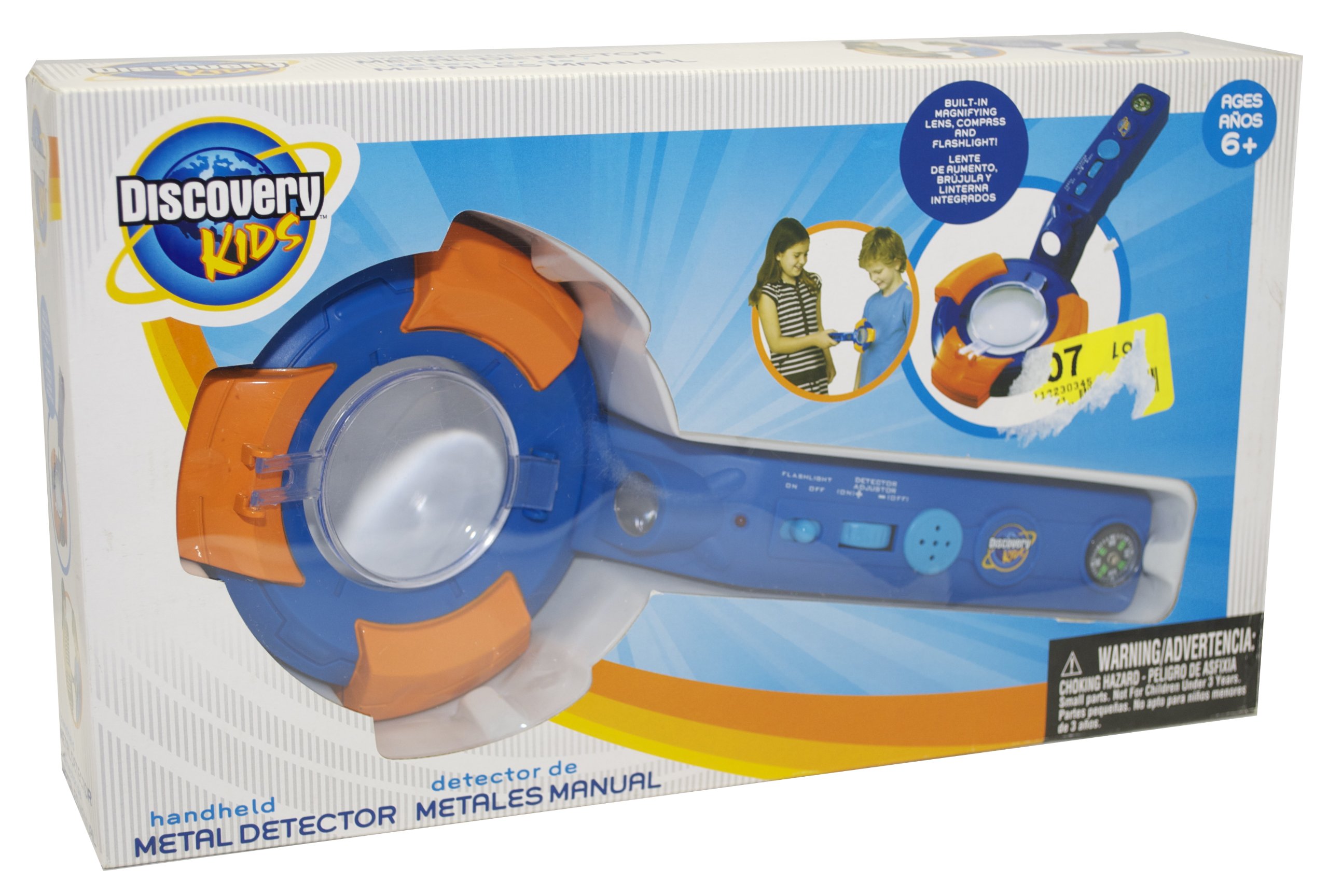
Figura 1: Packaging of the Discovery Kids Handheld Metal Detector, highlighting its features such as the metal detection indicator light, buzzer alarm, compass, flashlight, and magnifying lens.

Figura 2: Un detallat view of the Discovery Kids Handheld Metal Detector, showing the main body, search coil, handle, and integrated features.
- Bobina de cerca: The circular part at the bottom used to detect metal.
- Mànec: For gripping the device.
- Control Panel/Buttons: For operating flashlight and other functions.
- Metal Detection Indicator Light: S'il·lumina quan es detecta metall.
- Metal Detection Buzzer Alarm: Sounds when metal is detected.
- Brúixola: Integrated for direction finding.
- Llanterna: Built-in for illumination.
- Lent d'augment: Built-in for examining discoveries.
- Compartiment de la bateria: Located on the device, typically in the handle or main body.
Configuració
Instal·lació de la bateria
- Locate the battery compartment on the device. This is typically secured with a small screw or latch.
- Using a small screwdriver (if necessary), open the battery compartment cover.
- Insert 2 x "AA" size batteries, ensuring the correct polarity (+ and -) as indicated inside the compartment.
- Substituïu la tapa del compartiment de la bateria i fixeu-la.
Important: Always use fresh batteries and ensure they are inserted correctly. Refer to the Safety Information section for battery handling guidelines.
Instruccions de funcionament
Encesa/apagada
Locate the power switch or button on the device. Press or slide it to the "ON" position to power on the metal detector. To turn off, press or slide it to the "OFF" position.
Detecció de metalls
- Once powered on, hold the metal detector by its handle.
- Sweep the search coil slowly and steadily over the area you wish to scan, keeping it parallel to the ground.
- When a metallic object is detected, the device will emit a Metal Detection Buzzer Alarm i el Metal Detection Indicator Light il·luminarà.
- Move the coil back and forth over the detected area to pinpoint the exact location of the object.
Using the Integrated Features
- Llanterna: Activate the built-in flashlight by pressing its dedicated button (if available) or by a specific switch. Use it to illuminate dark areas during your search.
- Brúixola: The integrated compass provides directional guidance. Hold the device steady and level to read the compass accurately.
- Lent d'augment: Use the magnifying lens to closely examine small objects or details of your discoveries.
Manteniment
- Neteja: Netegeu el dispositiu amb un drap suau i sec després de cada ús. No utilitzeu productes de neteja abrasius ni dissolvents.
- Emmagatzematge: Store the metal detector in a cool, dry place away from direct sunlight and extreme temperatures.
- Extracció de la bateria: Always remove batteries if the device will not be used for an extended period to prevent leakage and damage.
Resolució de problemes
| Problema | Causa possible | Solució |
|---|---|---|
| El dispositiu no s’encén. | Les piles estan gastades o incorrectament inserides. | Replace with fresh "AA" batteries, ensuring correct polarity. |
| No metal detection or weak signal. | Low batteries; environmental interference. | Replace batteries. Move to a different location away from large metal structures or strong electromagnetic fields. |
| Buzzer alarm sounds continuously. | Device is too close to a large metal object or experiencing interference. | Move the device away from known metal objects. Check for environmental interference. |
Especificacions
- Número de model: KSD5021
- Marca: Kids Discovery
- Font d'alimentació: 2 x "AA" Batteries (not included)
- Material: Metal (components)
- Pes de l'article: 8.8 unces (0.55 lliures)
- Dimensions del producte: 14 x 8 x 3 polzades
- Classificació de protecció internacional: IP54
- Característiques: Metal Detection Buzzer Alarm, Metal Detection Indicator Light, Compass, Flashlight, Magnifying Lens
Garantia i Suport
This product is manufactured by Discovery Kids. For support or warranty inquiries, please contact the manufacturer directly. Information found on the product packaging indicates the manufacturer is Discovery Kids and the distributor is Kids Station Toys International Ltd.
Fabricant: Kids Discovery
Distribuït per: Kids Station Toys International Ltd.
Número de contacte: 1-888-321-7191
Weblloc: discoverykids.com
Product and colors may vary. Conforms to ASTM F-963.


