1. Introducció
This manual provides detailed instructions for the setup, operation, and maintenance of your Technoline WS 9120 Weather Station. Please read this manual thoroughly before using the device to ensure correct operation and to prevent damage.
The Technoline WS 9120 is a compact weather station featuring a quartz clock, indoor temperature and humidity display, weather forecast, and an alarm function with snooze.
2. Informació de seguretat
- No exposeu el dispositiu a temperatures extremes, llum solar directa ni humitat elevada.
- Eviteu deixar caure el dispositiu o sotmetre-lo a forts impactes.
- No intenteu desmuntar ni reparar la unitat vosaltres mateixos. Encarregueu tot el manteniment a personal qualificat.
- Mantingueu les piles fora de l'abast dels nens. En cas d'ingestió, busqueu atenció mèdica immediatament.
- Eliminar les bateries usades d'acord amb la normativa local.
3. Contingut del paquet
En desempaquetar, assegureu-vos que tots els articles estiguin presents i en bon estat:
- Technoline WS 9120 Weather Station Unit
- Manual d'usuari (aquest document)
Nota: Les piles no estan incloses i s'han de comprar per separat.
4. Dispositiu acabatview
Familiarize yourself with the main components and controls of your WS 9120 Weather Station.
4.1 Davant View (Display and Buttons)

Figura 1: Frontal view of the Technoline WS 9120, displaying time, weekday, forecast, humidity, and temperature. Control buttons are visible at the bottom.
- Pantalla LCD: Shows time, date, weekday, indoor temperature, indoor humidity, weather forecast symbols, and temperature trend.
- Botó MODE: Used to switch between display modes and enter setting modes.
- Botó MAX/MIN: Displays maximum and minimum recorded temperature and humidity.
- SNZ (Snooze) Button: Activates the snooze function for the alarm.
- Botó amunt: Adjusts values upwards in setting modes.
- Botó ABAIX: Adjusts values downwards in setting modes.
- Botó LLUM: Activates the blue backlight for a few seconds.
4.2 Darrera View (Battery Compartment)
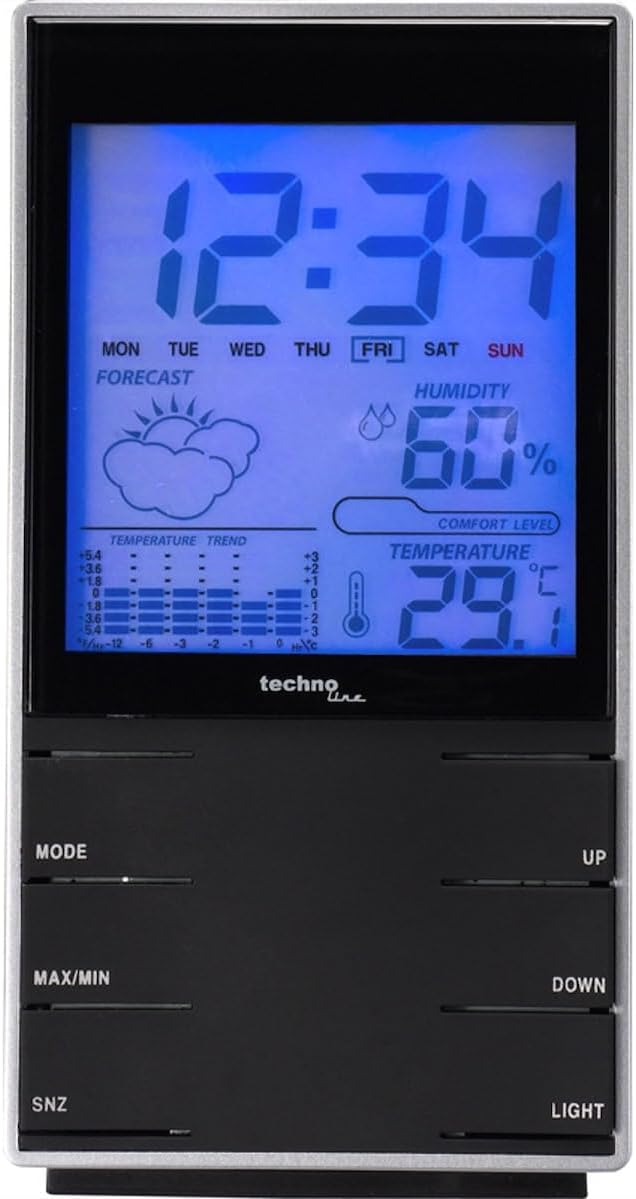
Figura 2: posterior view of the Technoline WS 9120, showing the battery compartment cover.
- Compartiment de la bateria: Located on the rear, holds 2 x AAA batteries.
- Suport de taula: Integrated stand for desktop placement.
5. Configuració
5.1 Instal·lació de la bateria
- Obriu la tapa del compartiment de les piles a la part posterior de la unitat.
- Insert 2 new AAA batteries, observing the correct polarity (+ and - markings).
- Tanqueu bé la tapa del compartiment de la bateria.
- The unit will power on and display default settings.
5.2 Configuració inicial
After battery installation, the device will typically start in time display mode. You may need to set the time, date, and other preferences.
- Configuració de l'hora i la data:
- Manteniu premut el botó MODE button for approximately 3 seconds to enter time setting mode. The hour digit will flash.
- Utilitza el UP or ABAIX botons per ajustar l'hora.
- Premeu MODE again to confirm the hour and move to setting the minute.
- Repeat this process for minutes, year, month, and day.
- Premeu MODE una última vegada per sortir del mode de configuració.
- Format 12/24 hores: Mentre esteu en el mode de visualització de l'hora normal, premeu la tecla UP button to toggle between 12-hour and 24-hour formats.
- Celsius / Fahrenheit: Mentre esteu en el mode de visualització de l'hora normal, premeu la tecla ABAIX button to toggle between Celsius (°C) and Fahrenheit (°F) temperature units.
6. Instruccions de funcionament
6.1 Visualització de l'hora i la data
The main display shows the current time, weekday, and date. The weekday automatically adjusts after setting the date.
6.2 Indoor Temperature and Humidity
The device continuously measures and displays the indoor temperature and relative humidity. The temperature trend indicator shows if the temperature is rising, falling, or stable.
6.3 Previsió meteorològica
The weather station provides a forecast using graphical symbols (e.g., sunny, cloudy, rainy). This forecast is based on changes in atmospheric pressure detected by the internal sensor and is an estimation for the next 12-24 hours.
6.4 Alarm Clock Function
- Configuració de l'alarma:
- Des de la visualització normal de l'hora, premeu la tecla MODE botó una vegada per mostrar l'hora de l'alarma.
- Manteniu premut el botó MODE button for approximately 3 seconds. The alarm hour will flash.
- Utilitza el UP or ABAIX botons per ajustar l'hora de l'alarma.
- Premeu MODE again to confirm the hour and move to setting the alarm minute.
- Utilitza el UP or ABAIX botons per ajustar el minut de l'alarma.
- Premeu MODE one last time to exit alarm setting mode.
- Activació/desactivació de l'alarma: While the alarm time is displayed (after pressing MODE once), press the UP button to toggle the alarm ON or OFF. An alarm icon will appear on the display when activated.
- Funció de posposar: Quan soni l'alarma, premeu el botó SNZ button to activate the snooze function. The alarm will sound again after approximately 5 minutes. To stop the alarm completely, press any other button.
6.5 Maximum and Minimum Readings
The device records the maximum and minimum indoor temperature and humidity values since the last reset.
- Premeu el botó MAX/MIN button once to display the maximum recorded temperature and humidity.
- Premeu el botó MAX/MIN button again to display the minimum recorded temperature and humidity.
- Premeu el botó MAX/MIN button a third time to return to the current readings.
- To clear the MAX/MIN records, press and hold the MAX/MIN button while the maximum or minimum values are displayed.
6.6 Llum de fons
Premeu el botó LLUM button to activate the blue backlight for a few seconds, improving visibility in low-light conditions.
7. Manteniment
- Neteja: Netegeu el dispositiu amb un suau, damp tela. No utilitzeu netejadors abrasius ni dissolvents.
- Substitució de la bateria: When the display becomes dim or functions are erratic, replace the batteries. Always replace both batteries at the same time with new AAA batteries.
- Emmagatzematge: Si no heu d'utilitzar el dispositiu durant un període prolongat, traieu-ne les piles per evitar fuites.
8. Solució De Problemes
| Problema | Causa possible | Solució |
|---|---|---|
| Sense pantalla o pantalla tènue | Piles baixes o gastades; polaritat incorrecta de la pila. | Canvieu les piles per piles AAA noves, assegurant-vos de la polaritat correcta. |
| Hora/data incorrecta | Time/date not set correctly after battery installation or reset. | Refer to Section 5.2 "Initial Settings" to set the time and date. |
| Weather forecast seems inaccurate | Weather forecast is an estimation based on local pressure changes, not a professional forecast. | The forecast is a general indicator. For precise local weather, consult official weather services. |
| Els botons no responen | Temporary software glitch; low batteries. | Remove batteries for 1 minute, then reinsert. Replace batteries if issue persists. |
9. Especificacions
- Model: WS 9120
- Marca: Technoline
- Tipus de visualització: LCD amb retroil·luminació blava
- Funcions: Quartz clock, Weekday display, Indoor temperature, Indoor humidity, Temperature trend, Weather forecast symbols, Alarm with snooze.
- Temperature Range (Indoor): Typically 0°C to +50°C (32°F to 122°F)
- Humidity Range (Indoor): Typically 20% to 95% RH
- Font d'alimentació: 2 piles AAA d'1.5 V (no incloses)
- Dimensions (aprox.): 2.95 x 1.54 x 5.63 polzades (7.5 x 3.9 x 14.3 cm)
- Pes (aprox.): 0.11 Kilograms / 3.87 ounces (without batteries)
10. Garantia i Suport
Technoline products are manufactured to high-quality standards. For warranty information or technical support, please refer to the warranty card included with your purchase or contact your local retailer or Technoline customer service. Please retain your proof of purchase for any warranty claims.
For further assistance, you may visit the official Technoline weblloc web o contacteu amb els seus canals d'assistència.


