1. Introducció
This instruction manual provides essential information for the safe and efficient use of your THOMSON CE-26 Cassette/SD/USB Audio System. Please read this manual thoroughly before operating the device and retain it for future reference. The CE-26 allows you to play audio from cassettes, USB drives, and SD/MMC cards, as well as record audio directly from cassettes or external sources to MP3 format on USB or SD/MMC media.
2. Producte acabatview
Familiarize yourself with the components and controls of your CE-26 audio system.

Figura 2.1: Tauler frontal View. This image displays the front of the THOMSON CE-26 unit, showing the cassette deck, control buttons, display screen, USB port, SD/MMC card slot, and volume knob.
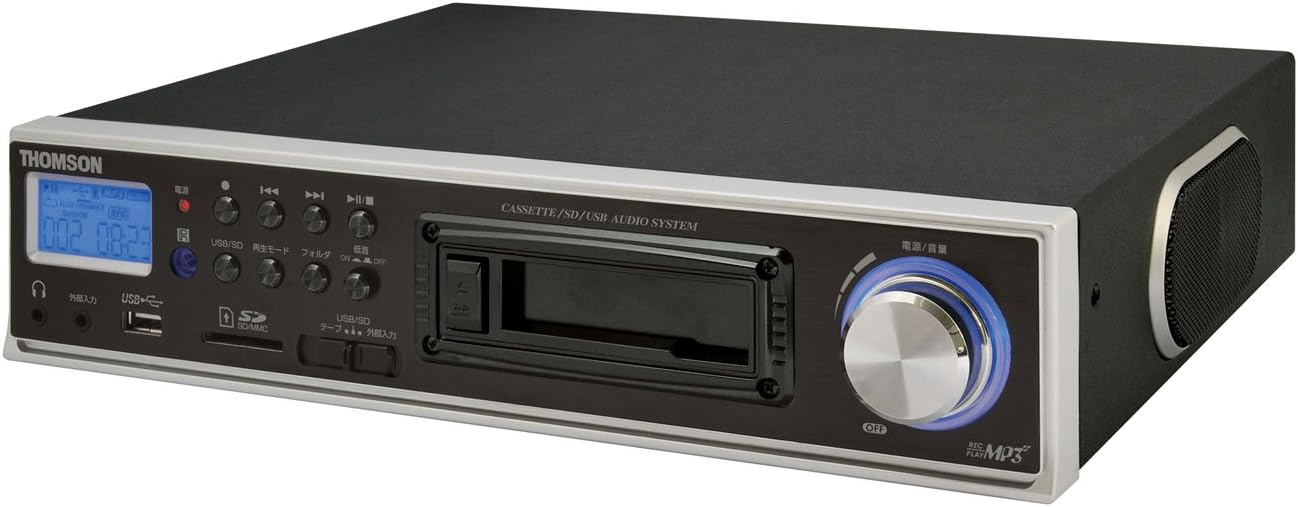
Figura 2.2: Angle View. This image shows the THOMSON CE-26 from an angled perspective, highlighting the integrated side speaker and the overall compact design.

Figure 2.3: Remote Control Unit. This image displays the included remote control for the THOMSON CE-26, featuring buttons for search, display, record, playback mode, program, folder navigation, and USB/SD selection.

Figura 2.4: Característica superiorview Diagrama. This diagram illustrates the key functionalities of the THOMSON CE-26, including direct recording from cassette to USB/SD, MP3/WMA playback, USB/SD memory copying, AUX input, built-in speaker, and remote control.
Controls del panell frontal:
- Botó d'encesa: Encén o apaga la unitat.
- Pantalla de visualització: Shows track information, mode, and time.
- Plata de cassets: For inserting and playing audio cassettes.
- Port USB: Connect USB flash drives for playback or recording.
- Ranura per a targetes SD/MMC: Insert SD or MMC cards for playback or recording.
- Controls de reproducció: Reproduir, Pausa, Aturar, Avançar ràpidament, Rebobinar, Saltar pista.
- Botó de gravació: Inicia la gravació.
- Botó de mode: Switches between Cassette, USB, SD, and AUX input modes.
- Pom de volum: Ajusta el nivell de sortida d'àudio.
- Auriculars Jack: Per a una escolta privada.
- Entrada AUX: Connecteu dispositius d'àudio externs.
3. Configuració
- Connexió d'alimentació: Connecteu el cable d'alimentació de CA a l'entrada d'alimentació de la unitat i després a una presa de corrent estàndard.
- Encesa inicial: Press the Power button to turn on the unit. The display will illuminate.
- Inserció de suports:
- cassette: Open the cassette door and insert an audio cassette with the open edge facing upwards. Close the door securely.
- Unitat USB: Insert a USB flash drive into the USB port. Ensure it is formatted to FAT32.
- Targeta SD/MMC: Insert an SD or MMC card into the card slot until it clicks into place. Ensure it is formatted to FAT32.
- External Audio Device (Optional): To use the AUX input, connect an external audio source (e.g., smartphone, CD player) to the AUX IN jack using a 3.5mm audio cable.
4. Instruccions de funcionament
4.1. Cassette Playback
- Inseriu una cinta de casset.
- Press the "Mode" button until "Cassette" mode is selected (or the cassette deck automatically starts playing).
- Premeu el botó Reproduir (►) a la unitat o al comandament a distància.
- Ajusteu el volum amb el botó de volum.
- Use Fast Forward (►►) or Rewind (◄◄) buttons to navigate the tape.
- Press Stop (■) to end playback.
4.2. Reproducció USB/SD
- Insert a USB drive or SD/MMC card containing MP3 or WMA audio files.
- Press the "Mode" button to select "USB" or "SD" mode. The unit will automatically scan and begin playing the first track.
- Utilitzeu el botó de reproducció/pausa (►/∥), Atura (■), Next Track (►►|), and Previous Track (|◄◄) botons per controlar la reproducció.
- The "Folder" buttons on the remote can be used to navigate between folders on the USB/SD media.
4.3. Recording Audio to MP3 (Cassette to USB/SD)
This feature allows you to convert your cassette tapes into digital MP3 files.
- Insert a blank or desired USB drive/SD card into the respective slot.
- Insert the cassette tape you wish to record.
- Press the "Mode" button to select "Cassette" mode.
- Start playing the cassette tape.
- Press the "Record" button on the unit or remote. The recording indicator will light up, and the unit will begin converting the cassette audio to MP3 format on the selected USB/SD media.
- To stop recording, press the "Stop" button. The recorded MP3 file will be saved on your USB drive or SD card.
- Nota: There might be a slight delay between pressing record and the actual start of recording. It is recommended to start recording slightly before the desired audio begins to avoid cutting off the start of a track.
4.4. Recording Audio to MP3 (AUX Input to USB/SD)
Grava àudio des d'un dispositiu extern connectat mitjançant l'entrada AUX.
- Connect your external audio device to the AUX IN jack.
- Insert a blank or desired USB drive/SD card.
- Press the "Mode" button to select "AUX" mode.
- Inicieu la reproducció al vostre dispositiu d'àudio extern.
- Press the "Record" button on the unit or remote. The recording indicator will light up, and the unit will begin converting the AUX audio to MP3 format on the selected USB/SD media.
- To stop recording, press the "Stop" button.
4.5. Còpia Files Between USB and SD/MMC
The CE-26 allows direct copying of MP3/WMA files between a USB drive and an SD/MMC card.
- Ensure both a USB drive and an SD/MMC card are inserted into their respective slots.
- Select either "USB" or "SD" mode using the "Mode" button, depending on which source you want to copy des de.
- Navegueu fins a file or folder you wish to copy.
- Press and hold the "Copy" button (often labeled "USB/SD Copy" or similar) on the unit or remote. Follow any on-screen prompts to confirm the copy operation.
- The display will indicate when the copying process is complete.
5. Manteniment
- Neteja: Feu servir un drap suau i sec per netejar l'exterior de la unitat. No utilitzeu netejadors líquids ni materials abrasius.
- Cassette Deck Care: Periodically clean the cassette head and pinch rollers with a specialized cassette head cleaner to ensure optimal audio quality and prevent tape damage.
- Emmagatzematge: Quan no l'utilitzeu durant períodes prolongats, desconnecteu el cable d'alimentació i guardeu la unitat en un lloc fresc i sec, allunyat de la llum solar directa i de temperatures extremes.
6. Solució De Problemes
| Problema | Causa possible | Solució |
|---|---|---|
| Sense poder | Cable d'alimentació no connectat; Presa de corrent no activa. | Assegureu-vos que el cable d'alimentació estigui ben connectat. Comproveu si la presa de corrent funciona. |
| No hi ha so durant la reproducció | Volum massa baix; Mode incorrecte seleccionat; Auriculars connectats. | Increase volume. Select the correct input mode (Cassette, USB, SD, AUX). Disconnect headphones if using speakers. |
| Cassette tape not playing or recording correctly | Tape tangled or damaged; Cassette heads dirty; Incorrect tape direction. | Check tape condition. Clean cassette heads and pinch rollers. Ensure tape is inserted correctly. |
| Recording stops prematurely or has gaps | USB drive/SD card full; Media format issue; Intermittent power. | Ensure sufficient storage space. Use FAT32 formatted media. Check power connection stability. |
| Poor audio quality from USB/SD | Corrupta files; Low bitrate MP3/WMA files. | Try different audio files. Assegurar-se files no estan malmeses. |
| El comandament a distància no funciona | Batteries depleted; Obstruction between remote and unit; Incorrect angle. | Replace remote control batteries. Ensure clear line of sight to the unit's IR receiver. |
7. Especificacions
| Característica | Detall |
|---|---|
| Marca | THOMSON |
| Número de model | CE-26 |
| Mitjans suportats | Cassette Tape, USB Memory, SD/MMC Card |
| Formats d'àudio compatibles | MP3, WMA (playback); MP3 (recording) |
| Funció de gravació | Direct digital recording from Cassette to MP3, AUX to MP3 |
| Connectivitat | USB Port, SD/MMC Card Slot, AUX Input (3.5mm), Headphone Output (3.5mm) |
| Altaveu incorporat | Sí |
| Control remot | Inclòs |
| Dimensions (aprox.) | 35.4 x 33.2 x 12 cm |
| Pes (aprox.) | 3.02 kg |
8. Garantia i Suport
For warranty information and technical support, please refer to the warranty card included with your product or contact THOMSON customer service directly. Keep your purchase receipt as proof of purchase.
For further assistance, please visit the official THOMSON weblloc web o poseu-vos en contacte amb els seus centres de servei autoritzats.


