Introducció
Gràcies per la compraasing the Muse M-10 CR Clock Radio. This manual provides important information regarding the setup, operation, and maintenance of your new device. Please read it thoroughly before use and retain it for future reference.
Informació important de seguretat
- No exposeu aquest aparell a degoteigs o esquitxades d'aigua.
- No col·loqueu objectes plens de líquids, com ara gerros, sobre l'aparell.
- Assegureu-vos que hi hagi una ventilació adequada al voltant de la unitat. No bloquegeu les obertures de ventilació.
- Utilitzeu només l'adaptador d'alimentació subministrat amb la unitat.
- No intenteu desmuntar ni modificar la unitat. Encarregueu tot el manteniment a personal qualificat.
- Mantingueu la unitat allunyada de la llum solar directa, de fonts de calor i de camps magnètics forts.
- Netegeu la unitat només amb un drap suau i sec.
Contingut del paquet
Si us plau, comproveu que hi hagi tots els elements:
- Muse M-10 CR Clock Radio
- Adaptador d'alimentació
- Manual d'usuari
Producte acabatview
Familiarize yourself with the controls and display of your Muse M-10 CR.

Imatge: Davant view of the Muse M-10 CR Clock Radio, showing the large white LED display and control buttons on top.

Imatge: A dalt view of the Muse M-10 CR Clock Radio, highlighting the control buttons for power, alarm settings, hour/minute adjustment, radio tuning, and the large snooze button.
Controls i indicadors:
- Botó d'encesa: Encén/apaga la unitat.
- Botons d'alarma 1 / Alarma 2: Set and activate individual alarms.
- HR (Hour) Button: Adjusts the hour.
- MIN (Minute) Button: Adjusts the minute.
- Tuning Buttons (<< / >>): Ajusta la freqüència de ràdio.
- Botó Posposa: Temporarily silences the alarm and dims the display.
- Pantalla LED: Mostra l'hora, l'estat de l'alarma i la freqüència de ràdio.
Configuració
1. Potència de connexió
- Insert the DC plug of the power adapter into the DC IN jack on the back of the unit.
- Plug the power adapter into a standard wall outlet (AC 220V, 50Hz).
- The LED display will light up, indicating the unit is powered.
2. Configuració de l'hora
- Per configurar l'hora, premeu i manteniu premut HR per ajustar l’hora.
- Premeu el botó MIN per ajustar el minut.
- Release the buttons to confirm the time. The time will be set in 24-hour format.
Instruccions de funcionament
Operació de ràdio (FM)
- Premeu el botó Poder botó per encendre la ràdio.
- Premeu el botó Tuning (<< / >>) buttons briefly to manually tune to your desired FM frequency.
- To auto-scan and store presets: Press and hold the Tuning (<< / >>) button for a few seconds. The radio will scan for available stations and store them automatically. The unit supports 20 preset FM stations.
- To recall a preset station: After auto-scanning, use the Tuning (<< / >>) buttons to cycle through the stored preset stations.
Nota: For optimal reception, ensure the FM wire antenna (located at the back of the unit) is fully extended.
Configuració d'alarmes (alarma dual)
The Muse M-10 CR features a dual alarm system, allowing you to set two separate alarm times.
- Premeu el botó Alarma 1 or Alarma 2 button once. The alarm time will flash on the display.
- While the alarm time is flashing, press the HR botó per configurar l'hora de l'alarma.
- Premeu el botó MIN botó per configurar els minuts de l'alarma.
- Premeu el botó Alarma 1 or Alarma 2 de nou per confirmar l'hora de l'alarma.
- To select the alarm source (Buzzer or Radio), press the respective Alarma 1 or Alarma 2 button repeatedly until the desired icon (buzzer or radio wave) appears next to the alarm indicator on the display.
- Per desactivar una alarma, premeu el botó corresponent Alarma 1 or Alarma 2 botó fins que l'indicador d'alarma desaparegui de la pantalla.
Funció de posposar
Quan soni una alarma, premeu la tecla gran DORMITAR button on top of the unit. The alarm will be temporarily silenced for approximately 9 minutes and will sound again after this period. The snooze function can be used multiple times.
Dimmer de la pantalla
The 0.6-inch white LED display has adjustable intensity. Press the DORMITAR button while the unit is in standby mode to cycle through different brightness levels (High, Low, Off). This allows you to adjust the display brightness to your preference, especially for nighttime use.
Manteniment
Neteja
- Desconnecteu sempre la unitat de la presa de corrent abans de netejar-la.
- Use a soft, dry cloth to wipe the exterior surfaces of the clock radio.
- No utilitzeu netejadors abrasius, ceres o dissolvents, ja que poden danyar l'acabat.
Emmagatzematge
If you plan to store the unit for an extended period, unplug it from the power source and store it in a cool, dry place, away from direct sunlight and extreme temperatures.
Resolució de problemes
| Problema | Causa possible | Solució |
|---|---|---|
| La unitat no s'encén. | L'adaptador de corrent no està connectat o està defectuós. | Assegureu-vos que l'adaptador de corrent estigui ben connectat a la unitat i a una presa de corrent que funcioni. Proveu una altra presa de corrent. |
| Mala recepció de ràdio. | Weak signal; antenna not properly extended. | Esteneu completament l'antena de cable FM. Reposicioneu la unitat per a una millor recepció. |
| L'alarma no sona. | Alarm not set or deactivated; volume too low (for radio alarm). | Verify that the alarm is set and activated (alarm icon visible). Ensure radio alarm volume is audible. |
| La pantalla és massa brillant/tenua. | Display dimmer setting needs adjustment. | Press the SNOOZE button in standby mode to cycle through display brightness levels. |
Especificacions
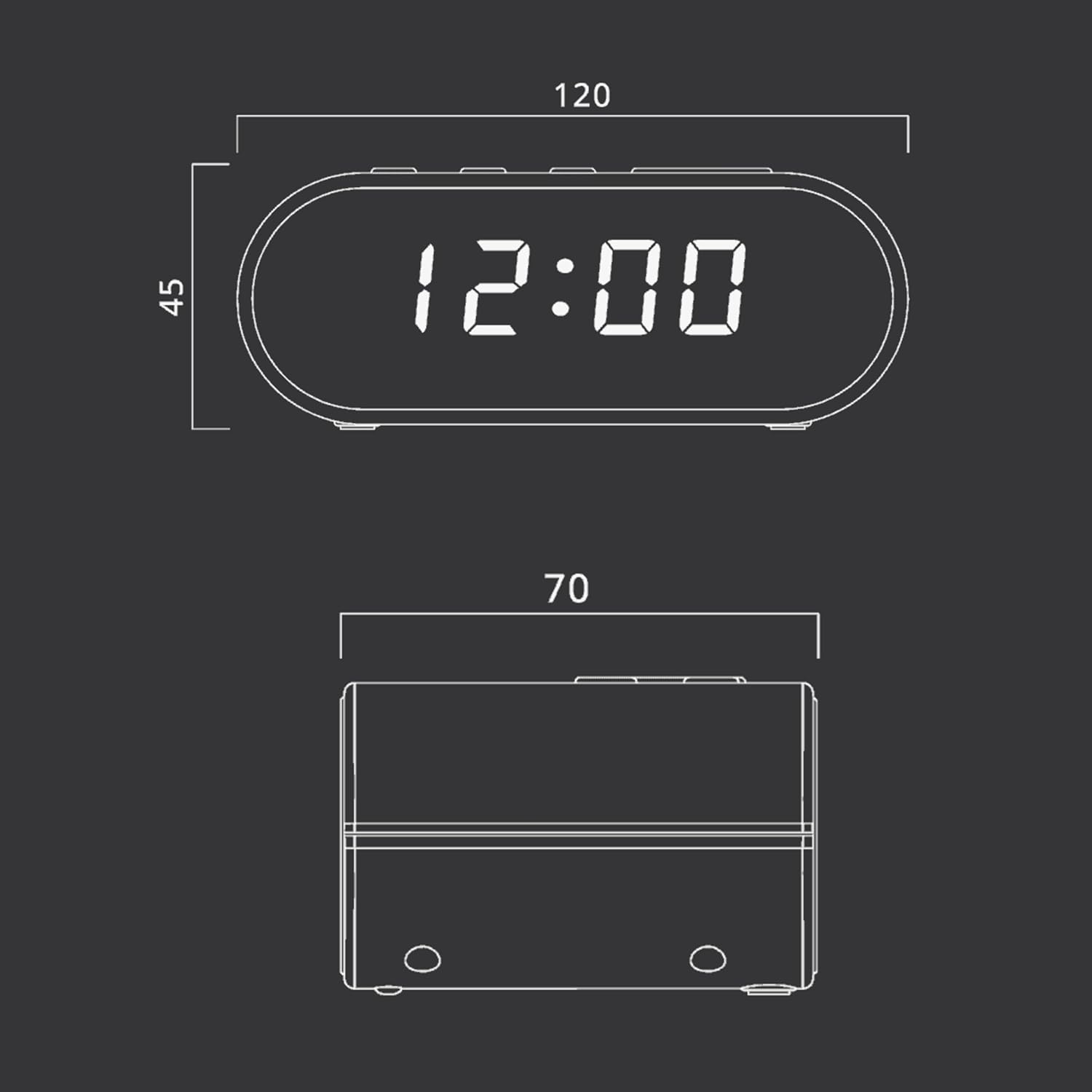
Imatge: Technical drawing illustrating the dimensions of the Muse M-10 CR Clock Radio, with measurements in millimeters.
- Marca: Musa
- Número de model: 3700460200701
- Color: Schwarz (negre)
- Dimensions del producte: 12 x 7 x 10.9 cm (L x A x A)
- Pes de l'article: 200 g
- Voltage: 220 Volts
- Material: material d'art (plàstic)
- Tipus de visualització: LED (0.6-inch white)
- Ràdio: FM PLL Radio with 20 preset stations
- Característiques especials: Adjustable Brightness, Large Display, Radio, Snooze Function, Dual Alarm
Garantia i Suport
For warranty information or technical support, please refer to the warranty card included with your purchase or contact your local Muse distributor or retailer. Keep your proof of purchase for any warranty claims.
You can also visit the official Muse weblloc web per obtenir més ajuda i informació sobre el producte.


