Introducció
The iRobot Roomba 562 Pet Series Vacuum Cleaning Robot is designed to autonomously clean floors, effectively managing pet hair, dirt, and debris. This manual provides essential information for setting up, operating, maintaining, and troubleshooting your Roomba to ensure optimal performance.
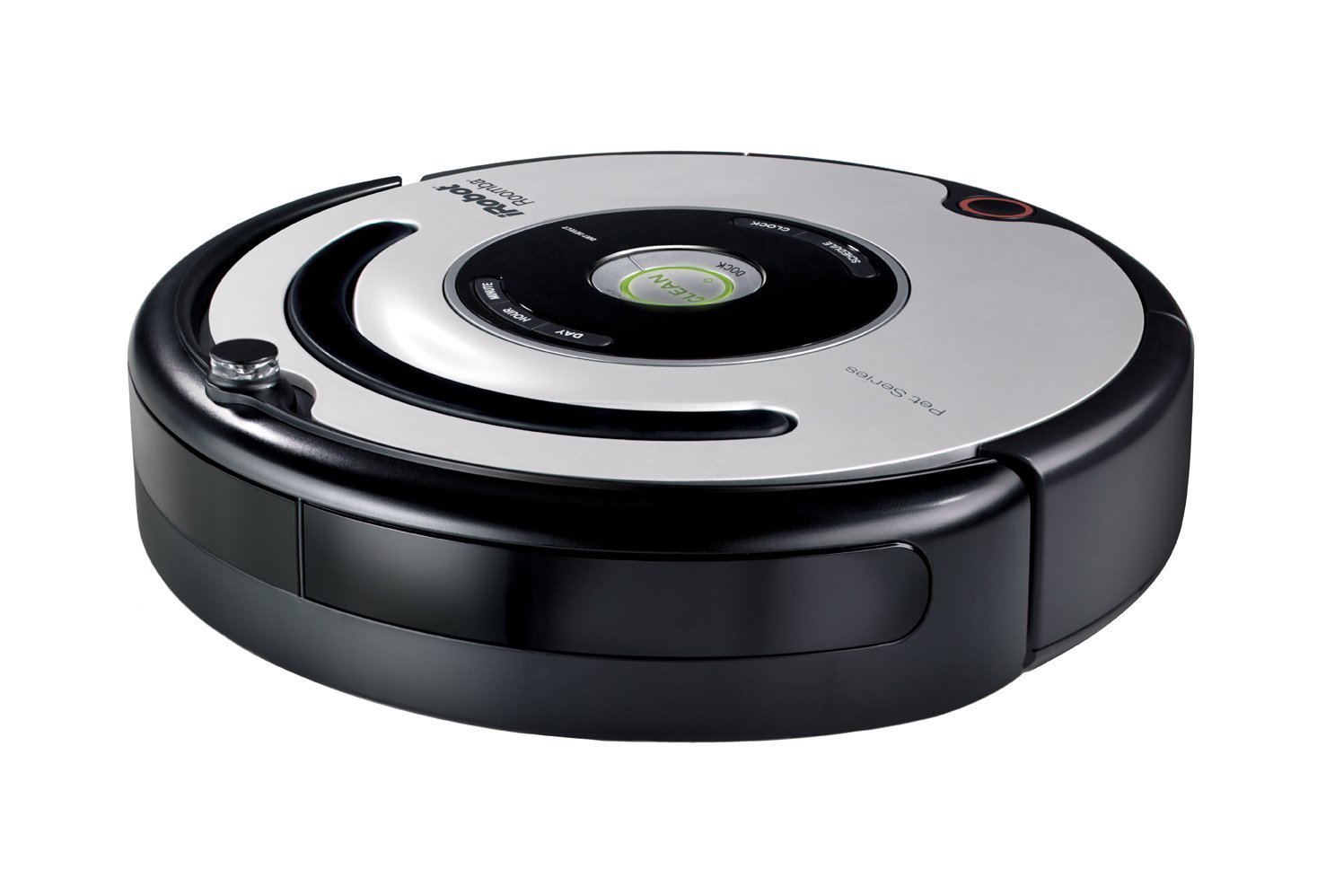
Image: The iRobot Roomba 562 Pet Series Vacuum Cleaning Robot, shown with its circular design and typical charging base.
Informació de seguretat
Please read all safety instructions carefully before using your Roomba. Failure to follow these instructions may result in electric shock, fire, or serious injury.
- Do not operate the Roomba or Home Base with a damaged power cord or plug.
- Do not use the Roomba in wet environments or near standing water.
- Keep fingers, hair, and loose clothing away from openings and moving parts.
- Do not allow children to play with the Roomba. Supervise children and pets when the Roomba is operating.
- Store the Roomba and Home Base indoors.
- Only use the manufacturer-specified charger.
Contingut del paquet
Comproveu que el vostre paquet contingui els elements següents:
- iRobot Roomba 562 Pet Series Robot
- Base de la llar
- Font d'alimentació
- 2 Virtual Wall Lighthouses (batteries not included)
- 2 Interchangeable Cleaning Bins (one for everyday, one for heavy duty)
- Set of Replaceable Brushes
- 2 filtres addicionals
- 2 Brush Cleaning Tools
Configuració
1. Charging the Home Base
- Place the Home Base against a wall in an open, uncluttered area. Ensure there is at least 1.5 feet (0.5 meters) of clear space on either side of the Home Base and 4 feet (1.2 meters) in front of it.
- Plug the power supply into the Home Base and then into a wall outlet. The power indicator light on the Home Base will illuminate.
2. Initial Roomba Charge
- Place your Roomba onto the Home Base, ensuring the metal charging contacts on the Roomba align with those on the Home Base.
- The Roomba will emit a tone, and the CLEAN button will pulse amber, indicating it is charging.
- Allow the Roomba to charge for a full 16 hours before its first use to condition the battery. The CLEAN button will turn green when fully charged.
3. Virtual Wall Lighthouses Setup
Virtual Wall Lighthouses help guide Roomba from room to room and contain it within specific areas.
- Insert two C batteries into each Virtual Wall Lighthouse.
- Place a Lighthouse in a doorway or opening between rooms to create an invisible barrier.
- Ensure the Lighthouse is set to 'Lighthouse' mode (if applicable) to allow Roomba to pass through and return, or 'Virtual Wall' mode to block access.
En funcionament
Inici d'un cicle de neteja
- Premeu el botó NETEJA button once to wake up Roomba.
- Premeu NETEJA again to start a cleaning cycle. Roomba will automatically adjust its cleaning patterns based on the environment.
- To pause Roomba, press NETEJA once. To resume, press NETEJA de nou.
- To send Roomba back to its Home Base, press the DOCK botó.
Scheduling Cleaning
The Roomba 562 can be scheduled to clean up to seven times per week.
- Premeu el botó HORARIS button on Roomba.
- Utilitza el DIA, HORA, i MINUT buttons to set the desired cleaning time for each day.
- Premeu OK per confirmar cada configuració.
Interchangeable Cleaning Bins
Your Roomba 562 comes with two cleaning bins:
- Everyday Vacuuming Bin: Suitable for regular cleaning and maintenance.
- Heavy Duty Cleaning Bin: Designed for areas with significant pet hair or heavier debris, offering enhanced suction and capacity.
To change bins, press the bin release button, slide out the current bin, and slide in the desired bin until it clicks into place.
Manteniment
Regular maintenance ensures your Roomba operates efficiently and extends its lifespan. Perform these tasks regularly, especially if you have pets.
1. Buidar el contenidor de pols (després de cada ús)
- Press the bin release button and pull the bin out from the back of the Roomba.
- Obriu la porta del contenidor i buideu totes les deixalles en un contenidor d'escombraries.
- Tap the bin to dislodge any remaining dust.
2. Cleaning Brushes (Weekly or Bi-Weekly)
- Remove the dust bin and turn Roomba over.
- Obriu el protector de raspalls aixecant les dues pestanyes grogues.
- Remove the main brushes (bristle and rubber) and the side brush.
- Use the provided cleaning tools to remove hair and debris wrapped around the brushes and their yellow end caps.
- Torneu a instal·lar els raspalls i tanqueu el protector dels raspalls.
3. Cleaning Filters (Weekly)
- Traieu el contenidor de pols.
- Pull the filter out from the side of the bin.
- Tap the filter against a trash can to remove dust. Do not wash filters.
- Replace the filter every 2-3 months, or more frequently with heavy pet hair.
4. Cleaning Sensors (Monthly)
- Wipe the four cliff sensors on the bottom of Roomba with a clean, dry cloth.
- Wipe the wall-following sensor on the right side of Roomba.
- Clean the charging contacts on Roomba and the Home Base with a clean, dry cloth.
Resolució de problemes
If your Roomba encounters an issue, consult the following common solutions:
- El Roomba no es carrega: Ensure the Home Base is plugged in and the charging contacts on both Roomba and the Home Base are clean.
- El Roomba s'ha enganxat: Clear obstacles from the cleaning area. Use Virtual Walls to block off problem areas like loose cords or thick rugs.
- Mal rendiment de neteja: Empty the dust bin, clean the brushes, and replace the filter if necessary. Ensure the correct cleaning bin is used for the task.
- Roomba making unusual noises: Check brushes for tangled hair or debris. Ensure all parts are correctly installed after maintenance.
- Missatges d'error: Refer to the iRobot website or customer support for specific error codes and solutions.
Especificacions
| Característica | Detall |
|---|---|
| Marca | iRobot |
| Número de model | 56301 |
| Característica especial | Bagless, Pet Hair Optimized |
| Color | Negre / Plata |
| Components inclosos | Brush, 2 Cleaning Bins, 2 Filters, 2 Cleaning Tools, Home Base, Power Supply, 2 Virtual Wall Lighthouses |
| Tipus de filtre | Disc |
| Font d'alimentació | Funciona amb bateria |
| Factor de forma | Robòtica |
| Dimensions del producte | 21.5 x 19 x 5 polzades |
| Pes de l'article | 13.4 lliures |
| Recomanació de superfície | Moqueta, Sòl dur |
Informació de la garantia
The iRobot Roomba 562 Pet Series Vacuum Cleaning Robot comes with a Garantia limitada d'1 any from the date of purchase. This warranty covers manufacturing defects under normal use. For full terms and conditions, please refer to the warranty card included in your product packaging or visit the official iRobot weblloc.
Atenció al client
For additional assistance, technical support, or to purchase replacement parts, please contact iRobot Customer Care or visit their official weblloc:
- Oficial d'iRobot Weblloc: www.irobot.com
- Refer to your product packaging for specific regional contact information.