1. Producte acabatview
The Antec ISK 300-150 is a compact desktop computer case designed exclusively for Mini-ITX motherboards. It offers a small footprint while providing essential features for a functional PC build, including drive bays, an integrated cooling system, and a stable power supply.

Figura 1.1: frontal i lateral view of the Antec ISK 300-150 Mini-ITX computer case, showcasinel seu disseny compacte i els ports del panell frontal.
Característiques principals:
- Disseny compacte: Specifically built for Mini-ITX motherboards, ideal for space-constrained environments.
- Font d'alimentació integrada: Features a stable 150-watt power supply to power your components.
- Emmagatzematge flexible: Includes one external 5.25" slim optical bay and two internal 2.5" HDD/SSD bays.
- Refrigeració eficient: Equipped with an 80mm TriCool 3-speed exhaust fan for effective heat dissipation.
- Convenient Front Ports: Provides 2 x USB 3.0, 1 x eSATA, and audio in/out ports for easy connectivity.
2. Informació de seguretat
Please read and understand all safety instructions before installing or operating the Antec ISK 300-150 computer case. Failure to follow these guidelines may result in personal injury or damage to the product.
- Always disconnect the power cord from the wall outlet before performing any installation, maintenance, or troubleshooting.
- Assegureu-vos de posar a terra correctament per evitar descàrregues elèctriques.
- Handle internal components with care to avoid damage from static electricity. Use an anti-static wrist strap if available.
- Do not block ventilation openings on the case, as this can lead to overheating.
- Mantingueu la carcassa allunyada de fonts de calor, llum solar directa i humitat excessiva.
- Do not attempt to repair the power supply unit yourself. Refer to qualified service personnel.
3. Configuració i instal·lació
This section provides step-by-step instructions for installing components into your Antec ISK 300-150 case.
3.1. Obertura de la caixa
- Col·loqueu la caixa sobre una superfície plana i estable.
- Locate the thumbscrews on the rear of the case. Unscrew them to release the side panel.
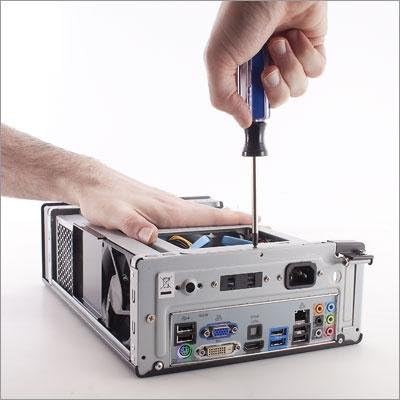
Figure 3.1: A hand using a screwdriver to remove a screw from the rear panel of the computer case, preparing to open it.
- Gently slide the side panel backward and lift it off to expose the interior.
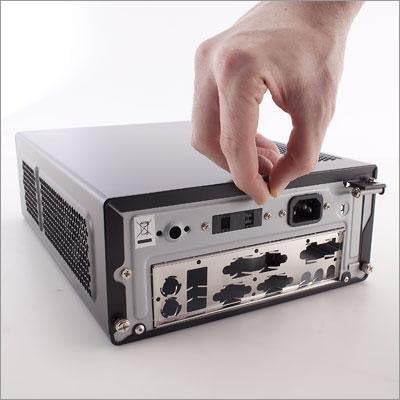
Figure 3.2: A hand gripping the rear edge of the computer case's side panel, sliding it open to reveal the internal components.
3.2. Instal·lació de la placa base
Install your Mini-ITX motherboard into the case. Ensure standoffs are correctly aligned and secure the motherboard with screws.

Figura 3.3: Un intern view of the Antec ISK 300-150 case, showing a Mini-ITX motherboard installed with CPU cooler and RAM, along with various cables.
3.3. Instal·lació de la unitat
The case supports one external 5.25" slim optical drive and two internal 2.5" hard disk drives or solid-state drives.
3.3.1. 5.25" Slim Optical Drive Installation
- Remove the drive cage if necessary.
- Slide the slim optical drive into the 5.25" bay from the front.
- Fixeu la unitat amb cargols.

Figure 3.4: Hands holding a slim optical drive and a drive cage, with a screwdriver securing the drive to the cage.
3.3.2. 2.5" HDD/SSD Installation
- Locate the two 2.5" drive bays inside the case.
- Mount your 2.5" drives into the designated bays and secure them with screws.

Figura 3.5: Un intern view of the Antec ISK 300-150 case, showing two 2.5-inch hard drives or SSDs mounted in their bays, with cables connected.
3.4. Gestió de cables
Due to the compact nature of the ISK 300-150, careful cable management is crucial for optimal airflow and ease of assembly. Route cables neatly to avoid obstructing components or airflow.

Figura 3.6: Un intern view of the Antec ISK 300-150 case, highlighting the 80mm TriCool fan and the routing of various internal cables.
Nota: The USB 3.0 front panel cable can be thick. Ensure it is routed carefully to prevent strain on the motherboard header.
3.5. Connexió a la font d'alimentació
The case includes a pre-installed 150W power supply. Connect the 24-pin ATX power connector and the 8-pin CPU power connector (if needed) from the power board to your motherboard. The external 19V power adapter connects to the DC input on the rear of the case.
4. Instruccions de funcionament
4.1. Encès / apagat
- Per encendre: Connect the external power adapter to the case and a wall outlet. Press the power button located on the front panel.
- Per apagar: Perform a graceful shutdown through your operating system. Alternatively, press and hold the power button for several seconds for a forced shutdown (not recommended for regular use).
4.2. Front Panel Ports
The front panel provides convenient access to various ports:
- Ports USB 3.0 (x2): Per connectar dispositius USB d'alta velocitat.
- eSATA Port (x1): For connecting external SATA devices.
- Entrada/Sortida d'àudio: For connecting headphones, microphones, or other audio peripherals.
5. Manteniment
Regular maintenance helps ensure the longevity and optimal performance of your Antec ISK 300-150 case.
- Eliminació de pols: Periodically clean dust from the case interior and fan blades using compressed air or a soft brush. Ensure the system is powered off and unplugged before cleaning.
- Inspecció del ventilador: Check the 80mm TriCool fan for any obstructions or excessive noise. If the fan becomes noisy, consider cleaning it or, if necessary, replacing it. Note that replacing the fan after motherboard installation can be challenging due to space constraints.
- Ventilació: Ensure that the case's ventilation openings are not blocked by objects or placed in an enclosed space.
6. Solució De Problemes
This section addresses common issues you might encounter with your Antec ISK 300-150 case.
| Problema | Causa possible | Solució |
|---|---|---|
| El sistema no s'encén. | Power cable not connected; PSU issue; motherboard connection issue. | Ensure power adapter is securely connected to the case and wall outlet. Verify 24-pin and 8-pin power connectors are properly seated on the motherboard. |
| El ventilador fa soroll. | Dust accumulation; fan bearing wear. | Clean the fan blades. If noise persists, consider replacing the 80mm TriCool fan. |
| Difficulty installing components due to limited space. | Compact design; thick cables. | Plan your component installation order carefully. Route cables, especially the thick USB 3.0 cable, before securing other components. Consider using M.2 SSDs instead of 2.5" drives if space is extremely tight. |
| Power supply makes ticking noises at low/medium loads. | Characteristic of some PSU designs. | This may be a normal operational characteristic for the integrated PSU. If concerned, monitor system stability. |
7. Especificacions
| Característica | Especificació |
|---|---|
| Model | ISK 300-150 |
| Dimensions de la unitat (H x A x P) | 96 mm x 222 mm x 328 mm (3.8 x 8.7 x 12.9 polzades) |
| Compatibilitat amb la placa base | Mini-ITX |
| Font d'alimentació | 150 Watt (Integrated) |
| Badies d'unitat externes | 1 x 5.25" Slim Optical Bay |
| Badies d'unitats internes | 2 x 2.5" HDD/SSD Bays |
| Sistema de refrigeració | 1 x Side 80mm TriCool 3-speed Exhaust Fan |
| Ports davanters | 2 x USB 3.0, 1 x eSATA, Audio In/Out (AC'97 and HDA compatible) |
| Ranures d'expansió | 1 (Note: May impact cable management) |
| Pes net | 2.5 kg (5.5 lliures) |
| Material | Acer d'aliatge |
| Color | ISK300-150 Black |
8. Garantia i Suport
Antec products are manufactured to high quality standards. For specific warranty terms and conditions, please refer to the warranty information provided with your purchase or visit the official Antec weblloc.
For technical support, troubleshooting assistance beyond this manual, or inquiries regarding replacement parts, please contact Antec customer support through their official channels.
Nota: Unauthorized modifications or repairs may void your warranty.


