Introducció
The LeapFrog My Own Leaptop is an interactive learning toy designed to introduce young children to letters, numbers, and basic computer literacy skills. Featuring a larger screen and four engaging learning modes, this device offers a fun and portable way for children to explore and learn.
Què hi ha a la caixa
- LeapFrog My Own Leaptop
- Guia d'inici ràpid
Configuració
Instal·lació de la bateria
The Leaptop requires 3 AA batteries. Batteries are included for demonstration purposes only. For regular use, new batteries are recommended to ensure optimal performance.
- Locate the battery compartment on the underside of the Leaptop.
- Amb un tornavís, obriu la tapa del compartiment de la bateria.
- Introduïu 3 piles AA noves, assegurant-vos de la polaritat correcta (+/-).
- Substituïu la tapa del compartiment de la bateria i premeu el cargol.
Personalització
To personalize the Leaptop with your child's name and custom content, connect the device to a computer and visit the LeapFrog Learning Path website. Follow the on-screen instructions to download songs and set up pretend emails.
Producte acabatview
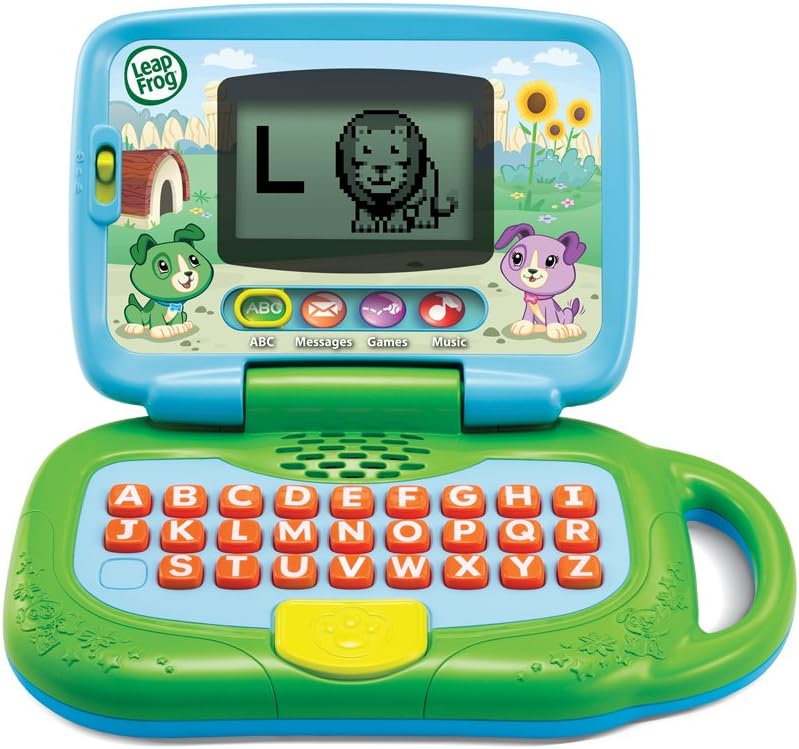
Figura 1: Frontal view of the LeapFrog My Own Leaptop.
The Leaptop features a durable, child-friendly design with a large screen for engaging animations. The keyboard includes all letters of the alphabet, along with dedicated buttons for different learning modes. A convenient handle allows for easy portability.
Controls i característiques
- Interruptor d'encesa/apagada/volum: Located on the side, this switch controls power and adjusts the sound level.
- Alphabet Keyboard: Features large, easy-to-press buttons for each letter.
- Botons de mode: Dedicated buttons for ABCs, Messages, Games, and Music modes.
- Pantalla: Displays letters, animations, and interactive content.
- Mànec: Integrated for easy carrying.
Modes de funcionament

Figure 2: Child engaging with the Leaptop in learning mode.
The Leaptop offers four interactive learning modes to keep children engaged:
- ABCs Mode: Press any letter button to hear the letter name, its sound, and a word that starts with that letter. The screen displays corresponding animal animations (26 in total).
- Messages Mode: Engage in pretend email exchanges with characters like Scout or Violet. This mode encourages imaginative role-play and early communication skills.
- Mode de joc: Play fun animal trivia and letter games designed to reinforce learning.
- Mode de música: Enjoy 16 songs and melodies. Children can bop along and explore musical sounds.

Figure 3: Child interacting with the Leaptop's keyboard.
Cura i Manteniment
- Keep the Leaptop clean by wiping it with a slightly damp tela. No submergir en aigua.
- Eviteu exposar el dispositiu a temperatures extremes o a la llum solar directa.
- Traieu les piles si no heu d'utilitzar la unitat durant un període prolongat per evitar fuites.
Resolució de problemes
If the Leaptop does not function as expected, please try the following:
- Assegureu-vos que les piles estiguin correctament instal·lades i que no estiguin esgotades. Substituïu-les per piles noves si cal.
- Turn the unit off and then on again to reset it.
- If issues persist, refer to the LeapFrog support weblloc per obtenir més ajuda.
Especificacions
| Especificació | Valor |
|---|---|
| Dimensions del producte | 3.8 x 11.5 x 11.4 polzades |
| Pes de l'article | 1.56 lliures |
| Número de model de l'article | 80-19150E |
| Edat recomanada pel fabricant | 24 mesos - 4 anys |
| Bateries | Calen 3 piles AA (incloses per a la demostració) |
| Data de llançament | 1 de maig de 2018 |
| Fabricant | VTech |
Garantia i Suport
For warranty information or technical support, please visit the official LeapFrog weblloc web o poseu-vos en contacte amb el seu departament d'atenció al client. Conserveu el rebut de compra com a comprovant de compra.


