Introducció
The Taylor Pro Digital 4-Event Timer is designed to track up to four separate timing events simultaneously. This device features a large LCD display for clear visibility and offers versatile placement options with its integrated magnets and built-in stand. It supports countdown timing up to 99 hours, 59 minutes, and 59 seconds, and includes a memory function for recalling previous settings.
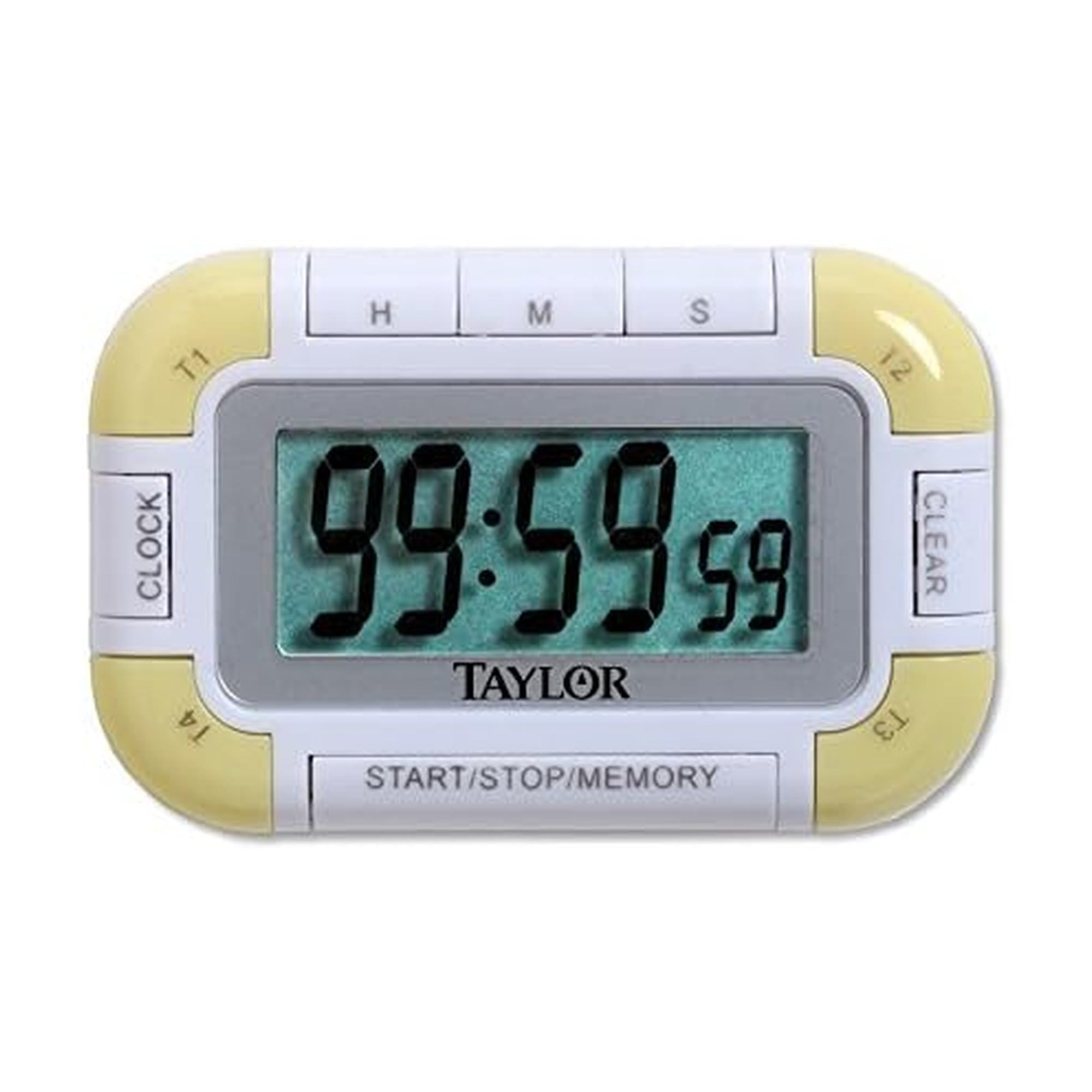
Figura 1: Frontal view of the Taylor Pro Digital 4-Event Timer.
Informació de seguretat
WARNING: This product contains button cell batteries. Swallowing a button cell battery can cause severe internal burns in as little as 2 hours and can lead to death. Keep new and used batteries away from children. If the battery compartment does not close securely, stop using the product and keep it away from children. If you think batteries might have been swallowed or placed inside any part of the body, seek immediate medical attention.

Figure 2: Button cell battery safety warning.
Contingut del paquet
- Taylor Pro Digital 4-Event Timer (Model 5862)
- Manual d'instruccions
- 2 x Product Specific Batteries (pre-installed or included separately)
Característiques del producte
- Four Independent Timers: Track up to four events simultaneously.
- Pantalla LCD gran: 0.8-inch display for clear time readings.
- Col·locació versàtil: Strong magnets for metal surfaces and a built-in stand for countertops.
- Extended Countdown: Sets times up to 99 hours, 59 minutes, 59 seconds.
- Distinctive Alarms: Each timer has a unique beep pattern.
- Funció de memòria: Recalls the last set time for each event.

Figura 3: Detallada view of the timer's display and control buttons.
Configuració
Instal·lació de la bateria
- Localitza el compartiment de les piles a la part posterior del temporitzador.
- Obriu la coberta del compartiment.
- Insert two product-specific batteries, ensuring correct polarity (+/-).
- Tanqueu bé la tapa del compartiment de la bateria.
Encès inicial
Once batteries are installed, the timer should automatically power on and display '00:00:00' or the current time if a clock function is present (refer to display for confirmation).
Instruccions de funcionament
Selecting a Timer (T1, T2, T3, T4)
Premeu el botó T1/T2/T3/T4 buttons to select the desired timer. The active timer will be indicated on the display.
Configuració d'un temporitzador de compte enrere
- Select the desired timer (T1-T4).
- Premeu el botó HR botó per configurar l'hora, MIN for minutes, and SEC for seconds. Each press increases the value. Hold the button for faster adjustment.
- To clear a set time, press the CLAR button while the timer is selected and stopped.
Starting and Stopping a Timer
- Després de configurar l'hora desitjada, premeu el botó INICI/PARA botó per iniciar el compte enrere.
- Per aturar el compte enrere, premeu INICI/PARA de nou.
- Per reprendre, premeu INICI/PARA una vegada més.
Funció d'alarma
When a timer reaches zero, it will emit an audible alarm. Each of the four timers has a distinct alarm sound to help differentiate between events. Press any button to silence the alarm.
Funció de memòria
The timer automatically stores the last set time for each of the four events. To recall a previously set time, select the desired timer (T1-T4) and press the MEMÒRIA button. The last set time for that specific timer will be displayed.
Manteniment
Neteja
Netegeu el temporitzador amb un suau, damp drap. No utilitzeu productes de neteja abrasius ni submergiu la unitat en aigua.
Canvi de bateria
When the display becomes dim or the timer functions erratically, it is time to replace the batteries. Follow the battery installation steps outlined in the Setup section.
Resolució de problemes
| Problema | Causa possible | Solució |
|---|---|---|
| La pantalla està en blanc o tènue. | Bateries baixes o esgotades. | Substituïu les piles per unes de noves, assegurant la polaritat correcta. |
| El temporitzador no comença. | Time not set or START/STOP not pressed. | Ensure a time is set for the selected timer. Press START/STOP. |
| L'alarma no sona. | Volume setting too low (if applicable) or timer not reaching zero. | Ensure timer counts down to zero. Check for any mute function (if available). |
| Els botons no responen. | Piles baixes o mal funcionament intern. | Canvieu les piles. Si el problema persisteix, poseu-vos en contacte amb el servei d'atenció al client. |
Especificacions
- Número de model: 5862
- Marca: Taylor
- Material: Plàstic
- Color: Blanc/Verd
- Pes de l'article: 2.4 unces
- Dimensions del producte: 7 x 5.1 x 6.68 polzades
- Mida de la pantalla: 0.8 polzades (LCD)
- Nombre de temporitzadors: 4
- Max Countdown: 99 Hours, 59 Minutes, 59 Seconds
- Bateries: 2 Product Specific batteries (required)
Garantia
This Taylor Pro Digital 4-Event Timer (Model 5862) comes with a 1 any de garantia covering parts and labor from the date of purchase. This warranty does not cover damage caused by misuse, accident, unauthorized modifications, or normal wear and tear. Please retain your proof of purchase for warranty claims.
Suport
For further assistance, troubleshooting not covered in this manual, or warranty inquiries, please contact Taylor customer support. Refer to the product packaging or the official Taylor weblloc web per obtenir la informació de contacte més actualitzada.


