1. Introducció
Thank you for choosing the Casio PAG240T-7CR Pathfinder Triple-Sensor Watch. This timepiece is engineered for outdoor enthusiasts, featuring a Triple Sensor (Altimeter, Barometer, Compass), Tough Solar power, and a durable titanium bracelet. This manual provides essential information for the proper setup, operation, and maintenance of your watch to ensure optimal performance and longevity.
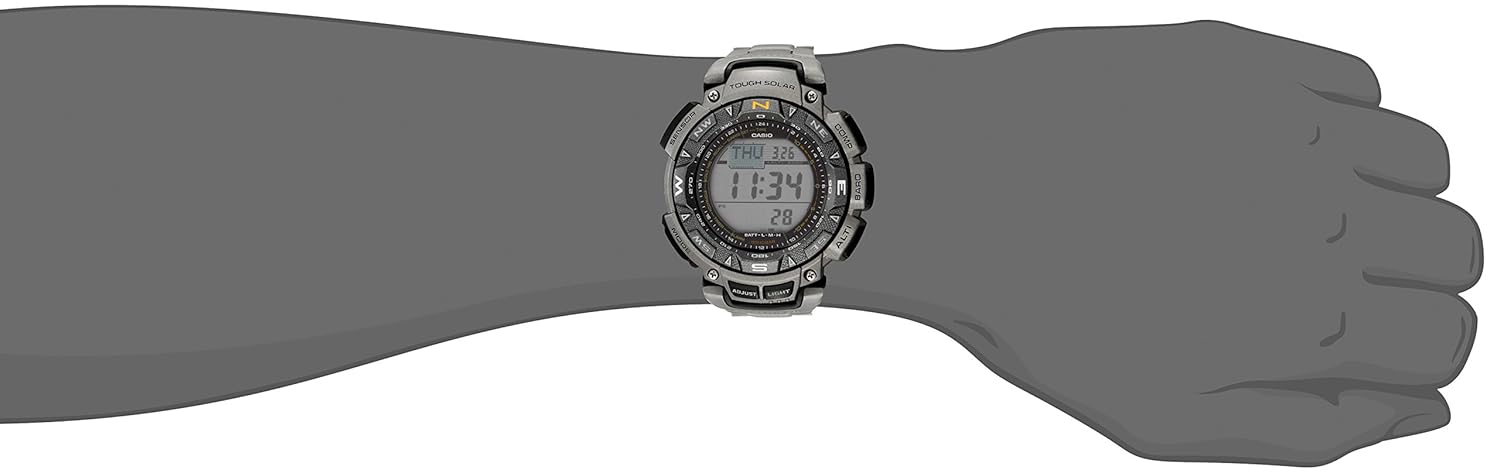
Image: Casio PAG240T-7CR Pathfinder watch on a wrist, showcasing its digital display and robust design.
2. Configuració
2.1 Càrrega inicial
Your Casio PAG240T-7CR watch is equipped with Tough Solar technology, which converts light into electrical power. Before initial use, ensure the watch is adequately charged by exposing it to light. The charging times vary based on the light source and intensity.

Image: Detailed table illustrating the approximate exposure times required to charge the watch from one power level to the next under different light conditions (e.g., outdoor sunlight, indoor fluorescent light).
Refer to the table above for approximate charging times. For daily operation, a minimum of 5 minutes in outdoor sunlight (50,000 lux) is recommended. Actual exposure times depend on lighting conditions and watch power level.
2.2 Configuració de la data i l'hora
To set the time and date, refer to the detailed instructions in the full product manual. Generally, this involves entering the Timekeeping Mode and using specific buttons to adjust hours, minutes, seconds, year, month, and day. Ensure your home city code is correctly set for accurate timekeeping.
3. Funcionament del rellotge
3.1 Triple Sensor Functions
The PAG240T-7CR features a Triple Sensor for environmental data:
- Altímetre: Measures relative altitude based on atmospheric pressure.
- Baròmetre: Measures atmospheric pressure and can indicate weather trends.
- Brúixola: Provides digital compass readings for direction.
Each sensor mode is typically accessed via dedicated buttons. Consult the full manual for calibration procedures and detailed usage instructions for each sensor.
3.2 Mode d'estalvi d'energia
To conserve power, the watch enters a sleep state automatically when left in a dark area for a certain period. This feature helps maintain the battery charge. The table below outlines how watch functions are affected by Power Saving.
Image: Section of the manual showing a table that describes the display and operation states during 'display sleep' and 'function sleep' in Power Saving mode, along with an illustration of the watch's buttons for activating/deactivating Power Saving.
To recover from the sleep state: Mou el rellotge a una zona ben il·luminada, prem qualsevol botó o inclina el rellotge cap a la teva cara per llegir-lo.
To turn Power Saving on and off:
- In the Timekeeping Mode, hold down the 'ADJUST' button (usually top left) until the currently selected city code starts to flash.
- Press the 'MODE' button (usually bottom left) repeatedly until the Power Saving (PS) setting appears.
- Use the 'SENSOR' button (usually bottom right) to toggle Power Saving between ON and OFF.
- Press the 'ADJUST' button to exit the setting screen.
When Power Saving is active, 'PS' will be displayed on the screen.
4. Manteniment
4.1 Resistència a l'aigua
Your watch is water-resistant up to 330 feet (100 meters). This means it is suitable for swimming and snorkeling, but not for scuba diving. Avoid operating buttons while the watch is submerged in water.
4.2 Neteja
Regularly wipe the watch case and band with a soft, dry cloth to remove dirt and moisture. For the titanium bracelet, use a soft brush with mild soap and water if necessary, then rinse thoroughly and dry. Avoid using harsh chemicals or abrasive cleaners.
4.3 Bateria
The Tough Solar power system eliminates the need for regular battery replacement. Ensure the watch receives sufficient light exposure to maintain its charge. If the charge level drops, expose the watch to bright light until it recovers.
5. Solució De Problemes
5.1 Watch Not Functioning or Display is Blank
- Check the charge level indicator. If low, expose the watch to bright light for an extended period.
- The watch might be in Power Saving mode. Move it to a well-lit area or press any button to wake it up.
5.2 Inaccurate Sensor Readings
- Altímetre/Baròmetre: These sensors are affected by weather changes. Calibrate them regularly using a known altitude or pressure reference.
- Brúixola: Perform a bidirectional calibration if readings seem off. Avoid strong magnetic fields.
For more detailed troubleshooting, refer to the comprehensive manual.
6. Especificacions
| Nom del model | PAG240T-7CR |
| Marca | Casio |
| Tipus de visualització | Digital |
| Tipus de moviment | Quartz (Solar Powered) |
| Material de la caixa | Acer inoxidable |
| Material de la banda | Titani |
| Diàmetre de la caixa | 51 Mil·límetres |
| Gruix de la caixa | 15.3 Mil·límetres |
| Profunditat de resistència a l'aigua | 330 peus (100 metres) |
| Pes de l'article | 113 g (4 unces) |
| Tipus de font d'alimentació | Energia solar |
| Material de cristall | Mineral |
| Tipus de tancament | Tancament plegable de doble tancament |
7. Garantia i Suport
7.1 Informació de la garantia
The warranty for your Casio PAG240T-7CR watch is provided by the seller of record. Please retain your proof of purchase for any warranty claims. For specific details regarding coverage and duration, refer to the warranty documentation provided at the time of purchase or contact the seller directly.
7.2 Atenció al client
For further assistance, technical support, or inquiries not covered in this manual, please contact Casio customer service or the authorized retailer from whom you purchased the watch. You can typically find contact information on the Casio official weblloc web o el vostre rebut de compra.