Introducció
This manual provides comprehensive instructions for the setup, operation, maintenance, and troubleshooting of your Logitech M510 Wireless Mouse. Designed for comfort and efficiency, the M510 offers precise control and convenient features for your computing needs.
The Logitech M510 is a comfortable wireless computer mouse featuring a USB Unifying Receiver, back/forward buttons, and side-to-side scrolling. It operates on 2 AA batteries and is compatible with Personal Computers and Macbooks running operating systems like Windows 10.
Contingut del paquet
- Ratolí sense fils Logitech M510
- Receptor unificador Logitech
- 2 piles AA (preinstal·lades o incloses)
Configuració
1. Instal·lació de la bateria
The Logitech M510 mouse requires two AA batteries for operation. These are typically included with your purchase. If not already installed, follow these steps:
- Localitzeu la tapa del compartiment de la bateria a la part inferior del ratolí.
- Feu lliscar o aixequeu la tapa per obrir el compartiment.
- Introduïu dues piles AA, assegurant-vos que els terminals positiu (+) i negatiu (-) s'alineïn correctament amb els indicadors de l'interior del compartiment.
- Tanqueu bé la tapa del compartiment de la bateria.
2. Connexió del receptor unificador
The Logitech M510 uses a Logitech Unifying Receiver for wireless connectivity. This small USB receiver allows you to connect multiple compatible Logitech devices to your computer using a single USB port.
- Locate the Logitech Unifying Receiver. It is often stored inside the battery compartment of the mouse for safekeeping during transport.
- Plug the Unifying Receiver into an available USB port on your computer (desktop, laptop, or Macbook).
- Your computer should automatically detect the receiver and install the necessary drivers. This may take a few moments.
- Once the drivers are installed, the mouse should be ready for use. If not, ensure the mouse's power switch (if present) is in the 'ON' position.

Imatge: De dalt a baix view of the Logitech M510 Wireless Mouse alongside its compact USB Unifying Receiver.
Funcionament del ratolí
The Logitech M510 Wireless Mouse is designed for intuitive use with several programmable buttons and comfortable ergonomics.
Funcions bàsiques
- Botó esquerre del clic: Botó principal per seleccionar elements, obrir files, i interactuant amb el programari.
- Botó del botó dret: Botó secundari per accedir als menús contextuals i a les opcions addicionals.
- Roda de desplaçament: Desplaça't amunt o avall pels documents i web pàgines. La roda de desplaçament també funciona com a botó de clic central.
- Side-to-Side Scrolling: Tilt the scroll wheel left or right to scroll horizontally in applications that support this feature.
Advanced Features (Programmable Buttons)
The M510 features two thumb buttons (back/forward) on the left side, which can be customized using Logitech Options software (available for download from the Logitech website). By default, these buttons perform browser navigation functions.
- Botó enrere: Navigates back in web navegadors o file exploradors.
- Botó Endavant: Navega cap endavant web navegadors o file exploradors.
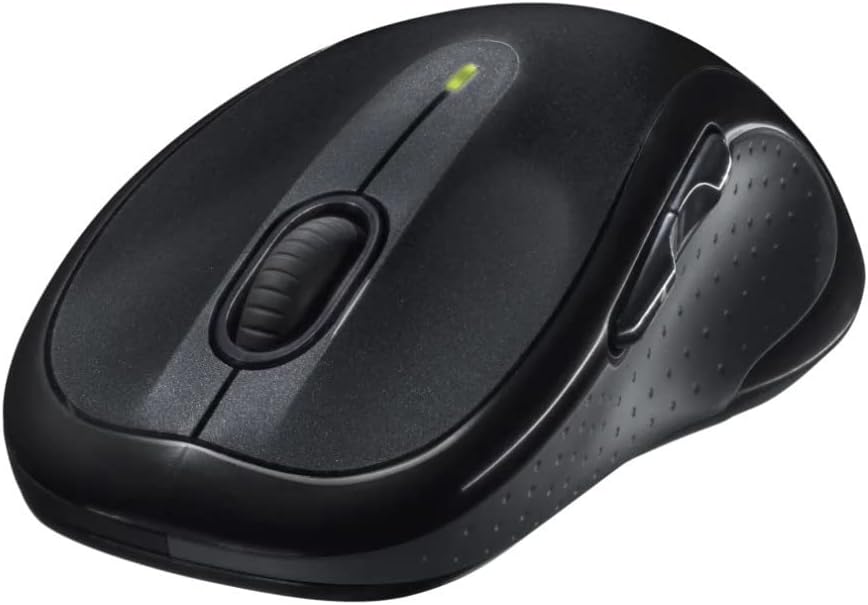
Imatge: Anglesa view of the Logitech M510 Wireless Mouse, highlighting its ergonomic shape and side buttons.
Manteniment
Neteja del ratolí
To ensure optimal performance and hygiene, regularly clean your Logitech M510 mouse:
- Disconnect the mouse from your computer by removing the Unifying Receiver.
- Utilitzeu un drap suau i sense pelusa dampened with water or a mild cleaning solution (e.g., isopropyl alcohol) to wipe down the surface of the mouse.
- For crevices and around buttons, use a cotton swab or a soft brush.
- Avoid getting liquid into the internal components or the optical sensor.
- Allow the mouse to dry completely before re-connecting.
Canvi de bateria
The Logitech M510 has an average battery life of 18 months. When the battery indicator light (if present) flashes or mouse performance degrades, it's time to replace the batteries.
- Turn off the mouse using the power switch on the underside.
- Obriu la tapa del compartiment de la bateria.
- Traieu les piles AA antigues.
- Introduïu dues piles AA noves, observant la polaritat correcta (+/-).
- Tanqueu la tapa del compartiment de la bateria.
- Torneu a engegar el ratolí.
Resolució de problemes
| Problema | Causa possible | Solució |
|---|---|---|
| El ratolí no respon | Low or dead batteries; Unifying Receiver not connected; Mouse power off; Driver issue. | Replace batteries; Ensure Unifying Receiver is securely plugged into a USB port; Turn mouse power switch to 'ON'; Reinstall Logitech Options software or check device manager for driver issues. |
| Moviment del cursor retardat o erràtic | Interference; Dirty optical sensor; Mouse used on unsuitable surface; Low battery. | Move mouse closer to receiver; Clear obstructions; Clean optical sensor; Use a mouse pad or suitable surface; Replace batteries. |
| Els botons laterals no funcionen | Software not installed or configured; Application does not support custom buttons. | Download and install Logitech Options software from the official Logitech website to customize button functions. Ensure the application you are using supports these functions. |
| Unifying Receiver not recognized | Faulty USB port; Driver issue. | Try a different USB port; Restart your computer; Download and install the Logitech Unifying Software to re-pair the mouse with the receiver. |
Especificacions
| Característica | Detall |
|---|---|
| Marca | Logitech |
| Número de model | 910-001822 |
| Sèrie | M510 |
| Tecnologia de connectivitat | Radio Frequency, USB (via Unifying Receiver) |
| Tecnologia de detecció de moviment | Làser |
| Color | Gris fosc |
| Pes de l'article | 4.6 unces (aproximadament 130 grams) |
| Dimensions del producte (LxWxH) | 4.38 x 2.5 x 1.75 polzades (aprox. 11.13 x 6.35 x 4.45 cm) |
| Font d'alimentació | Funciona amb bateria |
| Piles necessàries | 2 piles AA (incloses) |
| Durada mitjana de la bateria | 18 mesos |
| Plataforma de maquinari | Personal Computer, Macbook |
| Compatibilitat de sistemes operatius | Windows 10 (and likely earlier versions, macOS) |
| Característiques especials | Battery Life Indicator, Power Saving Mode, Programmable Buttons, Wireless |
| Data de primera disponibilitat | 7 de juny de 2010 |

Imatge: De dalt a baix view of the Logitech M510 Wireless Mouse showing its approximate dimensions (4.4" length, 2.5" width).
Garantia i Suport
Informació de la garantia
Logitech products typically come with a limited hardware warranty. For specific warranty terms and conditions applicable to your Logitech M510 Wireless Mouse, please refer to the warranty card included with your product or visit the official Logitech weblloc.
Atenció al client
For further assistance, technical support, or to download the latest software (such as Logitech Options or Unifying Software), please visit the official Logitech support weblloc:
També podeu trobar recursos útils, preguntes freqüents i fòrums comunitaris a les seves weblloc.


