1. Introducció
This manual provides comprehensive instructions for the operation and maintenance of your Coby 8 GB 2.8-Inch Video MP3 Player (Model: MP828-8G). This device is a versatile multimedia player featuring a 2.8-inch color TFT LCD touchscreen, 8 GB of integrated flash memory, an FM radio, stereo speakers, and a 0.3MP camera. It supports playback of music, video, photos, and text files, and includes a miniSD card slot for memory expansion.
Please read this manual thoroughly before using the device to ensure proper operation and to maximize your user experience.
2. Contingut del paquet
Verifiqueu que tots els elements siguin presents al paquet:
- Coby MP828-8G Video MP3 Player
- Cable USB 2.0
- Auriculars
- Manual d'instruccions (aquest document)
- Software CD (for video conversion, if applicable)
Note: A miniSD card is not included and must be purchased separately for memory expansion.
3. Producte acabatview
Familiarize yourself with the various components and controls of your MP3 player.

Figura 3.1: Frontal i lateral View of the MP828-8G
This image displays the Coby MP828-8G MP3 Player from the front and a slightly angled side view. The device is black with a prominent 2.8-inch touchscreen showing a grid of colorful icons for functions like music, video, photo, radio, text, explorer, calendar, clock, and settings. A power button and 'M' button are visible below the screen. The overall design is compact and rectangular.

Figura 3.2: Esquena View of the MP828-8G
This image shows the rear of the Coby MP828-8G MP3 Player. The back panel is black and features the "COBY" brand logo prominently at the top. Below the logo, an integrated camera lens is visible in the upper center. A white label with "J064110038763" and "MP828-4G" (note: product is 8GB, this label might be a generic one or for a different variant) is affixed to the lower half, along with regulatory marks like "FC CE".
Components físics:
- 2.8-inch TFT LCD Touchscreen: Main display and interactive interface.
- Botó d'encesa: Located below the screen, used to turn the device on/off and lock/unlock the screen.
- Botó 'M': Menu/Back button, typically located next to the power button.
- Altaveus estèreo integrats: Per a la reproducció d'àudio sense auriculars.
- MiniSD Card Slot: Per ampliar la capacitat d'emmagatzematge.
- Port USB: Per a càrrega i transferència de dades.
- Auriculars Jack: Per connectar auriculars.
- Integrated 0.3MP Camera: Per capturar fotos.
4. Configuració
4.1 Càrrega inicial
Before first use, fully charge the integrated rechargeable battery. Connect the device to a computer's USB port using the provided USB cable. The charging indicator will typically show progress. A full charge may take several hours.
4.2 Encès/Apagat
- Per encendre: Premeu i manteniu premut el botó d'engegada fins que la pantalla s'il·lumini.
- Per apagar: Press and hold the Power button until a power-off prompt appears on the screen. Tap "Power Off" to confirm.
- Per bloquejar/desbloquejar la pantalla: Briefly press the Power button to lock or unlock the touchscreen.
4.3 Inserting a MiniSD Card
To expand the device's storage, insert a miniSD card (not included) into the miniSD card slot until it clicks into place. Ensure the card is inserted in the correct orientation. To remove, gently push the card in until it springs out.
5. Instruccions de funcionament
5.1 Navegació amb pantalla tàctil
The device features intuitive touchscreen controls. Tap icons to select applications or options. Swipe across the screen to navigate through lists or pages. Use the 'M' button to go back to the previous screen or menu.
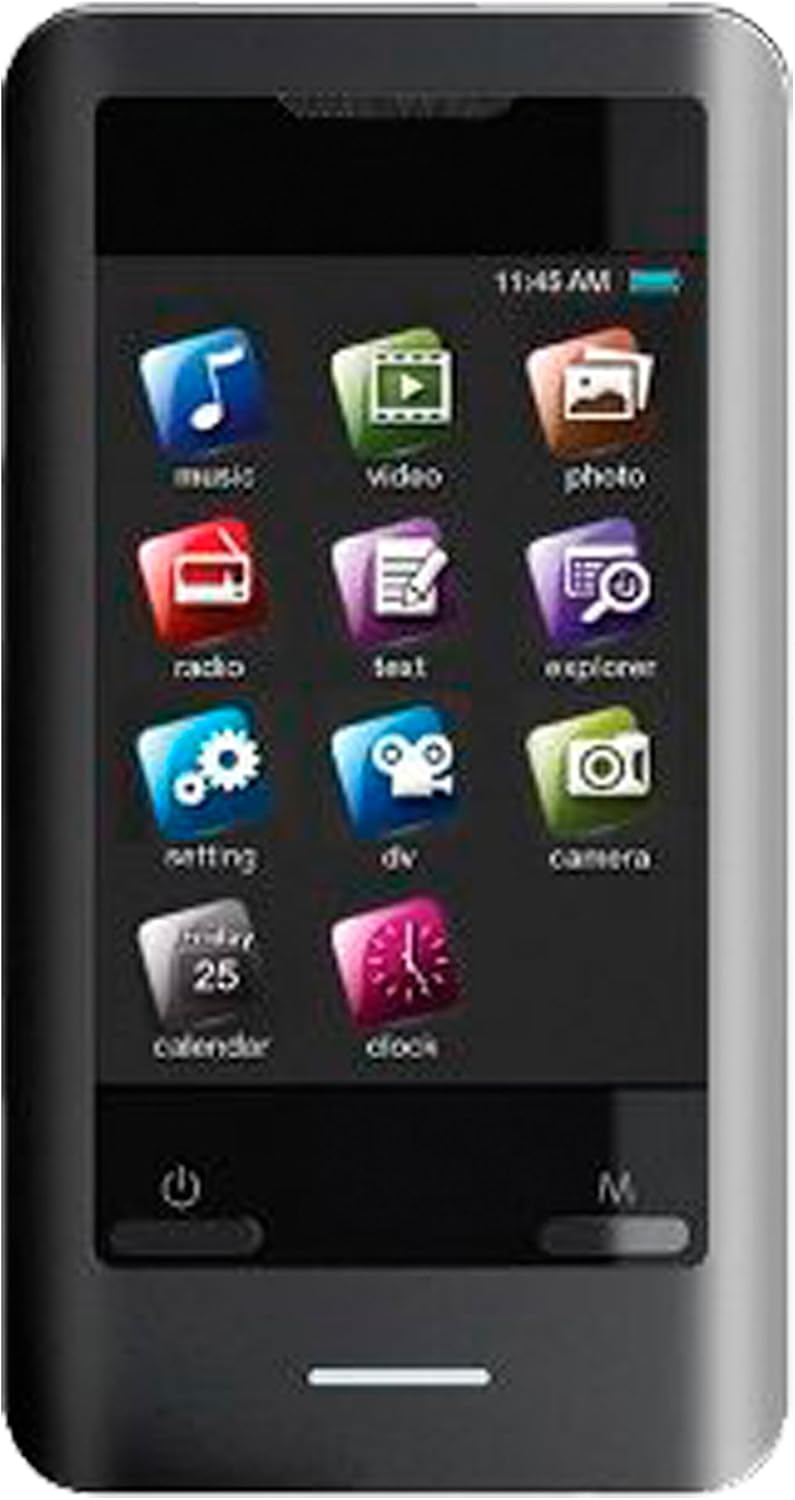
Figure 5.1: Main Menu Interface
Aquesta imatge ofereix un primer pla view of the Coby MP828-8G MP3 Player's touchscreen. The screen shows the main menu, organized as a grid of colorful square icons. Icons include "music," "video," "photo," "radio," "text," "explorer," "setting," "dv," "camera," "calendar," and "clock." A battery indicator and time are visible at the top right of the screen.
5.2 Reproducció de música
Tap the "Music" icon on the main menu. You can browse music by artist, album, genre, or all songs. Tap a song to begin playback. Use the on-screen controls for play/pause, skip, volume adjustment, and repeat/shuffle modes. The device supports ID3 and LRC for song and lyric information display.
5.3 Reproducció de vídeo
Tap the "Video" icon. Select a video file per jugar. Note: Videos may need to be converted using the included software for optimal device playback. The device supports common video formats. Use the on-screen controls for playback management.
5.4 Foto Viewing
Tap the "Photo" icon. Browse your image files. Tap an image to view it in full screen. You can swipe to navigate between photos.
5.5 Ràdio FM
Tap the "Radio" icon. Connect your earphones as they act as the antenna. You can auto-scan for stations or manually tune to a specific frequency. Save your favorite stations for quick access.
Funcionalitat de càmera 5.6
Tap the "Camera" icon to activate the integrated 0.3MP camera. Frame your shot using the screen and tap the capture button to take a photo. Photos are saved to the device's internal memory or the miniSD card if inserted.
5.7 File Management (Explorer)
Tap the "Explorer" icon to access the device's file system. You can view, copy, move, or delete files stored on the internal memory or the miniSD card.
5.8 Calendar and Clock
Access the "Calendar" and "Clock" applications from the main menu for timekeeping and date viewfuncions d'ing.
5.9 Connexió a un ordinador (USB)
Connect the device to your computer using the USB cable. The device will appear as a removable disk drive. You can drag and drop music, video, photo, and text files directly to the device's storage or miniSD card. The device supports USB 2.0 Hi-speed for fast file transferències.
6. Manteniment
6.1 Neteja
Wipe the device with a soft, dry cloth. For stubborn smudges on the screen, use a screen-cleaning solution specifically designed for electronics and a microfiber cloth. Do not use abrasive cleaners or solvents.
6.2 Cura de la bateria
- Eviteu exposar el dispositiu a temperatures extremes.
- Charge the battery regularly, even if the device is not used frequently, to maintain battery health.
- Si no heu d'utilitzar el dispositiu durant un període prolongat, carregueu-lo al 50% aproximadament abans de guardar-lo.
7. Solució De Problemes
| Problema | Causa possible | Solució |
|---|---|---|
| El dispositiu no s'encén. | La bateria està esgotada. | Connect to a USB power source and charge for at least 30 minutes before attempting to power on. |
| No es pot transferir files a/des de l'ordinador. | Incorrect USB connection; driver issue. | Ensure the USB cable is securely connected to both the device and the computer. Try a different USB port or cable. Restart both the device and computer. |
| Vídeo files do not play or play incorrectly. | Video format incompatibility. | Use the included software (if applicable) to convert video files to a compatible format for the device. |
| La pantalla tàctil no respon. | Temporary software glitch; screen locked. | Briefly press the Power button to unlock the screen. If unresponsive, perform a soft reset by pressing and holding the Power button for 10-15 seconds until the device restarts. |
| Mala recepció de ràdio FM. | Earphones not connected or poor signal. | Ensure earphones are fully plugged in, as they function as the antenna. Try moving to an area with better signal reception. |
8. Especificacions
| Característica | Detall |
|---|---|
| Model | MP828-8G |
| Capacitat d'emmagatzematge digital | 8 GB (internal flash memory) |
| Mostra | 2.8-inch Color TFT LCD Touchscreen |
| Càmera | 0.3 MP Integrated Camera |
| Formats d'àudio compatibles | MP3 |
| Formats de vídeo admesos | Requires conversion via included software |
| Formats d'imatge compatibles | JPEG, BMP, GIF |
| Text Formats Supported | TXT |
| Expansió de memòria | MiniSD Card Slot (card not included) |
| Connectivitat | USB 2.0 Hi-speed |
| Font d'alimentació | Integrated Rechargeable Lithium Ion Battery |
| Característiques integrades | FM Radio, Stereo Speakers, Calendar, Clock |
| Dimensions del producte | 1.17 x 5.59 x 10.41 cm |
| Pes del producte | 68.04 g |
9. Garantia i Suport
Coby products are designed for reliability and performance. For information regarding warranty coverage, technical support, or service, please refer to the warranty card included with your product or visit the official Coby support weblloc web. Conserveu el rebut de compra com a comprovant de compra per a reclamacions de garantia.
For further assistance, you may contact Coby customer service through their official channels.


