1. Producte acabatview
The NZXT Phantom ATX Full Tower Case (PHAN-001WT) is designed to accommodate high-performance computer components, offering extensive cooling capabilities and ample space for system builds. This full tower chassis supports ATX motherboards and provides features for efficient cable management and component installation.
Key features include multiple fan mounting options for optimized airflow, an integrated fan controller, and spacious interior design to support large graphics cards and cooling solutions.
2. Informació de seguretat
- Always disconnect the power supply from the wall outlet before performing any installation or maintenance.
- Handle all components with care to prevent damage from electrostatic discharge. Consider using an anti-static wrist strap.
- Assegureu-vos que hi hagi una ventilació adequada al voltant de la carcassa per evitar el sobreescalfament.
- Mantingueu les peces petites i els cargols fora de l'abast dels nens.
3. Contingut del paquet
Verifiqueu que tots els elements siguin presents al paquet:
- NZXT Phantom ATX Full Tower Case (PHAN-001WT)
- Accessory box (containing screws, standoffs, cable ties, etc.)
- Manual d'usuari (aquest document)
4. Configuració i instal·lació
4.1. Preparació del cas
- Col·loqueu la caixa sobre una superfície plana i estable.
- Locate the six thumb screws on the rear of the case. Loosen and remove the top two and bottom two thumb screws. The middle two screws are spring-loaded; loosen them slightly and push downwards to release the side panels.
- Carefully remove both side panels.
- Open the front panel by swinging it outwards. It can be removed completely by swinging it all the way out until it detaches.
- Locate the accessory box inside the bottom front right SSD slot. Open it and familiarize yourself with the included screws and components.
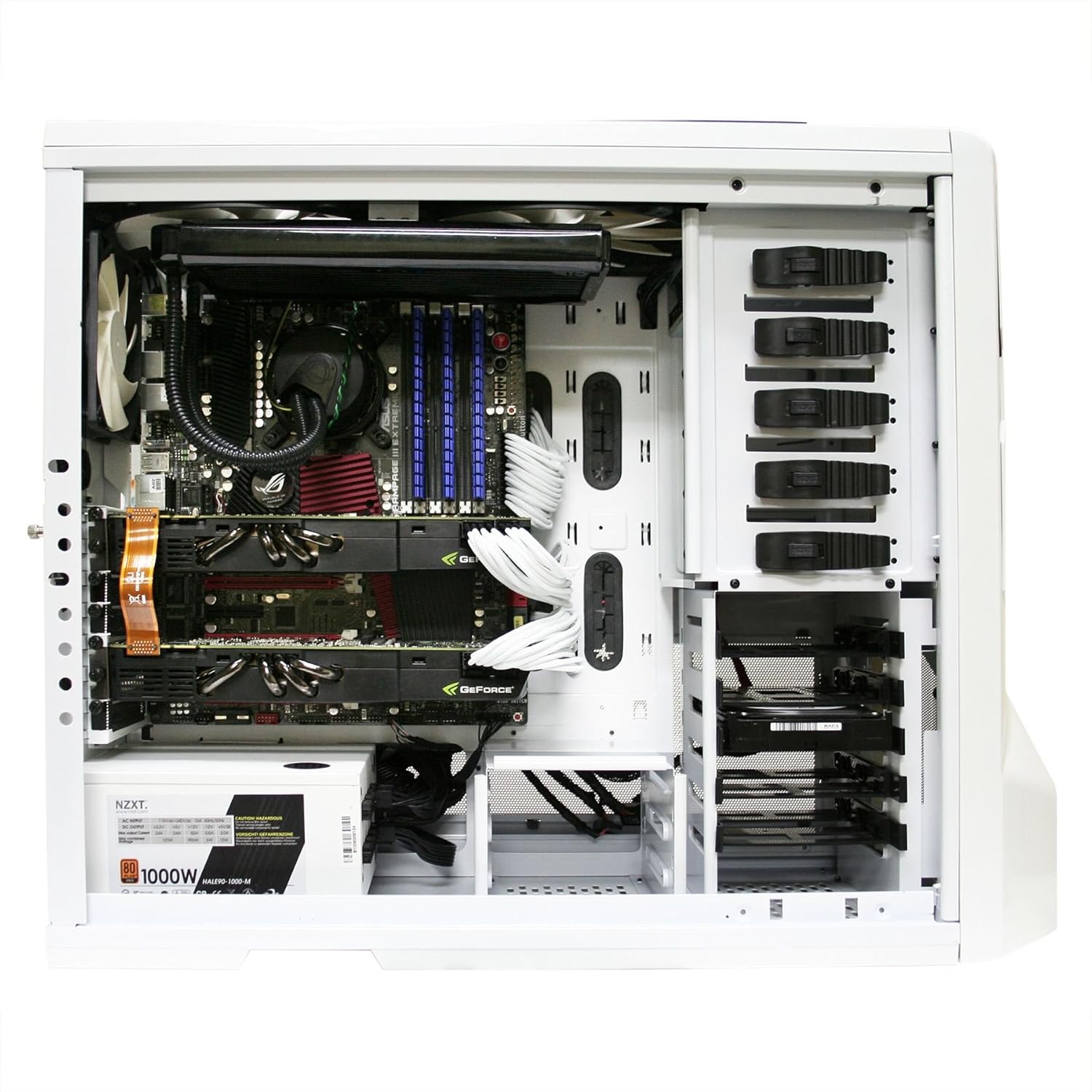
Figura 1: Interior view of the NZXT Phantom case, showing motherboard, graphics cards, power supply, and drive bays.
4.2. Instal·lació de la placa base
- Identify the correct standoff locations for your motherboard size (e.g., ATX) by referring to the etched notations on the motherboard tray.
- Install the appropriate standoffs into the designated holes.
- Carefully place your motherboard onto the installed standoffs, aligning the screw holes.
- Secure the motherboard with the hexagonal screws provided in the accessory box.
4.3. Instal·lació de la font d'alimentació (PSU)
- Position your PSU in the designated bottom mount area.
- Fixeu la font d'alimentació a la part posterior de la carcassa amb cargols.
- Route the PSU cables (PCI-E, main motherboard power, SATA power) through the cable management holes and grommets to the back side of the motherboard tray. This helps maintain a clean interior and improves airflow.
4.4. Drive Installation (HDD/SSD/Optical Drives)
- For 3.5" HDDs and 2.5" SSDs, utilize the tool-less drive bays. Slide the drive into the bay until it clicks into place.
- For 5.25" optical drives, remove the front panel cover, slide the drive into the bay, and secure it using the quick-release latches or screws.
- Connect SATA data and power cables to your installed drives.
4.5. Instal·lació de la targeta d'expansió
- Remove the necessary PCI slot mesh bars from the rear of the case to match your expansion card (e.g., graphics card, sound card).
- Insert the expansion card into the appropriate PCI-E slot on your motherboard.
- Secure the card with a screw or the provided latch mechanism.
4.6. Connecting Case Cables
- Connect the front panel headers (Power SW, Reset SW, HDD LED, Power LED, USB, Audio) to their corresponding pins on your motherboard. Refer to your motherboard manual for pin assignments.
- Connect the case fans to the integrated fan controller cables. Each cable is labeled for its corresponding fan.
- Connect the standard Molex connector from your PSU to the fan controller to provide power to the fan system.

Figura 2: lateral view of the NZXT Phantom case, highlighting the mesh panels for fan mounting locations.
5. Funcionament
5.1. Encès
- Once all components are installed and cables connected, replace the side panels and secure them with the thumb screws.
- Connecteu el monitor, el teclat, el ratolí i altres perifèrics.
- Connecteu el cable d'alimentació a la font d'alimentació i a una presa de corrent.
- Premeu el botó d'engegada al panell superior de la carcassa per iniciar el sistema.
5.2. Control del ventilador
The NZXT Phantom case features an integrated fan controller located on the top panel. Use the sliders to adjust the speed of the connected case fans. Adjusting fan speed will also dim the LEDs on fans that support this feature.

Figure 3: Integrated fan controller on the top panel, allowing adjustment of fan speeds.
5.3. Front Panel Ports
The top panel of the case provides convenient access to:
- Ports USB 2.0 (2x)
- USB 3.0 port (1x, depending on model revision)
- Presa d'auriculars
- Presa de micròfon
6. Manteniment
6.1. Neteja
- Exterior: Utilitzeu un suau, damp drap per netejar les superfícies exteriors. Eviteu productes de neteja abrasius.
- Interior: Periodically open the case and use compressed air to remove dust buildup from components and fan blades. Ensure the system is powered off and unplugged before cleaning.
- Filtres de pols: The case features mesh panels that act as dust filters. Regularly remove and clean these filters to maintain optimal airflow and cooling performance.
7. Solució De Problemes
7.1. El sistema no s'encén
- Verifiqueu que el cable d'alimentació estigui connectat correctament tant a la font d'alimentació com a la presa de corrent.
- Assegureu-vos que l'interruptor de la font d'alimentació estigui a la posició "ON".
- Check that the front panel 'Power SW' header is correctly connected to the motherboard.
- Confirm all major power cables (24-pin ATX, CPU, GPU) are securely seated.
7.2. Fan Issues
- If fans are not spinning, check their connections to the integrated fan controller and ensure the Molex power connector for the controller is plugged into the PSU.
- Adjust fan speeds using the top panel sliders.
- Excessive fan noise may indicate dust buildup or a faulty fan. Clean fans or consider replacement if noise persists.
7.3. Side Panel Latch Issues
- If the side panel latches are difficult to secure or frequently dislodge, ensure they are properly aligned. As an alternative, the side panels can be secured solely with the thumb screws.
7.4. Component Fitment
- When installing large CPU air coolers or liquid cooling radiators, verify clearance with the side panel fan mounts. In some configurations, it may be necessary to adjust or remove certain side panel fans to accommodate oversized components.
8. Especificacions
| Característica | Especificació |
|---|---|
| Marca | NZXT |
| Sèrie | PHAN-001WT |
| Nom del model | PHAN-001WT |
| Tipus de cas | Torre plena |
| Compatibilitat amb la placa base | ATX |
| Color | Blanc |
| Material | Acer d'aliatge, plàstic |
| Pes de l'article | 24.2 lliures |
| Dimensions del producte (LxWxH) | 24.6 x 8.7 x 21.35 polzades |
| Tipus de muntatge de la font d'alimentació | Muntatge inferior |
| Mètode de refrigeració | Aire |
| Mida del ventilador | 200 Millimeters (various fan sizes supported) |
| Nombre de ports USB 2.0 | 2 |
| Audio-out Ports | 1 |
9. Garantia i Suport
Per obtenir informació detallada sobre la garantia i assistència tècnica, visiteu el lloc web oficial de NZXT website. The warranty period and terms may vary by region and product. Ensure you retain your proof of purchase for warranty claims.
Recursos en línia:
- Oficial de NZXT Weblloc: www.nzxt.com
- Support Portal: Refer to the NZXT website for their dedicated support section.


