Introducció
The APC Back-UPS Pro 1500VA is an Uninterruptible Power Supply (UPS) designed to provide guaranteed power and surge protection for your electronic devices. It safeguards wireless networks, computers, external hard drives, routers, and other sensitive electronics from power outages, damaging power surges, and voltage fluctuations. This unit ensures your critical equipment remains operational and your data is protected during unexpected power events.

Figura 1: Frontal view of the APC Back-UPS Pro 1500VA, showing the LCD display and control buttons.
Configuració
Follow these steps for initial setup of your UPS unit:
- Desembalatge: Carefully remove the UPS from its packaging. It is heavy, so lift with care.
- Connexió de la bateria: The battery may be disconnected for shipping. Refer to the quick start guide for instructions on connecting the internal battery.
- Col·locació: Place the UPS in a cool, dry location away from direct sunlight and excessive heat. Ensure adequate ventilation around the unit.
- Dispositius de connexió:
- Connect critical devices (e.g., computer, monitor, router) to the Battery Backup & Surge Protection endolls. Aquests endolls proporcionen energia duranttages.
- Connect non-critical devices (e.g., printer, scanner) to the Només protecció contra sobretensions outlets. These outlets protect against surges but do not provide battery power.
- Connexió d'alimentació: Plug the UPS power cord into a grounded wall outlet.
- Càrrec inicial: Allow the UPS to charge for at least 8-10 hours before connecting any devices to ensure full battery capacity.
- Instal·lació de programari: Install the PowerChute Personal Edition software (CD included or download from APC website) on your computer. This software enables automatic shutdown during extended outages and provides energy management features.

Figure 2: Rear panel of the UPS, highlighting the battery backup and surge-only outlets, and the external battery pack connection port.
Funcionament
The APC Back-UPS Pro operates automatically to protect your devices. During normal operation, it provides clean, consistent power. In the event of a power outage o volum significatiutage fluctuation, the unit will seamlessly switch to battery power.
- Volum automàtictage Regulació (AVR): The UPS features AVR, which instantly corrects low or high voltage fluctuations without discharging the battery. This preserves battery runtime for when it's truly needed during a complete power loss.
- Pantalla LCD: The front LCD display provides real-time status updates, including battery charge level, utility power status, and estimated runtime.
- Alarmes sonores: The UPS will emit audible alarms to notify you of power events, such as switching to battery power or low battery. These alarms can often be configured or muted via the PowerChute software.
Vídeo 1: Un overview of the APC Back-UPS Pro, detailing its features and benefits, including power protection and battery backup capabilities.
Video 2: This video explains the value of an APC UPS in a smart home environment, emphasizing continuous connectivity during power interruptions.
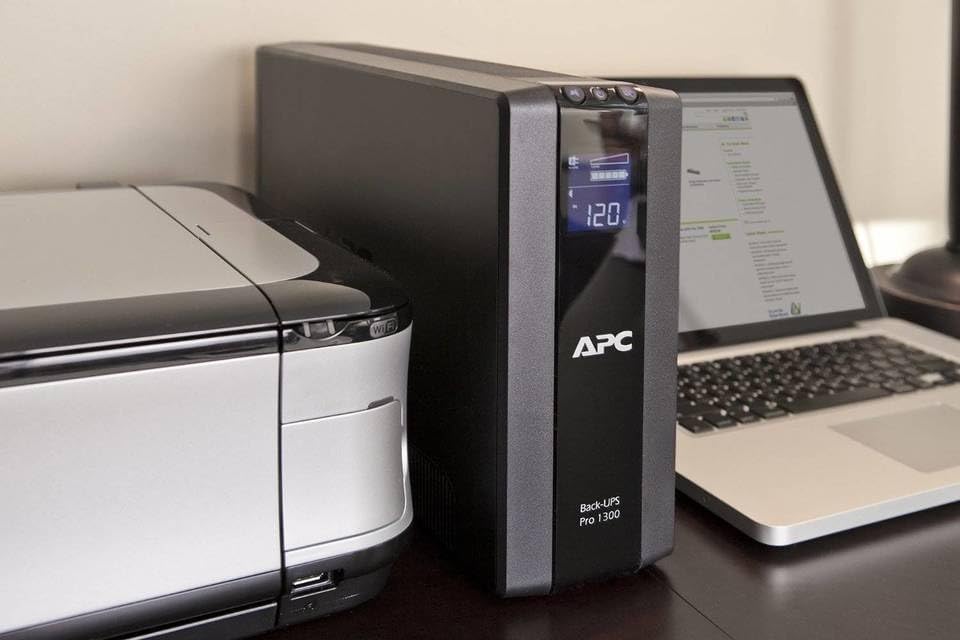
Figure 3: The UPS integrated into a workspace, providing power to a laptop and printer.
Manteniment
Regular maintenance ensures the longevity and optimal performance of your UPS. The primary maintenance task is battery replacement.
- User-Replaceable Battery: The APC Back-UPS Pro features a user-replaceable battery (model APCRBC124, sold separately). This allows you to extend the life of your UPS without needing to replace the entire unit.
- Durada de la bateria: Batteries typically last 3-5 years depending on usage and environmental conditions. The PowerChute software can provide alerts when the battery needs replacement.
- Procediment de substitució: To replace the battery, ensure the UPS is turned off and disconnected from the wall outlet. Follow the specific instructions provided in the user manual or the video demonstration for safe and proper battery replacement. The battery is hot-swappable, meaning operation is not disrupted during replacement if performed correctly.
Video 3: This overview video demonstrates the user-replaceable battery feature of the APC Back-UPS Pro, showing how to access and swap the battery for continued operation.
Resolució de problemes
If you encounter issues with your APC Back-UPS Pro, refer to the following common problems and solutions:
- El SAI no s'encén: Ensure the power cord is securely plugged into a live wall outlet and the UPS. Check the circuit breaker on the back of the unit and reset if tripped.
- Temps d'execució curt: The battery may not be fully charged, or it may be nearing the end of its service life. Allow ample charging time or consider replacing the battery. Overloading the UPS with too many devices can also reduce runtime.
- Constant Beeping: This usually indicates a power event (e.g., on battery, low battery, overload). Check the LCD display for specific error codes or messages. Refer to the PowerChute software for detailed event logs.
- Soroll del ventilador: The fan may run during initial charging or during extended power outages to cool the unit. This is normal. If the fan noise is excessive or constant during normal operation, ensure adequate ventilation and check for any obstructions.
- "Bad Battery" Warning: If the UPS displays a "Bad Battery" warning after replacing the battery, allow some time (e.g., an hour or more) for the new battery to settle and be recognized by the system. If the warning persists, the new battery may be faulty, or there might be an issue with the UPS itself.
For more complex issues, consult the full user manual or contact APC customer support.
Especificacions
| Característica | Especificació |
|---|---|
| Número de model | BR1500G |
| Capacitat | 1500 VA / 865 W |
| Dimensions del producte (P x A x A) | 15 x 4.4 x 11.9 polzades |
| Pes de l'article | 26.6 lliures |
| Vol. De sortidatage | 230 volts (nominals) |
| Punts de venda | 10 (5 Battery Backup & Surge, 5 Surge Only) |
| Tipus de bateria | Lead Acid (User-replaceable: APCRBC124) |
| Volum automàtictagReglament (AVR) | Sí |
| Protecció de Línies de Dades | Network (RJ-45) / Coax |
| Longitud del cable d'alimentació | 6 peus |
| País d'origen | Vietnam |
Garantia i Suport
Your APC Back-UPS Pro 1500VA comes with a manufacturer's warranty. Please refer to the warranty documentation included with your product for specific terms and conditions. Typically, APC offers a one-year manufacturer warranty.
Què hi ha a la caixa:
- APC Back-UPS Pro 1500VA Unit
- CD with PowerChute Software
- Cable USB
- Manual d'usuari (aquest document i una versió PDF)
For additional support, technical data, or to download the latest PowerChute software, please visit the official APC weblloc web o consulteu la guia completa Guia de l'usuari (PDF) or Manual d'usuari (PDF).


