1. Introducció i finalview
The Avision AV 320D2+ is a high-performance A3 document scanner designed for efficient and reliable document digitization. Featuring a 600 dpi optical resolution and USB connectivity, it is capable of handling a wide range of document sizes up to A3, making it suitable for various professional environments. This manual provides essential information for setting up, operating, maintaining, and troubleshooting your scanner.
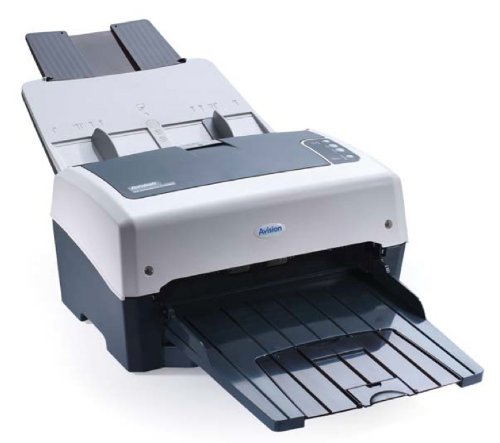
Figure 1: Avision AV 320D2+ A3 Document Scanner. This image displays the Avision AV 320D2+ A3 Document Scanner from a front-right perspective. The scanner is light grey and dark grey, featuring an automatic document feeder (ADF) at the top with paper guides visible, and an extended output tray at the front. The Avision logo is visible on the front panel.
2. Configuració
2.1 Desembalatge
- Traieu amb cura l'escàner i tots els accessoris de l'embalatge.
- Verifiqueu que hi hagi tots els components que figuren a la llista d'embalatge.
- Remove all protective tapes and packing materials from the scanner, including any inside the document feeder and output tray.
2.2 Connexió de l'escàner
- Col·loqueu l'escàner sobre una superfície estable i plana a prop de l'ordinador.
- Connect the power adapter to the scanner's power input and then plug it into an electrical outlet.
- Connect one end of the supplied USB cable to the USB port on the scanner and the other end to an available USB port on your computer.
- Power on the scanner using the power button, typically located on the side or rear panel.
2.3 Instal·lació del programari
Before using the scanner, you must install the necessary drivers and scanning software. Refer to the included software CD or visit the official Avision weblloc web per als controladors i utilitats més recents.
- Insert the software installation CD into your computer's CD/DVD drive, or download the software package from the Avision support weblloc.
- Follow the on-screen instructions to install the scanner drivers and bundled scanning applications. It is recommended to install all provided software for full functionality.
- Restart your computer if prompted after the installation is complete.
3. Funcionament de l'escàner
3.1 Càrrega de documents
- Alimentador automàtic de documents (ADF): Open the ADF input tray. Adjust the paper guides to fit the width of your documents. Place the documents face-down with the top edge first into the ADF. The standard sheet capacity is 50 sheets.
- Ensure documents are free of staples, paper clips, or any foreign objects that could damage the scanner.
- For mixed-size documents, ensure they are aligned properly to prevent skewing.
3.2 Basic Scanning Procedures
- Load your documents into the ADF as described above.
- Open your preferred scanning application (e.g., Avision Button Manager, TWAIN/ISIS compatible software).
- Select the Avision AV 320D2+ as your scanner.
- Choose your desired scanning settings (e.g., color mode, resolution, destination folder).
- Initiate the scan from the software interface. The scanner will automatically feed and scan the documents.
- Review the scanned images and save them to your desired location.
3.3 Configuració d'escaneig
The scanner supports various settings to optimize scan quality and file mida:
- Resolució: Adjustable up to 600 dpi. Higher resolution provides better image quality but results in larger file mides.
- Mode de color: Options typically include Color, Grayscale, and Black & White (Binary).
- Escaneig dúplex: The AV 320D2+ supports duplex (two-sided) scanning, allowing you to capture both sides of a document in a single pass.
- Format de sortida: Common output formats include PDF, JPEG, TIFF, and searchable PDF.
4. Manteniment
4.1 Neteja de l'escàner
Regular cleaning ensures optimal performance and extends the life of your scanner.
- Exterior: Netegeu les superfícies exteriors amb un damp, drap sense borrissol. No utilitzeu productes de neteja abrasius ni dissolvents.
- Superfícies de vidre: Utilitzeu un drap suau dampened with a non-abrasive glass cleaner to clean the scanner's glass surfaces (if applicable).
- Rodets: Periodically clean the feed rollers with a lint-free cloth lightly dampNetejat amb alcohol isopropílic per eliminar la pols i els residus de paper.
- Apagueu i desendolleu sempre l'escàner abans de netejar-lo.
5. Solució De Problemes
This section addresses common issues you might encounter with your Avision AV 320D2+ scanner.
| Problema | Causa possible | Solució |
|---|---|---|
| Scanner not detected by computer | Loose USB cable, power off, driver issue | Comproveu la connexió USB, assegureu-vos que l'escàner estigui engegat i reinstal·leu els controladors. |
| Embussos de paper | Misaligned documents, worn rollers, foreign objects | Remove jammed paper carefully, align documents properly, clean rollers. |
| Poor scan quality (streaks, blurry images) | Dirty glass, incorrect settings, worn rollers | Clean scanner glass and rollers, adjust resolution/color settings. |
| Documents not feeding | Incorrectly loaded, worn feed rollers | Ensure documents are loaded correctly, clean or replace feed rollers if worn. |
6. Especificacions
Key technical specifications for the Avision AV 320D2+ scanner:
- Tipus de producte: Escàner de documents
- Format de paper: A3
- Resolució: 600 dpi (Optical)
- Connectivitat: USB
- Color: Negre/Blanc
- Pes: Aproximadament 26.46 lliures (12 kg)
- Consum d'energia: 38.4 watts
- Standard Sheet Capacity (ADF): 50 fulls
- Tecnologia del sensor òptic: CMOS
- Nom del model: AV320D2+
- Número de model de l'article: FT-0807H
7. Garantia i Suport
7.1 Garantia del fabricant
The Avision AV 320D2+ scanner typically comes with a Garantia del fabricant de 2 anys. This warranty covers defects in materials and workmanship under normal use. Please retain your proof of purchase for warranty claims. For specific terms and conditions, refer to the warranty card included with your product or visit the official Avision weblloc.
7.2 Suport tècnic
For technical assistance, driver updates, or further troubleshooting not covered in this manual, please contact Avision customer support. Support contact information can usually be found on the Avision official website or in the documentation provided with your scanner.
Note: Availability of spare parts and software updates may vary. Please check the manufacturer's official channels for the most current information.


