1. Introducció
This manual provides detailed instructions for the installation, operation, and maintenance of your Dual XHDR6435 AM/FM/MP3/WMA/USB/HD Ready Receiver. Please read this manual thoroughly before using the product to ensure proper operation and to prevent damage.
The Dual XHDR6435 is a versatile car stereo receiver featuring CD/MP3/WMA playback, front panel 3.5mm auxiliary input, front panel USB input for direct iPod/iPhone control and charging, and is ready for Bluetooth (requires BTM60) and HD Radio (requires HDM90). It delivers 240 Watts total power (60 x 4) via MOSFET amplification and includes an infrared remote control.

Figura 1: Frontal view of the Dual XHDR6435 AM/FM/MP3/WMA/USB/HD Ready Receiver, showing the display, control buttons, CD slot, USB port, and auxiliary input.
2. Informació de seguretat
Always observe the following safety precautions when installing or operating the receiver:
- Do not operate the unit in any way that would distract you from safe driving.
- Keep the volume at a level where you can still hear outside traffic noises.
- For installation, consult a qualified professional. Incorrect wiring can cause damage to the vehicle's electrical system or the unit itself.
- Assegureu-vos que tot el cablejat estigui correctament aïllat i fixat per evitar curtcircuits.
- No exposeu la unitat a la humitat ni a temperatures extremes.
- Use only accessories and parts specified by the manufacturer.
3. Configuració
3.1 Instal·lació
The Dual XHDR6435 is designed for standard DIN-sized openings. Professional installation is highly recommended to ensure correct wiring and secure mounting. Refer to the detailed wiring diagram provided with the product packaging for specific connections.
- Muntatge: Securely mount the receiver in the vehicle's dashboard using the supplied mounting sleeve and hardware.
- Connexió d'antena: Connect the vehicle's antenna cable to the antenna input on the rear of the receiver.
3.2 Connexions de cablejat
Ensure the vehicle's battery is disconnected before making any electrical connections. The main wiring harness includes connections for power, ground, accessory, illumination, and speaker outputs. The unit also features 2 pairs of RCA outputs (Front + Rear/Subwoofer selectable) for external ampaixecadors.
- Potència (Groc): Connect to a constant +12V power source.
- Terra (negre): Connecteu-ho a un punt de terra net del xassís.
- Accessori (vermell): Connect to a switched +12V power source (ignition).
- Sortides dels altaveus: Connect to the vehicle's speakers, observing correct polarity.
- Sortides RCA: Connecteu-vos a l'exterior amplifiers if used.
- Steering Wheel Interface Input (PAC SWI-PS): Connect compatible steering wheel control adapters here.
- Bluetooth Ready (requires BTM60): Connect the optional BTM60 module for Bluetooth functionality.
- HD Radio Ready (requires HDM90): Connect the optional HDM90 module for HD Radio reception.
3.3 Encès inicial
After all connections are made and verified, reconnect the vehicle's battery. Press the POWER/SELECT button on the unit's front panel to turn it on. The 2-Line LCD display will illuminate.
4. Instruccions de funcionament
4.1 Controls bàsics
- POWER/SELECT Button: Press to turn the unit ON/OFF. Rotate to adjust volume. Press to confirm selections in menus.
- Botó MODE: Press to cycle through available sources (Tuner, CD, USB, AUX).
- Botó DISP: Press to change display information (e.g., clock, track title).
- Botó AUDIO: Access audio settings like Bass, Treble, Balance, Fader, EQ.
- BAND/ESC Button: In tuner mode, press to change radio bands (FM1, FM2, FM3, AM1, AM2). In menu mode, press to exit current menu.
- Botó MUTE: Silencia o activa la sortida d'àudio.
- SCAN/HD-SK Button: In tuner mode, initiates station scan. With HD Radio module, seeks HD Radio stations.
- Seek/Track Buttons (<< / >>): In tuner mode, seek up/down stations. In CD/USB mode, skip tracks.
4.2 Funcionament de la ràdio
Premeu el botó MODE button until "TUNER" or "RADIO" is displayed. Use the BANDA button to select FM1, FM2, FM3, AM1, or AM2. Use the Busca buttons to tune to stations. Press and hold the Busca buttons for manual tuning.
Estacions preseleccionades: To store a station, tune to the desired frequency, then press and hold one of the preset buttons (1-6) until you hear a beep.
HD Radio (with optional HDM90): When the HDM90 module is connected, the unit will automatically detect and tune to HD Radio broadcasts. The display will indicate "HD Radio Ready" or similar. Use the HD-SK button to seek HD Radio stations.
Reproducció de CD/MP3/WMA 4.3
Insert a CD into the disc slot. The unit will automatically switch to CD mode and begin playback. If a disc is already inserted, press the MODE botó per seleccionar "CD".
- Reproduir/pausa: Premeu el botó 4/II botó.
- Omet la pista: Premeu el botó Busca botons.
- Avançar/reveure ràpid: Manteniu premut el botó Busca botons.
- Repetició (RPT): Premeu el botó 1 RPT button to repeat current track/folder.
- Aleatori (RDM): Premeu el botó 2 RDM button for random playback.
- Escaneig d'introducció (INT): Premeu el botó 3 INT button to play the first few seconds of each track.
4.4 USB/iPod/iPhone Operation
Connect your USB device or iPod/iPhone to the front panel USB input. The unit will automatically switch to USB mode and begin playback. The unit supports direct USB control for iPod/iPhone and charges any iPod via USB.
- Navegació: Utilitza el Busca buttons to navigate tracks. Use the CARPETA (buttons 5 and 6) to navigate folders on USB devices.
- Control de l'iPod/iPhone: Basic playback controls (play/pause, skip) are available directly from the receiver. Advanced browsing may be done from the iPod/iPhone itself.
4.5 Entrada auxiliar
Connect an external audio device (e.g., MP3 player) to the front panel 3.5mm auxiliary input. Press the MODE button until "AUX" is displayed. Audio will play through the vehicle's speakers.
4.6 Bluetooth (with optional BTM60)
If the optional BTM60 Bluetooth module is connected, refer to the BTM60 manual for pairing and operation instructions. The unit will allow for hands-free calling and audio streaming once paired with a compatible device.
4.7 Steering Wheel Control Interface
The unit supports a steering wheel interface input (PAC SWI-PS). If a compatible adapter is installed, refer to the adapter's manual for programming and operation of your vehicle's steering wheel controls with the XHDR6435.
4.8 Funcionament del control remot
The included infrared remote control provides convenient access to most functions. Point the remote control directly at the receiver's front panel when operating.
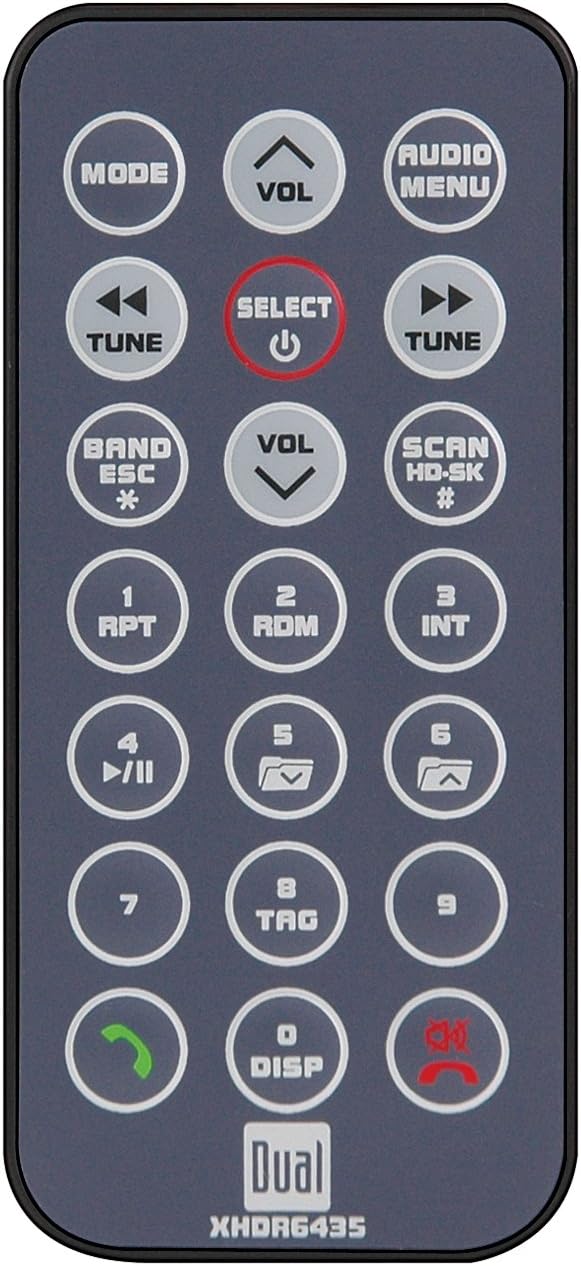
Figure 2: The infrared remote control for the Dual XHDR6435 receiver, showing various buttons for mode, volume, tuning, playback, and menu navigation.
- Mode: Changes source.
- VOL +/-: Ajusta el volum.
- TUNE/SEEK << / >>: Tunes radio or skips tracks.
- SELECT/POWER: Power ON/OFF, confirms selections.
- AUDIO MENU: Accesses audio settings.
- BAND/ESC: Changes radio band, exits menus.
- SCAN/HD-SK: Scans stations, seeks HD stations.
- 1-6 (Preset Buttons): Accesses preset radio stations or specific playback functions (RPT, RDM, INT).
- DISP: Changes display information.
- Mute/Call Buttons: Mutes audio, answers/ends calls (with BTM60).
5. Manteniment
- Neteja de la unitat: Feu servir un drap suau i sec per netejar el panell frontal. Per a taques difícils,ampen the cloth with water only. Do not use abrasive cleaners, waxes, or solvents.
- Cura del disc: Handle CDs by their edges. Keep discs clean and free of scratches. Do not use irregularly shaped discs or discs with adhesive labels.
- Atenció general: Avoid exposing the unit to direct sunlight for extended periods or to extreme temperatures. Ensure proper ventilation around the unit.
6. Solució De Problemes
| Problema | Causa possible | Solució |
|---|---|---|
| Sense poder | Fusible fundit; Cablejat incorrecte; Bateria del vehicle baixa. | Check and replace fuse; Verify power and ground connections; Charge vehicle battery. |
| Sense so | Volume too low; Mute activated; Speaker wires disconnected/shorted; Fader/Balance set incorrectly. | Increase volume; Deactivate mute; Check speaker connections; Adjust Fader/Balance settings. |
| Mala recepció de ràdio | Antenna not connected; Antenna damaged; Weak signal area. | Ensure antenna is securely connected; Inspect antenna for damage; Try tuning to stronger stations. |
| CD/USB playback issues | Dirty/scratched disc; Incompatible file format; USB device not recognized. | Netegeu o substituïu el disc; assegureu-vos files are MP3/WMA; Reconnect USB device, try different USB device. |
| El comandament a distància no funciona | Dead battery; Obstruction; Not pointing correctly. | Replace battery; Remove obstructions; Point directly at receiver. |
7. Especificacions
| Característica | Detall |
|---|---|
| Número de model | XHDR6435 |
| Potència de sortida | 240 Watts total (60 Watts x 4 channels) MOSFET |
| Compatibilitat de disc | CD, MP3, WMA |
| Entrada USB | Front panel, Direct control for iPod/iPhone, Charges iPod via USB |
| Entrada auxiliar | Front panel 3.5mm |
| Sortides RCA | 2 Pairs (Front + Rear/Subwoofer selectable) |
| Mostra | LCD de 2 línies |
| Control remot | Infrared remote included |
| Control del volant | Interface input (PAC SWI-PS compatible) |
| Bluetooth llest | Requires optional BTM60 module |
| HD Radio Ready | Requires optional HDM90 module |
| Dimensions (L x A x A) | 25.4 x 13.97 x 13.97 cm |
| Pes | 2 kg (4.4 lliures) |
8. Garantia i assistència
For warranty information and technical support, please refer to the warranty card included with your product or visit the official Dual Electronics weblloc web. Conserveu el comprovant de compra per a reclamacions de garantia.
If you encounter issues not covered in the troubleshooting section, contact Dual customer service for assistance. Do not attempt to repair the unit yourself, as this may void your warranty.


