Introducció
The Cellularline Roller Clip Bluetooth Headset is designed for convenient, hands-free communication. Featuring a retractable cable and a wireless Bluetooth clip, this headset offers flexibility and ease of use. It supports simultaneous connection to two mobile phones, automatically activating when a call is received or made on either device. Its automatic cable winder ensures a tidy experience, making it ideal for users who prefer to wear the headset only during calls.
Producte acabatview
Familiarize yourself with the components and features of your Cellularline Roller Clip Bluetooth Headset.

Figura 1: Davant view of the Cellularline Roller Clip Bluetooth Headset, showing the main unit with the retractable earbud.
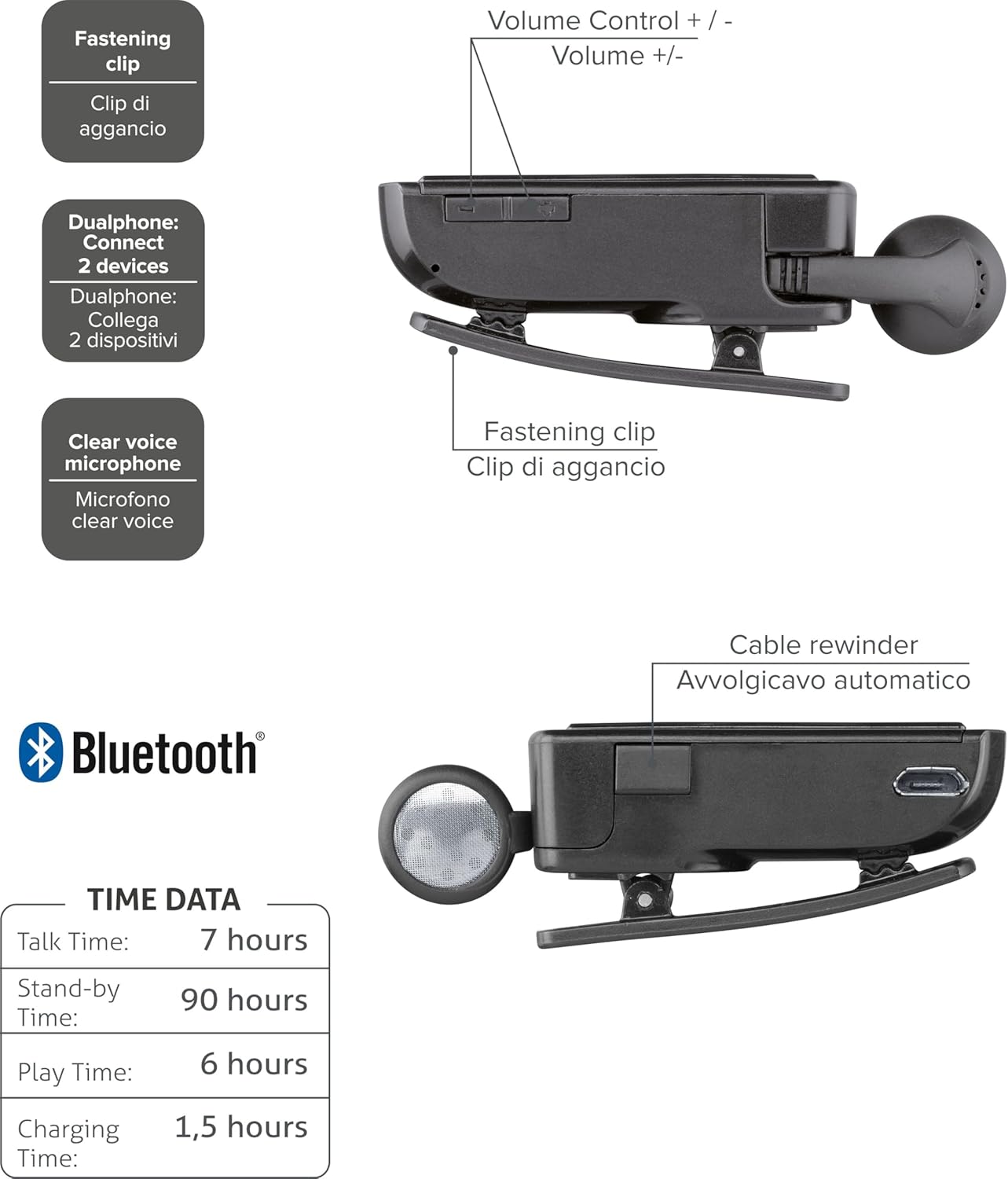
Figura 2: Diagram illustrating key features including the fastening clip, volume controls, dualphone connectivity, clear voice microphone, and cable rewinder.
- Retractable Earbud: The earbud cable automatically retracts into the main unit for compact storage.
- Bluetooth Clip: The main unit features a clip for attaching to clothing.
- Controls de volum: Buttons located on the side for adjusting audio volume.
- Connexió multipunt: Es connecta a dos telèfons mòbils simultàniament.
- Clear Voice Microphone: Ensures clear audio transmission during calls.
- Port micro-USB: Per carregar el dispositiu.
Configuració
1. Càrrega dels auriculars
Before first use, fully charge the headset. Use the provided Micro-USB cable to connect the headset to a USB power source (e.g., computer USB port or wall adapter).
- El llum indicador de càrrega s'il·luminarà durant la càrrega.
- Una càrrega completa sol trigar aproximadament 1.5 hores.
- El llum indicador canviarà o s'apagarà un cop finalitzada la càrrega.

Figura 3: lateral view of the headset showing the Micro-USB charging port.
2. Emparellament amb un dispositiu mòbil
To use the headset, it must be paired with your Bluetooth-enabled mobile phone or device.
- Assegureu-vos que els auriculars estan apagats.
- Press and hold the Multi-function button (usually the main power button) until the indicator light flashes blue and red alternately, indicating pairing mode.
- Al dispositiu mòbil, activa el Bluetooth i cerca dispositius nous.
- Select "Cellularline Roller Clip" or a similar name from the list of available devices.
- Si se us demana un codi d'accés, introduïu "0000" (quatre zeros).
- Once paired, the indicator light will typically flash blue slowly, and you may hear a confirmation tone.
3. Connecting to Two Devices (Multi-point)
The headset can be connected to two mobile phones simultaneously.
- Pair the headset with the first mobile device as described above.
- Desactiveu el Bluetooth al primer dispositiu.
- Put the headset back into pairing mode and pair it with the second mobile device.
- Once paired with the second device, re-enable Bluetooth on the first device.
- The headset should now be connected to both devices. It will automatically switch to the active call on either phone.
Instruccions de funcionament
Encès/Apagat
- Encès: Press and hold the Multi-function button for approximately 3 seconds until the blue indicator light flashes.
- Apagar: Press and hold the Multi-function button for approximately 3 seconds until the red indicator light flashes and then turns off.
Fer i rebre trucades
- Respon a la trucada: Press the Multi-function button once when a call comes in.
- Finalitzar la trucada: Premeu el botó multifunció una vegada durant una trucada.
- Rebutja la trucada: Press and hold the Multi-function button for approximately 2 seconds when a call comes in.
- Torna a marcar l'últim número: Double-press the Multi-function button when the headset is idle.
- Marcació per veu (si el telèfon ho admet): Press and hold the Multi-function button for approximately 1 second when the headset is idle.
Control de volum
Adjust the call or media volume using the dedicated volume buttons on the side of the headset.

Figura 4: lateral view of the headset showing the volume control buttons.
- Pujar el volum: Premeu el botó '+'.
- Baixar el volum: Premeu el botó '-'.
Cable retràctil
To extend the earbud, gently pull it out. To retract, press the cable winder button (if present) or gently pull the cable slightly further and release to activate the retraction mechanism.
Manteniment
- Neteja: Netegeu els auriculars amb un drap suau i sec. No utilitzeu productes de neteja abrasius ni dissolvents.
- Emmagatzematge: Guardeu els auriculars en un lloc fresc i sec, allunyat de la llum solar directa i de temperatures extremes.
- Cura de la bateria: Per allargar la durada de la bateria, eviteu descarregar-la completament amb freqüència. Carregueu els auriculars regularment, fins i tot si no els feu servir durant períodes prolongats.
- Cura del cable: Avoid forcefully pulling the retractable cable. Allow the automatic winder to retract the cable smoothly.
Resolució de problemes
| Problema | Causa possible | Solució |
|---|---|---|
| Els auriculars no s'encén. | Bateria baixa. | Carregueu completament els auriculars. |
| No es poden emparellar els auriculars. | Auriculars no en mode d'emparellament; Bluetooth desactivat al dispositiu; dispositiu massa lluny. | Ensure headset is in pairing mode (flashing red/blue). Enable Bluetooth on your device. Move headset closer to the device. |
| No hi ha àudio o hi ha mala qualitat d'àudio. | Volume too low; headset not connected; interference. | Increase volume on both headset and phone. Reconnect the headset. Move away from other electronic devices. |
| El cable retràctil no funciona correctament. | Obstrucció o dany del mecanisme. | Ensure no debris is obstructing the cable. Avoid forceful pulling. If damaged, contact support. |
| Cannot connect to two devices. | Seqüència d'aparellament incorrecta. | Follow the multi-point pairing instructions carefully (pair first, disable Bluetooth, pair second, re-enable first). |
Especificacions
| Característica | Detall |
|---|---|
| Número de model | BTCLIPARDP |
| Marca | Línia cel·lular |
| Color | Black/Grey (Schwarz) |
| Col·locació de l'orella | A l'orella |
| Factor de forma | A l'orella |
| Impedància | 32 ohms |
| Dimensions del producte | 9 x 2.4 x 11 cm; 50 g |
| Tipus de bateria | 1 bateria de ions de liti |
| Temps de conversa | Fins a 7 hores |
| Temps d'espera | Fins a 90 hores |
| Hora de jugar | Fins a 6 hores |
| Temps de càrrega | Aproximadament 1.5 hores |
Garantia i Suport
Per obtenir informació sobre la garantia i assistència tècnica, consulteu la pàgina oficial de Cellularline. weblloc web o contacteu directament amb el servei d'atenció al client. Conserveu el comprovant de compra per a reclamacions de garantia.
Per obtenir ajuda addicional, podeu visitar el product page on Amazon.ae.


