Introducció
This manual provides detailed instructions for the proper use and maintenance of your Casio FX-570MS Scientific Calculator. The FX-570MS is a versatile calculator designed for a wide range of scientific and engineering computations, featuring a 2-line display for enhanced readability and functionality.
Les capacitats clau inclouen:
- 2-line display for input and results.
- Càlculs i conversions de fraccions.
- Integration and differentiation calculations.
- Combination and Permutation functions.
- Statistical calculations.
- Base-n calculations and conversions.
- Logical operations.
- Complex number calculations.
- CALC memory and Engineering symbol calculations.
- 40 scientific constants and 40 metric conversions.

Figura 1: Davant view of the Casio FX-570MS Scientific Calculator, showing the 2-line display and full keypad layout.
Configuració
Instal·lació de la bateria
The Casio FX-570MS calculator requires two LR44 batteries for operation. These are typically included with the product. To install or replace batteries:
- Ensure the calculator is turned OFF.
- Localitzeu la tapa del compartiment de la bateria a la part posterior de la calculadora.
- Feu servir un tornavís petit per treure el cargol que fixa la tapa i, a continuació, feu lliscar la tapa per treure-la.
- Remove old batteries (if any) and insert two new LR44 batteries, ensuring correct polarity (+/-).
- Substituïu la tapa del compartiment de la bateria i fixeu-la amb el cargol.
Encès inicial
Després de la instal·lació de la bateria, premeu el botó [ACTIVAT] button to power on the calculator. The display should show '0' or a previous calculation result. If the display is blank or shows unusual characters, ensure batteries are correctly installed or try resetting the calculator.
Instruccions de funcionament
Operacions bàsiques
Input numbers and operations using the numeric keypad and function buttons. The 2-line display shows the input expression on the upper line and the result on the lower line.
S'han acabat les funcions clauview
- [MAJÚS]: Accesses the secondary functions printed in yellow above the keys. Press [MAJÚS] then the desired key.
- [ALFA]: Accesses the alpha functions printed in red above the keys. Press [ALFA] then the desired key.
- [MODE CLR]: Used to change calculation modes or clear memory. Press [MODE] to select a mode, or [MAJÚS] [CLR] to clear memory or reset settings.
- [ACTIVAT]: Powers on the calculator.
- [AC]: Clears all entries and returns to the initial display.
- [DEL]: Deletes the last entered character.

Figura 2: Primer pla view of the navigation and primary function keys, including SHIFT, ALPHA, MODE CLR, and ON buttons.
Funcions avançades
The FX-570MS offers a range of advanced functions accessible via the [MAJÚS] i [ALFA] keys. Refer to the markings above each key for specific functions.
- Equation Solver (CALC, SOLVE): Ús [MAJÚS] [CALC] for SOLVE function to solve equations.
- Càlculs matricials i vectorials: Access dedicated modes for matrix and vector operations.
- Multi-Replay Function: Allows scrolling through and editing previous calculations.
- Scientific Constants and Metric Conversions: Utilize the built-in library for common constants and unit conversions.
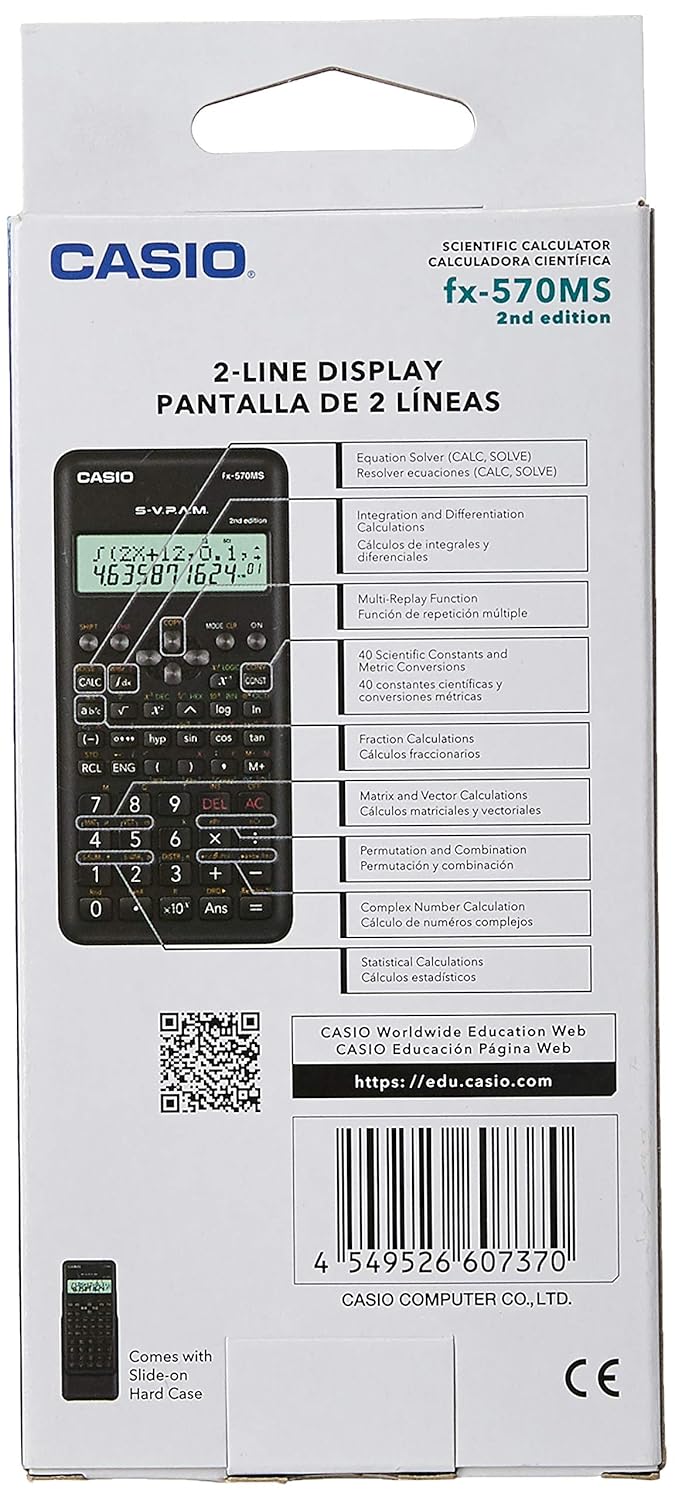
Figura 3: Product packaging highlighting key features such as Equation Solver, Matrix and Vector Calculations, and Multi-Replay function.
Manteniment
Neteja
Per netejar la calculadora, netegeu-la amb un drap suau i sec. No utilitzeu netejadors abrasius, dissolvents ni productes químics agressius, ja que poden danyar la calculadora.asing o pantalla.
Canvi de bateria
When the display becomes dim or calculations are erratic, it is time to replace the batteries. Follow the battery installation steps outlined in the Setup section.
Emmagatzematge
Store the calculator in a cool, dry place away from direct sunlight and extreme temperatures. Use the provided slide-on hard case to protect the calculator from dust and physical damage when not in use.
Resolució de problemes
- La pantalla està en blanc o té poca llum: Check battery installation. Replace batteries if necessary.
- Resultats incorrectes: Ensure you are in the correct calculation mode (e.g., DEG, RAD, GRAD). Clear all memory and settings by pressing [MAJÚS] [CLR] [TOTS] [=].
- La calculadora no s'encén: Verify battery installation and charge. If issues persist, contact customer support.
Especificacions
| Característica | Descripció |
|---|---|
| Número de model | FX-570MS |
| Mostra | Pantalla de 2 línies |
| Nombre de funcions | 401 (tal com s'indica a l'envàs) |
| Font d'alimentació | Battery Powered (2 x LR44 batteries) |
| Dimensions (LxWxH) | 16.1 x 13.7 x 0.8 centímetres |
| Pes de l'article | 150 g |
| Mida de la pantalla | 3.35 polzades |
Garantia i Suport
Per obtenir informació sobre la garantia i l'assistència al client, consulteu la documentació inclosa amb el producte o visiteu el lloc web oficial de Casio. website. You can also verify the authenticity of your product using the QR code provided on the packaging.
For educational resources and further information, visit the Casio Worldwide Education Web:
To check product authenticity:
https://check.casio-intl.com/vZRAZvOksFB4V5

Figura 4: Product packaging front, showing the authenticity QR code for verification.


