Introducció
This manual provides detailed instructions for the proper setup, operation, and maintenance of your Nortek NDVX 2503 DVD Player. Please read this manual thoroughly before using the device to ensure optimal performance and safety. Keep this manual for future reference.
Informació de seguretat
- Font d'alimentació: Connect the DVD player only to the specified power supply voltage.
- Ventilació: Assegureu-vos que hi hagi una ventilació adequada al voltant de la unitat. No bloquegeu les obertures de ventilació.
- Aigua i humitat: Do not expose the unit to rain, moisture, or dripping/splashing liquids.
- Calor: Mantingueu la unitat allunyada de fonts de calor com ara radiadors, registres de calor, estufes o altres aparells que produeixin calor.
- Neteja: Desendolleu la unitat de la presa de corrent abans de netejar-la. Feu servir un drap sec per netejar-la.
- Manteniment: No intenteu atendre aquest producte vosaltres mateixos. Consulteu tots els serveis a personal de servei qualificat.
Contingut del paquet
Verifiqueu que tots els elements que s'enumeren a continuació s'inclouen al vostre paquet:
- Nortek NDVX 2503 DVD Player
- Comandament a distància (amb piles)
- Cable AV (tipus RCA)
- Manual d'usuari (aquest document)
- Cable d'alimentació
Producte acabatview
Familiarize yourself with the components and controls of your DVD player.
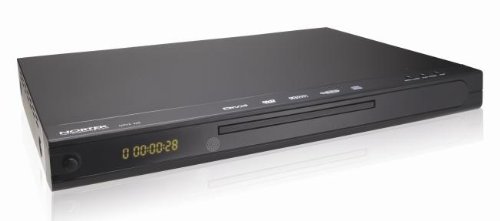
Figura 1: Davant view of the Nortek NDVX 2503 DVD Player. This image shows the sleek black casing, the central disc tray, the digital display on the left, and control buttons on the right side of the front panel.
Controls del panell frontal:
- Botó d'encesa: Encén o apaga la unitat.
- Safata de disc: Insert your DVD or CD here.
- Visualització: Shows playback time, track number, and other status indicators.
- Botó Obrir/Tancament: Obre i tanca la safata del disc.
- Botó Reproduir/Pausa: Inicia o posa en pausa la reproducció del disc.
- Botó d'aturada: Atura la reproducció del disc.
- Skip Buttons (Forward/Backward): Skips to the next or previous track/chapter.
Connexions del panell posterior:
(Note: Specific connections may vary. Common connections include:)
- Audio/Video Output (RCA): Red, White (audio) and Yellow (video) jacks for connecting to a TV or ampmés viu.
- Sortida d'àudio digital coaxial/òptica: For connecting to a home theater receiver for digital audio.
- Entrada d'alimentació: Connecta el cable d'alimentació.
Configuració
1. Connecting to a Television:
- Ensure both the DVD player and your television are turned off and unplugged.
- Connect the yellow RCA video cable from the "Video Out" jack on the DVD player to the "Video In" jack on your television.
- Connect the red and white RCA audio cables from the "Audio Out" jacks (Red for Right, White for Left) on the DVD player to the corresponding "Audio In" jacks on your television or audio receiver.
- If using digital audio, connect a coaxial or optical cable from the DVD player's digital audio output to your receiver's digital audio input.
2. Connexió d'alimentació:
- Plug the power cord into the power input on the rear of the DVD player.
- Connecteu l'altre extrem del cable d'alimentació a una presa de corrent.
3. Engegada inicial:
- Turn on your television and select the correct input source (e.g., AV1, Video 1) that corresponds to where you connected the DVD player.
- Press the Power button on the DVD player or its remote control to turn it on.
- The Nortek logo or a setup menu should appear on your TV screen.
Instruccions de funcionament
1. Reproducció de disc:
- Premeu el botó OBRIR/TANCAR botó del panell frontal o del comandament a distància per obrir la safata del disc.
- Place a DVD, DVD+R, or Video CD disc gently into the tray with the label side facing up.
- Premeu el botó OBRIR/TANCAR botó de nou per tancar la safata.
- The player will automatically begin reading the disc. Playback should start shortly. If a menu appears, use the arrow keys on the remote to navigate and the ENTRAR botó per seleccionar.
- Utilitza el REPRODUCCIÓ/PAUSA, STOP, i SALTAR buttons on the remote or front panel to control playback.
2. Navegació del menú:
- Utilitza el FLECHA buttons on the remote control to move through menu options.
- Premeu el botó ENTRAR or OK botó per confirmar una selecció.
- El MENÚ button typically returns you to the disc's main menu.
Manteniment
Neteja de la unitat:
- Unplug the DVD player from the power outlet before cleaning.
- Use a soft, dry cloth to wipe the exterior of the unit. Do not use liquid cleaners or aerosol sprays.
- Avoid getting dust or debris inside the disc tray mechanism.
Cura del disc:
- Manipuleu els discs per les vores per evitar que deixeu empremtes dactilars a la superfície de reproducció.
- Store discs in their cases when not in use to prevent scratches.
- Netegeu els discs bruts amb un drap suau i sense borrissol, netejant des del centre cap a fora.
Resolució de problemes
| Problema | Causa possible | Solució |
|---|---|---|
| Sense poder | Cable d'alimentació no connectat; Presa de corrent no activa. | Assegureu-vos que el cable d'alimentació estigui ben connectat. Proveu la presa de corrent amb un altre dispositiu. |
| Sense imatge ni so | AV cables not connected correctly; Incorrect TV input selected. | Check all AV cable connections. Select the correct input source on your TV (e.g., AV1, Video 1). |
| El disc no es reprodueix | Disc is dirty or scratched; Disc inserted incorrectly; Incompatible disc format. | Clean the disc. Ensure the disc is inserted label-side up. Verify the disc is a supported format (DVD, DVD+R, Video CD). |
| El comandament a distància no funciona | Les piles estan gastades o inserides incorrectament; Obstrucció entre el comandament a distància i el reproductor. | Replace batteries. Ensure correct battery polarity. Remove any obstructions. Point remote directly at the player's sensor. |
Especificacions
- Marca: Nortek
- Nom del model: NDVX 2503
- Tipus de suports compatibles: DVD, DVD+R, Video CD
- ASIN: B0044AL0TM
- Fabricant: Nortek
- Note: Other specifications such as dimensions, weight, and power consumption are not available in the provided data.
Garantia i Suport
For warranty information or technical support, please refer to the warranty card included with your product or visit the official Nortek weblloc web. Conserveu el comprovant de compra per a qualsevol reclamació de garantia.
For further assistance, you may contact Nortek customer service through their official channels.


