Introducció
This manual provides comprehensive instructions for the safe and efficient use of your BlackBerry HS-300 Wireless Bluetooth Headset. Please read this manual thoroughly before operating the device and retain it for future reference. The BlackBerry HS-300 is designed for hands-free communication with compatible Bluetooth-enabled devices.
Contingut del paquet
Comproveu que el vostre paquet contingui els elements següents:
- BlackBerry HS-300 Wireless Bluetooth Headset
- Ear hook (optional, for secure fit)
- Ear gels/tips (various sizes for comfort)
- Cable de càrrega
- Manual d'usuari (aquest document)
Dispositiu acabatview
Familiarize yourself with the components of your BlackBerry HS-300 headset.
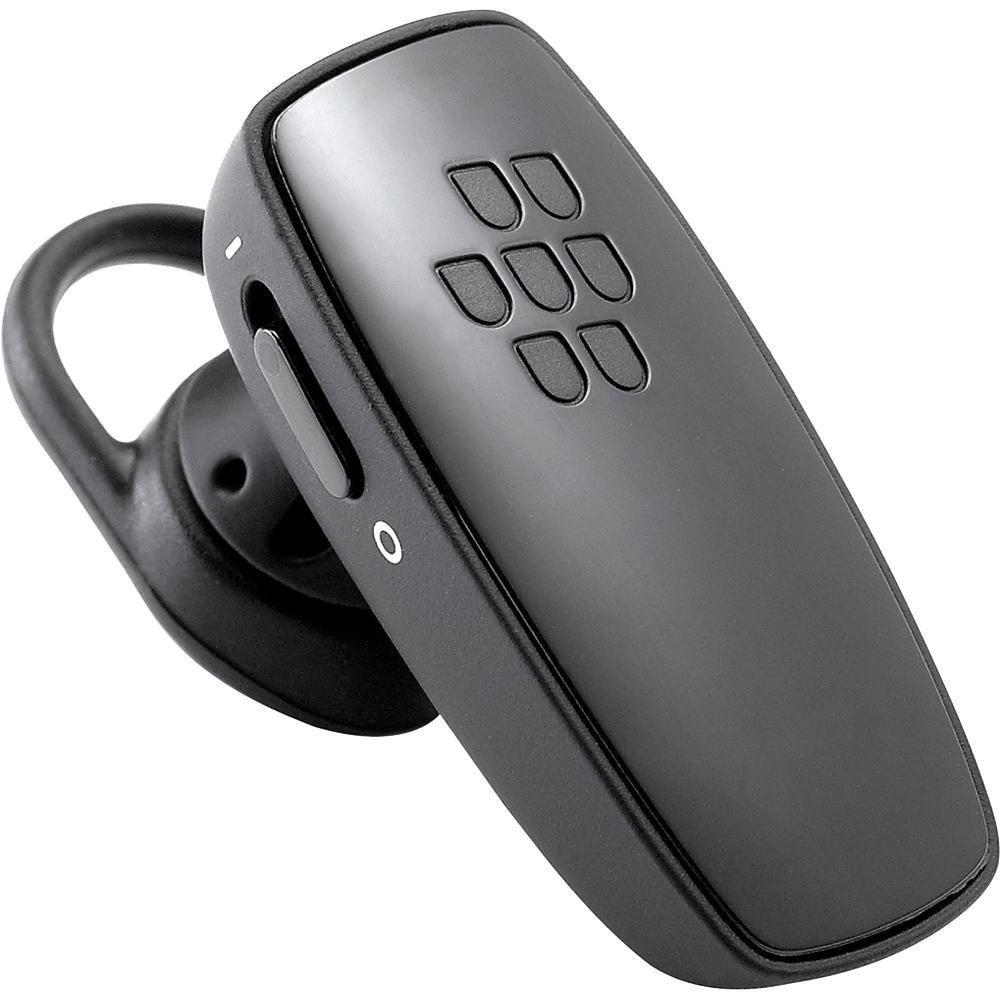
Imatge 1: Davant view of the BlackBerry HS-300 Wireless Bluetooth Headset. The image displays the main body of the headset, featuring the BlackBerry logo (seven-dot pattern) on the front surface. A slender button, likely for volume control or multi-function, is visible on the side. An ear hook is attached, designed to secure the headset over the ear. A small indicator light is also present near the button.
- Botó multifunció: Used for answering/ending calls, voice commands, and pairing.
- Botons de control de volum: Adjusts call and media volume.
- Llum indicador LED: Mostra l'estat (engegada, emparellament, càrrega).
- Micròfon: Captures your voice during calls.
- Interruptor d'alimentació: Encén o desactiva els auriculars.
- Port de càrrega: Connects to the charging cable.
Configuració
1. Càrrega dels auriculars
Before initial use, fully charge your headset. The HS-300 features rapid charge capabilities.
- Connect the charging cable to the headset's charging port and to a compatible USB power source.
- The LED indicator will show the charging status (e.g., solid red for charging, solid blue for fully charged).
- Una càrrega completa proporciona fins a 4 hores de temps de conversa.
2. Vinculació amb un dispositiu Bluetooth
To use your headset, it must be paired with a Bluetooth-enabled phone or device.
- Assegureu-vos que els auriculars estan apagats.
- Press and hold the Multi-function Button until the LED indicator flashes blue and red alternately. This indicates pairing mode.
- On your phone, enable Bluetooth and search for new devices.
- Select "BlackBerry HS-300" from the list of available devices.
- Si se us demana un codi d'accés, introduïu "0000" (quatre zeros).
- Once paired, the LED indicator will flash blue periodically.
Instruccions de funcionament
Encès/Apagat
- Per encendre: Slide the Power Switch to the 'On' position. The LED indicator will flash blue.
- Per apagar: Slide the Power Switch to the 'Off' position. The LED indicator will turn off.
Fer i rebre trucades
- Respondre una trucada: Premeu el botó multifunció una vegada.
- Finalització d'una trucada: Premeu el botó multifunció una vegada durant una trucada.
- Rebutjar una trucada: Premeu i manteniu premut el botó multifunció durant aproximadament 2 segons.
- Fer una trucada: Dial the number on your phone. The call will automatically transfer to the headset if connected.
- Voice Dialing (if supported by phone): Press the Multi-function Button once when not on a call.
Control de volum
- Use the Volume Control Buttons on the headset to adjust the call or media volume.
Manteniment
- Netegeu els auriculars regularment amb un drap suau i sec.
- Eviteu exposar els auriculars a temperatures extremes, humitat o substàncies corrosives.
- Guardeu els auriculars en un lloc fresc i sec quan no els feu servir.
- No intenteu desmuntar ni modificar els auriculars, ja que això anul·larà la garantia i els pot fer malbé.
Resolució de problemes
| Problema | Solució |
|---|---|
| Els auriculars no s'encenen. | Ensure the headset is charged. Connect it to a power source using the charging cable. |
| Cannot pair the headset with my phone. |
|
| No hi ha àudio o hi ha mala qualitat d'àudio. |
|
| Els auriculars es desconnecten sovint. |
|
Especificacions
| Característica | Detall |
|---|---|
| Número de model | HS-300 |
| Connectivitat | Bluetooth Wireless (Version 2.1) |
| Temps de conversa | Fins a 4 hores |
| Carregant | Rapid charge capable |
| Controls | Volume control, Multi-function button |
| Micròfon | Integrat |
| Factor de forma | On-ear (single ear) |
| Pes | Aproximadament 3.2 unces |
| Dimensions | 2.5 x 2 x 6.5 polzades (aproximadament) |
Garantia i Suport
For warranty information and technical support, please refer to the documentation provided at the time of purchase or visit the official BlackBerry support weblloc web. Conserveu el comprovant de compra per a reclamacions de garantia.
Assistència en línia: www.blackberry.com/support


