1. Introducció
This manual provides essential information for the proper setup, operation, and maintenance of your Shure SV100-W Multipurpose Cardioid Dynamic Vocal Microphone. Please read these instructions carefully to ensure optimal performance and longevity of your device.
2. Producte acabatview
The Shure SV100-W is a versatile dynamic microphone designed for various audio applications. Its cardioid pickup pattern effectively reduces feedback, while its wide frequency response and high output contribute to clear sound reproduction. This microphone is suitable for spoken word presentations, karaoke performances, multimedia use, and instrument amplificació.

Figure 1: Shure SV100-W Multipurpose Cardioid Dynamic Vocal Microphone. This image displays the microphone's overall design, featuring a black body, a silver mesh grille, and an on/off switch.
Característiques principals:
- Patró de captació cardioide: Designed to minimize feedback and isolate the main sound source.
- Resposta de freqüència àmplia: Delivers clear and natural audio across a broad range.
- Alt rendiment: Ensures a strong signal for excellent sound quality.
- Aplicacions versàtils: Ideal for spoken word, karaoke, multimedia, and instrument use.
- Cable resistent: Includes a 15-foot XLR-to-1/4" (6.3mm) cable for connection to various audio systems.
3. Configuració
Follow these steps to set up your Shure SV100-W microphone:
- Connecteu el cable: Ensure the microphone's On/Off switch is in the "OFF" position. Connect the XLR end of the provided cable to the microphone's output port.
- Connecta al dispositiu d'àudio: Connect the 1/4" (6.3mm) end of the cable to the microphone input of your karaoke machine, mixer, audio interface, or other compatible device.
- Connexió segura: Verify that both connections are firm and secure to prevent signal loss or interference.
4. Instruccions de funcionament
4.1. Using the On/Off Switch
The microphone features a convenient On/Off switch for quick control over the audio signal.
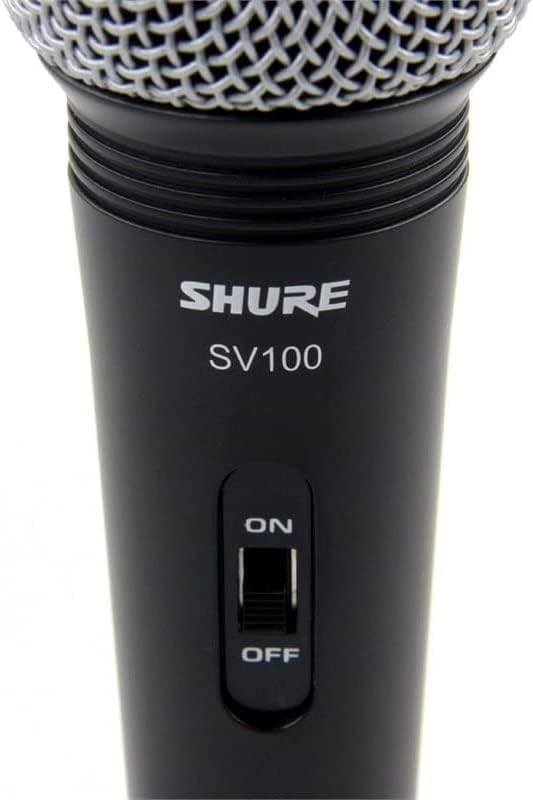
Figura 2: Primer pla view of the Shure SV100-W microphone's On/Off switch, clearly labeled for easy operation.
- To turn the microphone ON, feu lliscar l'interruptor a la posició "ON".
- To turn the microphone OFF, feu lliscar l'interruptor a la posició "OFF".
- Always ensure the switch is in the "OFF" position when connecting or disconnecting the microphone from any audio equipment.
4.2. Microphone Handling and Feedback Prevention
Proper microphone handling is crucial for optimal sound quality and to prevent unwanted audio feedback (howling).
Figure 3: Diagram showing recommended microphone holding techniques and how to position the microphone to prevent feedback from loudspeakers.
- Mantingueu premut correctament: Hold the microphone by the body, avoiding covering the grille with your hand. Covering the grille can affect the microphone's directional pattern and sound quality.
- Mantenir la distància: Keep a consistent distance from the microphone, typically 2-6 inches (5-15 cm), for balanced sound.
- Eviteu comentaris: Position the microphone away from loudspeakers. If feedback occurs, try moving the microphone or reducing the volume of the sound system.
5. Manteniment
Regular maintenance helps preserve the performance and appearance of your microphone.

Figure 4: The Shure SV100-W microphone with its grille detached, showing the internal components. This view is useful for understanding the microphone's construction and for cleaning purposes.
- Neteja de la reixa: The microphone grille can be carefully unscrewed for cleaning. Use a soft, damp cloth to wipe the grille. Ensure it is completely dry before reattaching.
- Neteja del cos: Wipe the microphone body with a soft, dry cloth. Avoid using harsh chemicals or abrasive cleaners.
- Emmagatzematge: When not in use, store the microphone in a protective case or bag to prevent dust accumulation and physical damage.
6. Solució De Problemes
If you encounter issues with your Shure SV100-W microphone, consider the following common troubleshooting steps:
- Sense so:
- Ensure the microphone's On/Off switch is in the "ON" position.
- Check all cable connections at both the microphone and the audio device.
- Verify that the volume on your audio device (mixer, karaoke machine) is turned up.
- Test with a different cable or audio input if available.
- So distorsionat:
- Redueix el guany o el volum d'entrada del dispositiu d'àudio.
- Ensure you are not speaking or singing too close to the microphone.
- Comproveu si hi ha cables danyats.
- Feedback (Howling):
- Reposition the microphone further away from loudspeakers.
- Reduce the overall volume of the sound system.
- Avoid pointing the microphone directly at speakers.
7. Especificacions
| Característica | Especificació |
|---|---|
| Marca | Shure |
| Número de model | SV100-W |
| Factor de forma del micròfon | Portàtil |
| Patró polar | Unidireccional (cardioide) |
| Impedància | 600 ohms |
| Tecnologia de connectivitat | Amb cable |
| Tipus de connector | XLR |
| Dimensions del producte (L x A x A) | 3.5 x 4.5 x 10.83 polzades |
| Pes de l'article | 7.8 unces (220 grams) |
| Font d'alimentació | Elèctric amb cable |
| Bateries | Cal 1 pila A (inclosa) |
| Tipus de bateria | Alcalí |
| Plataforma de maquinari | Màquina de karaoke |
| Nombre de canals | 1 |
| Color | Negre |
| Usos recomanats per al producte | Karaoke |
| Característica especial | Mute Function, Voice Activated Recording (Note: Mute function refers to the On/Off switch) |
| Dispositius compatibles | Màquina de karaoke |
| Components inclosos | Shure SV100-W Multipurpose Cardioid Dynamic Vocal Microphone with On/Off Switch and 15' XLR-to-1/4" Cable |
8. Garantia i Suport
For warranty information, product registration, or technical support, please visit the official Shure website or contact Shure customer service. Keep your purchase receipt as proof of purchase for any warranty claims.
Shure Oficial Weblloc: www.shure.com


