Introducció
The Energizer Weather Ready Multi-Function NOAA Lantern is designed to provide reliable light and communication during emergencies, power outages, or outdoor activities. This versatile device combines an LED area lantern, an AM/FM/Weatherband radio with NOAA Emergency Alert, and a cell phone charging function. It offers dual power options: 8 AA batteries (not included) or a hand-crank.
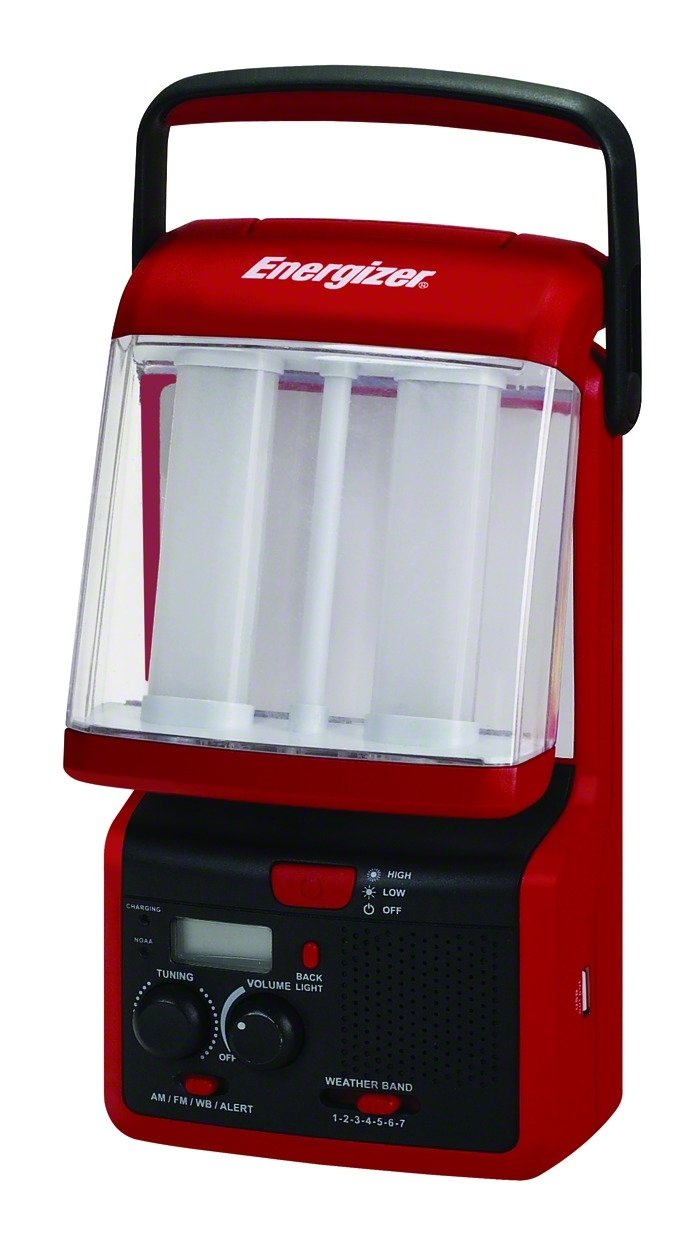
Image: The Energizer Weather Ready Multi-Function NOAA Lantern, featuring its red casing and the foldable LED panels in an upright position, ready for use.
Configuració
1. Instal·lació de la bateria
This device requires 8 AA batteries (not included) for primary power. Follow these steps to install them:
- Locate the battery compartment cover, typically on the base or rear of the unit.
- Obriu la tapa.
- Introduïu 8 piles AA, assegurant-vos de la polaritat correcta (+ i -) tal com s'indica a l'interior del compartiment.
- Tanqueu bé la tapa del compartiment de la bateria.
Note: For optimal performance and to prevent leakage, use fresh, high-quality alkaline batteries. Remove batteries if the unit will not be used for an extended period.
2. Initial Power Check
After installing batteries, briefly turn on the lantern or radio to confirm power. If using crank power, proceed to the "Operating Instructions" section.
Instruccions de funcionament
1. LED Area Lantern
- To activate the lantern, locate the power button, usually marked with a light bulb icon.
- The lantern features foldable panels. Gently unfold these panels to achieve a 360-degree area light.
- Press the power button again to cycle through brightness settings or to turn off the light.
- The lantern provides up to 100 lumens of light and can operate for up to 80 hours on a fresh set of batteries.
2. AM/FM/Weatherband Radio
- To turn on the radio, press the radio power button.
- Use the tuning knob or buttons to select your desired AM, FM, or Weatherband (WB) frequency. The unit features an easy-to-read digital display.
- Extend the antenna for improved reception.
- NOAA Emergency Alert: The radio is equipped with a NOAA Emergency Alert function. When activated, it will sound an alarm and display emergency information during severe weather or other public safety alerts. Refer to the specific radio controls for activating and managing this feature.
3. Cell Phone Charging (USB Port)
- Locate the standard USB output port on the unit.
- Connect your device's charging cable (USB-A to your device's connector) to the USB port on the lantern.
- Ensure your device is properly connected. Charging will typically begin automatically.
- Note: This feature is intended for emergency charging of small devices. Charging speed may vary. Always use your device's original or certified charging cable.
4. Crank Power Operation
- When batteries are depleted or unavailable, the integrated hand-crank can power the unit.
- Unfold the hand-crank handle.
- Rotate the crank handle clockwise or counter-clockwise at a steady pace.
- Continuous cranking will generate power for the lantern, radio, and USB charging functions. A few minutes of cranking can provide several minutes of operation, depending on the function used.
Manteniment
- Neteja: Netegeu la unitat amb un suau, damp drap. No utilitzeu productes de neteja abrasius ni submergiu la unitat en aigua.
- Emmagatzematge: Store the lantern in a cool, dry place away from direct sunlight when not in use. Remove batteries if storing for extended periods to prevent leakage.
- Substitució de la bateria: Replace all 8 AA batteries simultaneously with new ones when the light dims or the radio performance degrades.
Resolució de problemes
| Problema | Causa possible | Solució |
|---|---|---|
| Lantern or Radio does not turn on. | Depleted batteries or incorrect battery installation. | Replace batteries with new ones, ensuring correct polarity. Use crank power if batteries are unavailable. |
| Mala recepció de ràdio. | Senyal feble, antena no estesa o interferències. | Extend the antenna fully. Reposition the unit for better signal. AM reception may be inherently weaker in some areas. |
| Digital tuner knob is not smooth or skips frequencies. | Characteristic of the tuning mechanism. | Adjust slowly and carefully to find the desired frequency. The unit should maintain frequency once set. |
| Blue LED light above tuner is too bright and cannot be turned off. | Designed as an indicator light. | This is a fixed feature. If desired, cover the LED with a small piece of opaque tape. |
| Cell phone not charging via USB. | Incorrect cable, device incompatibility, or insufficient power. | Ensure you are using a compatible USB charging cable for your device. Verify the unit has sufficient power (fresh batteries or adequate cranking). Some devices may draw too much power for this emergency charger. |
Especificacions
- Número de model: WRWS81BP
- Marca: Energitzant
- Sortida de llum: Fins a 100 lúmens
- Run Time (Lantern): Fins a 80 hores (amb 8 piles AA)
- Font d'alimentació: 8 AA batteries (not included) or Hand-crank
- Bandes de ràdio: AM, FM, Weatherband (NOAA Emergency Alert)
- Port de càrrega: Standard USB output
- Dimensions del producte: 9.65 x 22.61 x 31.75 cm
- Pes de l'article: Aproximadament 879.97 g (1.94 lliures)
- Voltage: 12 Volts (likely referring to internal circuitry, not external power input)
- UPC: 039800111968, 039800102171
Garantia i Suport
For warranty information and customer support, please refer to the documentation included with your purchase or contact Energizer customer service directly. Keep your proof of purchase for warranty claims.
Fabricant: Sportsman Supply Inc. (for Energizer)


