1. Introducció i finalview
The Zoom AD-14D is a dedicated AC power adapter designed to provide stable and continuous power to compatible Zoom audio and video recording devices. This adapter eliminates the need for battery power during extended use, ensuring uninterrupted operation for your creative projects.
Compatible Zoom Devices:
- ARQ AR-96
- H4n
- H4n Pro
- Q3
- Q3HD
- R16
- R24
2. Informació de seguretat
Please read and understand the following safety precautions before using the Zoom AD-14D Power Supply Adapter to prevent electric shock, short circuit, damage, or other hazards.
- Font d'alimentació: Utilitzeu-ho només amb el volum especificattage and frequency as indicated on the adapter. Connecting to an incompatible power source may cause damage.
- Medi ambient: Do not expose the adapter to water, moisture, rain, or extreme temperatures. Avoid using in dusty or humid environments.
- Manipulació: Do not attempt to disassemble, modify, or repair the adapter. Refer all servicing to qualified personnel.
- Cura del cable: Avoid placing heavy objects on the power cord or subjecting it to excessive bending or pulling. Ensure the cord is not pinched or damaged.
- Ventilació: Ensure adequate ventilation around the adapter during use. Do not cover it with cloth or other materials.
- Desconnexió: Always unplug the adapter from the wall outlet when not in use for extended periods or during electrical storms.
3. Configuració
Follow these steps to correctly connect your Zoom AD-14D Power Supply Adapter to your compatible Zoom device.
- Identify DC Input: Locate the DC input jack on your Zoom device. This is typically a circular port labeled 'DC IN' or with a power symbol.
- Connecteu l'adaptador al dispositiu: Carefully insert the small DC plug of the AD-14D adapter into the DC input jack of your Zoom device. Ensure a firm connection.
- Connecteu-vos a la presa de corrent: Plug the AC power plug of the adapter into a standard, grounded wall outlet.
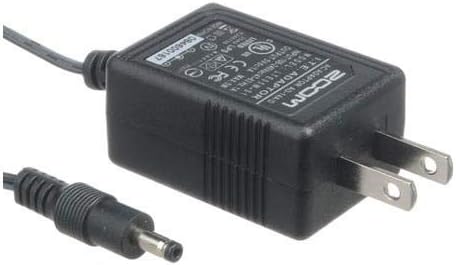
Image 1: The Zoom AD-14D Power Supply Adapter, showing the main unit and coiled DC output cable.

Imatge 2: Un apropament view of the Zoom AD-14D Power Supply Adapter, highlighting the DC output plug for device connection.
4. Instruccions de funcionament
Once the AD-14D Power Supply Adapter is correctly connected to your Zoom device and a power outlet, your device will automatically draw power from the adapter.
- Encès: Turn on your Zoom device as you normally would. It will now operate using AC power provided by the adapter.
- Battery Bypass: When the adapter is connected, most compatible Zoom devices will bypass internal batteries, preserving their charge.
- Ús estès: The adapter allows for extended recording or operation sessions without the need to monitor or replace batteries.
- Desconnexió: To disconnect, first power off your Zoom device, then unplug the adapter from the wall outlet, and finally disconnect the DC plug from your device.
5. Manteniment
Proper care will ensure the longevity and reliable performance of your AD-14D Power Supply Adapter.
- Neteja: Feu servir un drap suau i sec per netejar l'adaptador. No utilitzeu netejadors líquids ni dissolvents.
- Emmagatzematge: Guardeu l'adaptador en un lloc fresc i sec, allunyat de la llum solar directa i de temperatures extremes quan no l'utilitzeu.
- Integritat del cable: Regularly inspect the power cord for any signs of damage, fraying, or exposed wires. If damage is found, discontinue use immediately.
- Evitar l'estrès: Do not wrap the cable too tightly around the adapter or pull on the cable to disconnect it from the outlet or device. Always grasp the plug.
6. Solució De Problemes
If you encounter issues with your AD-14D Power Supply Adapter, try the following troubleshooting steps:
- El dispositiu no s'encén:
- Ensure the adapter's DC plug is fully inserted into the Zoom device.
- Verify the AC plug is securely inserted into a working wall outlet. Try a different outlet.
- Confirm that your Zoom device is compatible with the AD-14D adapter (refer to Section 1).
- Check the power switch on your Zoom device.
- L'adaptador s'escalfa: It is normal for the adapter to become warm during operation. If it becomes excessively hot to the touch or emits smoke/unusual odors, immediately unplug it from the wall outlet and discontinue use.
- Potència intermitent: Check all connections for looseness. Ensure the power cord is not damaged.
If problems persist after trying these steps, contact Zoom customer support or your retailer for assistance.
7. Especificacions
| Número de model | AD-14 |
| Entrada Voltage | 240 Volts |
| Ampedat | 14 Amps |
| Wattage | 60 watts |
| Dimensions del producte | 8.89 x 5.59 x 6.6 cm |
| Pes | 59 g |
| Color | Negre |
| Tipus de connector | Propietari |
8. Garantia i Suport
For detailed warranty information, technical support, and service inquiries regarding your Zoom AD-14D Power Supply Adapter, please refer to the warranty card included with your original Zoom product or visit the official Corporació Zoom webllocConserveu el rebut de compra com a comprovant de compra per a reclamacions de garantia.


