Introducció
The Belkin Hands-Free Bluetooth CarAudio Connect Aux provides an in-car solution for making calls and streaming music from a smartphone through your vehicle's stereo system. This device enables hands-free communication and audio playback, routing both calls and music through your car's speakers for enhanced sound quality.
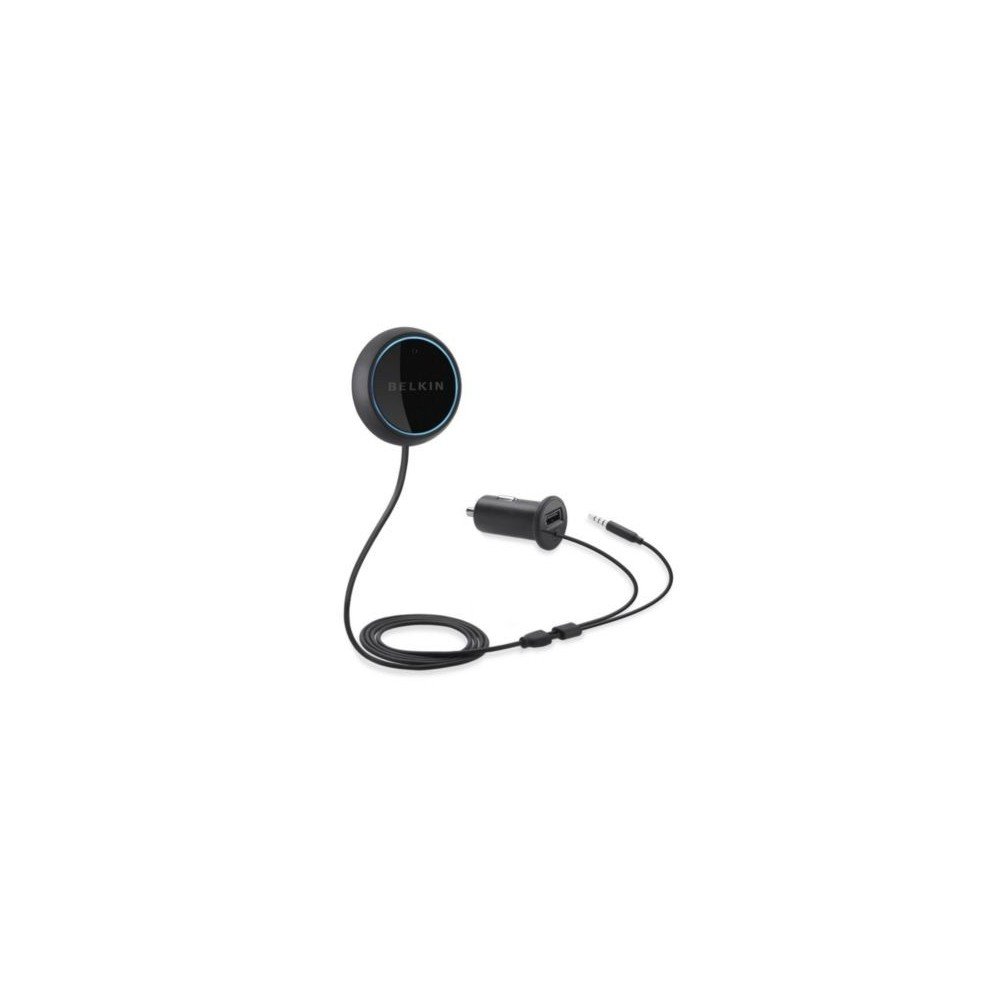
Image: The Belkin Hands-Free Bluetooth CarAudio Connect Aux, showing the main control button, the Micro CLA power adapter with USB port, and the Aux-In connection cable.
Què hi ha a la caixa
Verifiqueu que tots els components siguin presents al paquet:
- Hands-Free Bluetooth CarAudio Connect Aux (main control button with integrated microphone)
- Micro CLA Power Adapter with USB Power Port
- Aux-In Connection Cable
Informació de seguretat
For safe operation and to prevent potential hazards, please observe the following guidelines:
- Do not attempt to adjust the device or its settings while operating a vehicle.
- Ensure the device is positioned in a location that does not obstruct your view de la carretera o interferir amb els controls del vehicle.
- Protegiu el dispositiu de temperatures extremes, la llum solar directa i la humitat.
Instruccions de configuració
1. Connexió física
- Connect the Aux-In Cable: Plug the 3.5mm audio jack from the Belkin device into your car's auxiliary input port.
- Connecteu l'adaptador de corrent: Insert the Micro CLA power adapter into your vehicle's 12V accessory outlet (cigarette lighter socket).
- Mount the Control Button: Secure the control button to a convenient location on your dashboard using the adhesive backing or magnetic mount. Ensure it is within easy reach and does not obstruct driving. The button also contains the microphone for hands-free calls.

Image: Connecting the Micro CLA power adapter to the car's 12V accessory outlet.

Image: Positioning the Belkin control button on the dashboard.
2. Emparellament Bluetooth
- Ensure your vehicle's ignition is on, providing power to the adapter. The control button should illuminate with an orange light.
- Press and hold the control button for several seconds until the light begins to blink blue. This indicates the device is in pairing mode.
- Al teu telèfon intel·ligent, vés a la configuració de Bluetooth i activa el Bluetooth.
- Select "Belkin CarAudio Connect" (or similar name) from the list of available devices.
- Once paired, the control button's light will turn solid blue. No PIN is typically required.
Vídeo: Un overview of the Belkin Hands-Free Bluetooth CarAudio Connect Aux, demonstrating its installation and basic functionality within a car environment.
Instruccions de funcionament
Reproducció de música
- Start/Resume Music: After pairing, select your audio content on your smartphone. The audio will play through your car stereo. If paused, briefly press the control button to resume playback.
- Pausa la música: Briefly press the control button once to pause playback.
- Omet la pista: Double-press the control button to skip to the next track.
- The device will automatically reconnect to your paired smartphone when the car is started and the button is pressed.
Trucades mans lliures
- Respon a la trucada: When an incoming call is received, your music will automatically fade. Briefly press the control button once to answer the call.
- Finalitzar la trucada: Briefly press the control button once to end an active call.
- Comandaments de veu: Press and hold the control button to activate your smartphone's voice assistant (e.g., Siri, Google Assistant) for voice dialing or other commands.

Image: Demonstrating an incoming call handled by the Belkin device in a car.
Manteniment
To ensure the longevity and optimal performance of your Belkin CarAudio Connect Aux:
- Mantingueu el dispositiu net netejant-lo amb un drap suau i sec. Eviteu utilitzar productes químics agressius o netejadors abrasius.
- Assegureu-vos que totes les connexions estiguin segures i lliures de residus.
- Guardeu el dispositiu en un lloc fresc i sec quan no el feu servir durant períodes prolongats.
Resolució de problemes
| Problema | Solució |
|---|---|
| No Power/Light Off | Ensure the Micro CLA power adapter is securely plugged into the 12V accessory outlet and the vehicle's ignition is on. Check the vehicle's fuse for the 12V outlet if necessary. |
| Cannot Pair Device | Ensure the Belkin device is in pairing mode (blinking blue light). Turn off and on your smartphone's Bluetooth. Try restarting both the Belkin device (by unplugging and replugging) and your smartphone. Ensure no other devices are actively connected to the Belkin unit. |
| Sense sortida d'àudio | Verify the 3.5mm Aux-In cable is fully inserted into both the Belkin device and your car's auxiliary input. Ensure your car stereo is set to the AUX input source. Check the volume levels on both your smartphone and car stereo. |
| Poca qualitat de trucada | Ensure the control button (microphone) is positioned clearly, away from obstructions or excessive noise sources like air vents. Adjust the volume on your car stereo. |
| El dispositiu es desconnecta amb freqüència | Ensure your smartphone is within close proximity to the Belkin device. Avoid placing large metal objects between the device and your phone. Try re-pairing the device. |
Especificacions
| Característica | Detall |
|---|---|
| Número de model | F4U037bt |
| Tecnologia de connectivitat | Bluetooth, auxiliar |
| Comunicació sense fils | Bluetooth |
| Característiques especials | Hands-Free Calls, Echo Cancelling Microphone, Seamless switching between calls and music |
| Entrada de la interfície humana | Micròfon |
| Font d'alimentació | Corded Electric (via 12V accessory outlet) |
| Color | Negre |
| Dimensions del producte | 1.4 x 6 x 5.6 polzades |
| Pes de l'article | 4.5 unces (aproximadament 127.57 grams) |
| Fabricant | Belkin |
Garantia i Suport
This product is subject to Belkin's standard warranty terms and conditions. For detailed warranty information, please refer to the official Belkin weblloc web o poseu-vos en contacte amb el servei d'atenció al client de Belkin.
Avís legal: This product is non-refundable as per the provided information. Please review the return policy of your retailer at the time of purchase.
For further assistance or technical support, please visit the official Belkin support page or contact their customer service.


