1. Introducció
Thank you for choosing the lightmaXX DJ Scan LED. This professional LED scanner is designed to provide dynamic lighting effects for various applications, including DJ sets, clubs, and events. Featuring a powerful LED light source and precise scanning capabilities, it offers vibrant colors and versatile patterns to enhance any performance space.
This manual provides essential information for the safe and efficient operation of your lightmaXX DJ Scan LED. Please read it thoroughly before installation and use, and keep it for future reference.

Figura 1: Mésview of the lightmaXX DJ Scan LED unit.
2. Instruccions de seguretat
Per garantir un funcionament segur, observeu les següents precaucions de seguretat:
- Connecteu sempre la unitat a una presa de corrent amb connexió a terra.
- No exposeu la unitat a la pluja o la humitat.
- Assegureu-vos que hi hagi una ventilació adequada al voltant de la unitat per evitar el sobreescalfament.
- Eviteu l'exposició directa dels ulls a la font de llum.
- Desconnecteu de l'alimentació abans de netejar o fer el manteniment.
- Només personal qualificat ha de realitzar les reparacions.
- Mantenir allunyat de materials inflamables.
3. Contingut del paquet
Verifiqueu que tots els elements siguin presents al paquet:
- lightmaXX DJ Scan LED unit
- Cable d'alimentació
- Manual d'usuari (aquest document)
- Mounting bracket (if included)
4. Característiques
The lightmaXX DJ Scan LED offers a range of features for dynamic lighting:
- Font de llum: Powerful LED technology for bright and efficient illumination.
- Barreja de colors: RGBAW (Red, Green, Blue, Amber, White) color mixing for a wide spectrum of colors.
- Tipus d'escàner: Designed as a scanner for precise beam movement and pattern projection.
- Control: DMX control for integration into professional lighting setups.
- Visualització: Digital display for easy navigation and setting adjustments.

Figura 2: Frontal view showing the LED lens and light output.
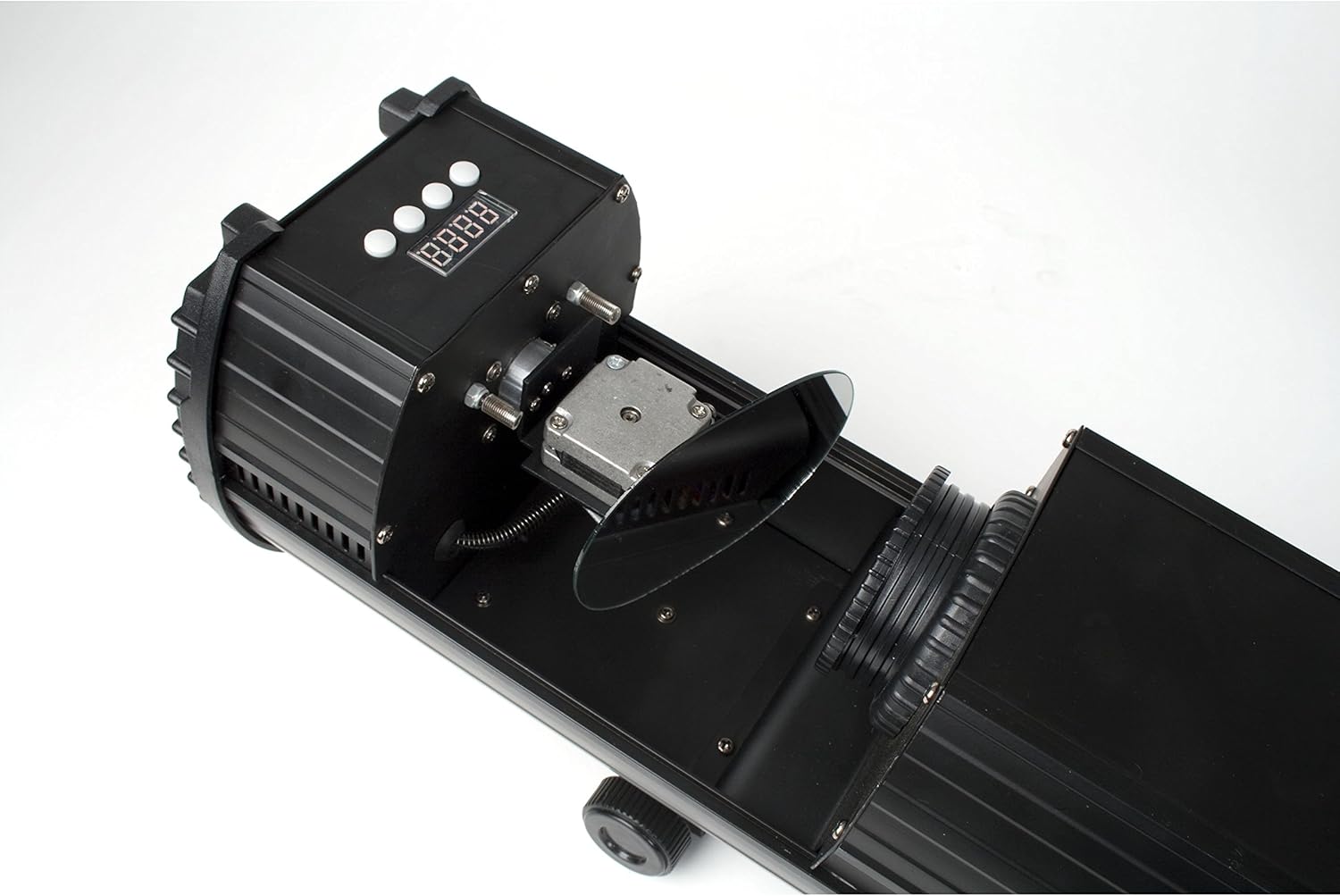
Figure 3: Internal mirror mechanism for dynamic scanning effects.
5. Configuració
5.1 Muntatge
The lightmaXX DJ Scan LED can be mounted on a truss, stand, or placed on a flat surface. Ensure the mounting surface or structure can support the weight of the unit securely. Use appropriate clamps and safety cables when mounting overhead.
5.2 Connexió d'alimentació
Connect the supplied power cable to the power input on the rear of the unit and then to a suitable grounded power outlet (230V AC, 50Hz). Ensure the power switch is in the OFF position before connecting.

Figure 4: Rear panel with power input and cooling fan.
Connexió DMX 5.3 (opcional)
For DMX control, connect a standard 3-pin DMX cable from your DMX controller's output to the DMX IN port on the lightmaXX DJ Scan LED. If connecting multiple units, daisy-chain them by connecting the DMX OUT of the first unit to the DMX IN of the next.

Figure 5: Control panel and DMX input/output ports.
6. Funcionament
6.1 Tauler de control
The control panel features a digital display and several buttons for navigating menus and adjusting settings. Refer to Figure 5 for the location of the control panel.
- MENÚ: Accesses the main menu or goes back to the previous menu.
- AMUNT AVALL: Navega per les opcions del menú o ajusta els valors.
- ENTRAR: Confirms a selection or saves a setting.
6.2 Modes de funcionament
The lightmaXX DJ Scan LED typically supports the following operating modes:
- Mode DMX: Allows full control over all functions via a DMX controller. Set the DMX address using the control panel.
- Mode actiu de so: The unit reacts to sound via a built-in microphone, creating dynamic light shows synchronized with music.
- Mode automàtic: Runs pre-programmed light sequences automatically.
- Mode mestre/esclau: Connect multiple units where one acts as the master, controlling the others (slaves) for synchronized operation without a DMX controller.

Figura 6: Example of a green light beam projection.

Figura 7: Example of a red light beam projection.
7. Manteniment
7.1 Neteja
Regular cleaning helps maintain optimal performance. Disconnect the unit from power before cleaning.
- Feu servir un drap suau i sense borrissol per netejar l'exterior.
- For lenses and mirrors, use a specialized lens cleaning solution and cloth to avoid scratches.
- Periodically clean the cooling fan and vents to ensure proper airflow.
7.2 Emmagatzematge
When not in use, store the unit in a dry, dust-free environment, preferably in its original packaging or a protective case.
8. Solució De Problemes
Si teniu problemes, consulteu la taula següent per veure els problemes i les solucions més habituals:
| Problema | Causa possible | Solució |
|---|---|---|
| La unitat no s'encén. | No power connection; faulty cable; blown fuse. | Check power cable connection; try another outlet; replace fuse if necessary. |
| Sense sortida de llum. | Unit in standby; DMX signal issue; LED failure. | Check operating mode; verify DMX connection and address; contact support if LED is faulty. |
| Sense control DMX. | Adreça DMX incorrecta; cable DMX defectuós; problema amb el controlador DMX. | Set correct DMX address; test DMX cable; check DMX controller settings. |
| Beam movement is erratic. | Obstruction; internal mechanism issue. | Ensure no physical obstructions; contact support if issue persists. |
9. Especificacions
| Característica | Detall |
|---|---|
| Número de model | LCD-502 |
| Font de llum | LED |
| Tipus de llum | Escàner |
| Barreja de colors | RGBAW (Red, Green, Blue, Amber, White) |
| Font d'alimentació | 230V AC, 50Hz (typical) |
| Modes de control | DMX, Sound Active, Auto, Master/Slave |
| ASIN | B004CTLQXK |

Figure 8: Energy efficiency information for the LED light source.
10. Garantia i Suport
lightmaXX products are designed for reliability and performance. For warranty information and technical support, please refer to the warranty card included with your product or visit the official lightmaXX weblloc web. Conserveu el comprovant de compra per a qualsevol reclamació de garantia.
For further assistance, please contact lightmaXX customer service.


