1. Introducció
The Behringer XENYX X2442USB is a premium ultra-low noise, high headroom analog mixer designed for professional audio applications. It integrates advanced features such as state-of-the-art XENYX Mic Preamps, studio-grade compressors, and a versatile multi-effects processor, making it suitable for live sound, studio recording, and broadcasting.
Característiques principals:
- Premium ultra-low noise, high headroom analog mixer architecture.
- 10 pres micròfons XENYX d'última generació amb alimentació fantasmaamps, comparable to stand-alone boutique preamps.
- 8 studio-grade compressors with super-easy "one-knob" functionality and control LED for professional vocal and instrumental sound.
- Neo-classic "British" 3-band EQs with semi-parametric mid band for warm and musical sound.
- Studio-grade FX processor with 16 editable presets including reverb, chorus, flanger, delay, pitch shifter, and multi-effects.
- Tap function and storable user parameter settings for the FX processor.
- Integrated USB audio interface for direct connection to computers.
2. Configuració i connexions
Before operating your XENYX X2442USB mixer, ensure all connections are made correctly and securely. Always power off the mixer and any connected equipment before making or changing connections.
2.1 Connexió d'alimentació
Connect the supplied AC power cord to the mixer's power inlet on the rear panel and then to a suitable electrical outlet. Ensure the power switch is in the OFF position before connecting to power.
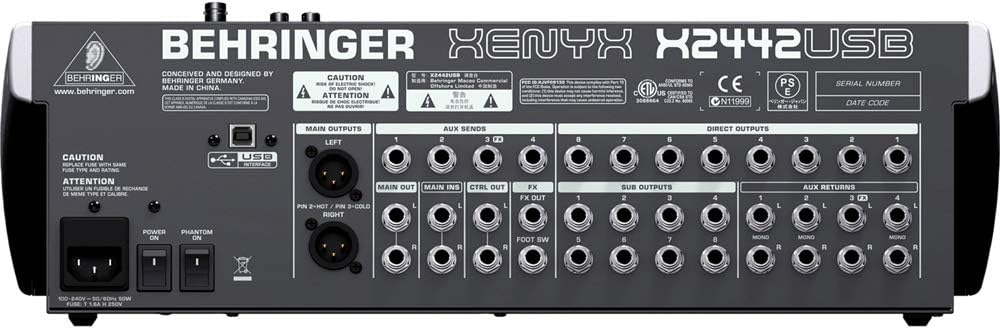
Figura 2.1: Rear panel of the Behringer XENYX X2442USB mixer, highlighting the power input, main outputs (XLR), aux sends, direct outputs, sub outputs, and aux returns. This view is crucial for understanding how to connect external audio devices and power the unit.
2.2 Connexions d'entrada d'àudio
The X2442USB features various input types:
- Microphone Inputs (Channels 1-10): Use XLR cables for microphones. Activate +48V phantom power via the dedicated switch for condenser microphones.
- Line Inputs (Channels 1-16): Use 1/4" TRS or TS cables for line-level sources such as keyboards, drum machines, or preamplified instruments. Channels 9/10, 11/12, 13/14, and 15/16 are stereo line inputs.
- 2-Track Input: RCA inputs for connecting external playback devices like CD players or media players.

Figura 2.2: De dalt a baix view of the Behringer XENYX X2442USB mixer, showing the layout of all input channels, EQ sections, aux sends, and faders. This image helps in identifying where to connect microphones and line-level instruments.
2.3 Connexions de sortida d'àudio
Connect your monitoring system or recording devices to the mixer's outputs:
- Main Outputs (LEFT/RIGHT): XLR outputs for connecting to main PA systems or studio monitors.
- Sortides de la sala de control: 1/4" TS outputs for connecting to control room monitors.
- Sortida d'auriculars: 1/4" TRS stereo output for headphones.
- Enviaments auxiliars: 1/4" TS outputs for sending signals to external effects processors or monitor mixes.
- Sub Outputs: 1/4" TS outputs for routing signals to subgroups.
2.4 Connexió de la interfície d'àudio USB
Connect the mixer to your computer using a standard USB cable. The X2442USB functions as a 2-in/2-out USB audio interface, allowing you to record the main mix or playback audio from your computer through the mixer.
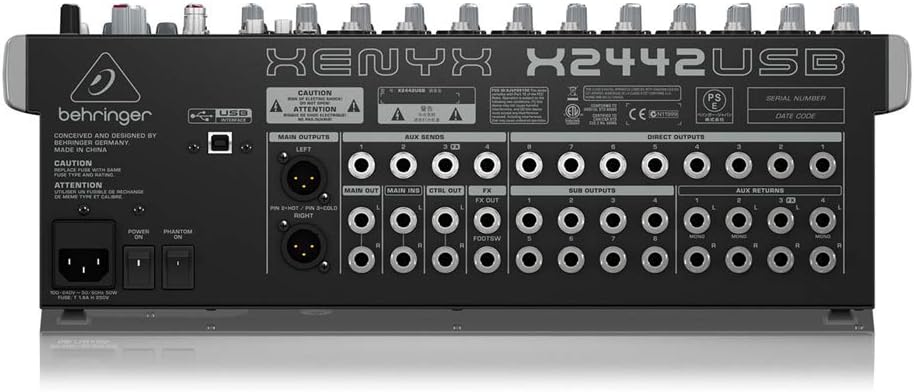
Figura 2.3: Detailed rear panel view of the Behringer XENYX X2442USB, specifically highlighting the USB interface port. This port enables direct digital audio connection to a computer for recording and playback.
3. Funcionament del mesclador
Aquesta secció ofereix un finalview of the mixer's controls and their functions.
3.1 Input Channels (Mono & Stereo)
Each input channel features a comprehensive set of controls:
- Control GAIN: Adjusts the input sensitivity for microphones or line-level signals. Set this to achieve a healthy signal level without clipping.
- COMP (Compressor): "One-knob" compressor for dynamic range control. Turn clockwise to increase compression.
- Secció EQ: 3-band "British" EQ (HIGH, MID, LOW) for tone shaping. The MID band is semi-parametric, allowing you to select the frequency to adjust.
- Enviaments AUX: Controls for sending signal to external effects (FX) or monitor mixes (MON).
- PAN/BAL: Pans mono signals left/right or adjusts the balance of stereo signals.
- MUTE/ALT 3-4: Mutes the channel or routes it to the ALT 3-4 subgroup.
- SOLO: Routes the channel signal to the solo bus for monitoring through headphones or control room outputs.
- Fader del canal: Adjusts the channel's output level to the main mix or assigned subgroups.
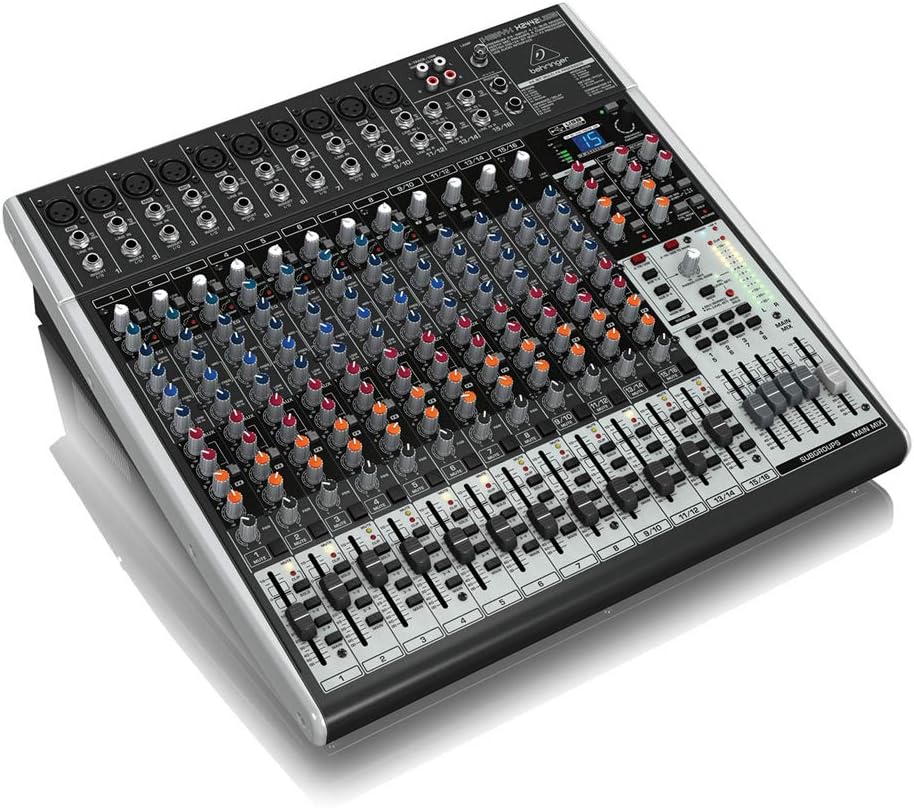
Figura 3.1: En angle view of the Behringer XENYX X2442USB mixer from the front-right, providing a clear perspective of the channel strips, including gain knobs, EQ sections, aux sends, and faders. This angle helps visualize the depth and layout of the controls.
3.2 Main Mix and Subgroups
- MAIN MIX Faders: Control the overall output level of the stereo main mix.
- SUBGROUPS Faders: Control the output level of the four subgroups (1-2 and 3-4). Channels can be routed to these subgroups for easier control of multiple instruments or vocals.
- MAIN MIX / SUBGROUP Assign Buttons: Located on each channel, these buttons route the channel's signal to the main mix or specific subgroups.
3.3 FX Processor
The built-in 24-bit multi-effects processor offers 16 editable presets:
- PROGRAM Knob: Selects one of the 16 effects presets (e.g., Reverb, Chorus, Delay).
- PARÀMETRE Knob: Adjusts specific parameters of the selected effect.
- Botó TAP: Used to set the tempo for time-based effects like delay.
- FX SEND Control: Adjusts the amount of effect signal sent to the main mix.

Figura 3.2: En angle view of the Behringer XENYX X2442USB mixer from the front-left, showcasing the main mix section, subgroup faders, and the integrated effects processor controls. This perspective is useful for understanding the master section layout.
4. Manteniment
Proper care and maintenance will ensure the longevity and optimal performance of your Behringer XENYX X2442USB mixer.
- Neteja: Use a soft, dry cloth to clean the exterior of the mixer. Avoid using abrasive cleaners, solvents, or waxes. Do not spray liquids directly onto the mixer.
- Protecció contra la pols: When not in use, cover the mixer with a dust cover to prevent dust and debris from entering the controls and internal components.
- Emmagatzematge: Guardeu la batedora en un lloc fresc i sec, allunyat de la llum solar directa, de temperatures extremes i d'alta humitat.
- Ventilació: Ensure adequate ventilation around the mixer to prevent overheating. Do not block ventilation openings.
- Fader and Knob Care: Avoid excessive force when operating faders and knobs. If they become stiff or noisy, consult a qualified service technician.
5. Solució De Problemes
Si teniu problemes amb la batedora, consulteu els següents problemes i solucions habituals:
| Problema | Causa possible | Solució |
|---|---|---|
| Sense sortida de so |
|
|
| So distorsionat |
|
|
| L'àudio USB no funciona |
|
|
| L'alimentació phantom no funciona |
|
|
6. Especificacions tècniques
| Característica | Detall |
|---|---|
| Marca | Behringer |
| Model | XENYX X2442USB |
| Nombre de canals | 24 |
| Tecnologia de connectivitat | USB |
| Tipus de connector de sortida | XLR |
| Font d'alimentació | Elèctric amb cable |
| Pes de l'article | 17.16 lliures (7.78 kg) |
| Dimensions del paquet | 20.51 x 20.08 x 8.7 polzades (52.1 x 51 x 22.1 cm) |
| Data de primera disponibilitat | 8 d'octubre de 2013 |


