1. Introducció
This manual provides comprehensive instructions for the setup, operation, maintenance, and troubleshooting of your Microsoft Xbox 360 Wireless Controller. Designed for use with both the Xbox 360 console and Windows-based personal computers, this controller offers a versatile and comfortable gaming experience with its integrated wireless technology and ergonomic design.
2. Producte acabatview
The Xbox 360 Wireless Controller features a familiar layout and responsive controls, ensuring precise input for various gaming genres. Key components include:
- Sticks analògics esquerre i dret: Per a un moviment precís i un control de la càmera.
- Coixinet direccional (D-Pad): For menu navigation and specific in-game actions.
- Botons A, B, X, Y: Primary action buttons, color-coded for easy identification.
- Para-xocs esquerre i dret (LB, RB): Located on the top edge for additional actions.
- Disparadors esquerre i dret (LT, RT): Pressure-sensitive for nuanced control in games.
- Botons d'inici i enrere: For in-game menus and system functions.
- Botó de la Guia de l'Xbox: Central button for accessing the Xbox Guide or Windows Game Bar. It also indicates controller connection status.
- Conector d'auriculars: For connecting compatible headsets for communication.
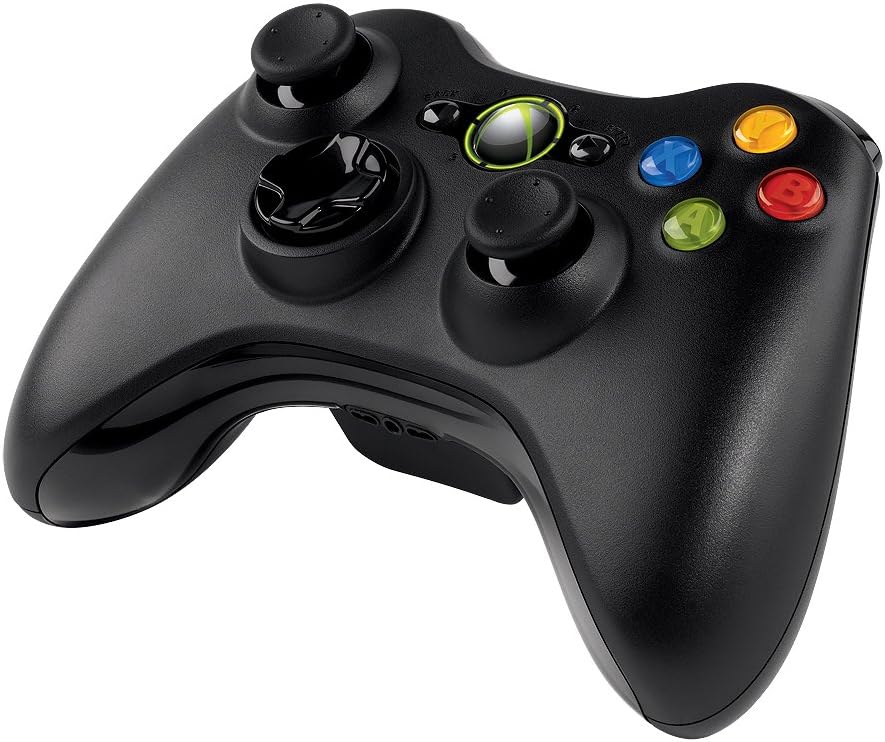
Figura 1: Frontal view of the Microsoft Xbox 360 Wireless Controller, showing all buttons and analog sticks.

Figura 2: De dalt a baix view of the Microsoft Xbox 360 Wireless Controller, highlighting the Xbox Guide button and trigger/bumper placement.
3. Instruccions de configuració
3.1. Instal·lació de la bateria
- Localitza el compartiment de la bateria a la part posterior del controlador.
- Press the tab on the battery pack and pull the pack downwards to remove it.
- Introduïu dues (2) piles AA, assegurant-vos de la polaritat correcta (+ i -).
- Slide the battery pack back into the compartment until it clicks securely into place.
3.2. Connecting to Xbox 360 Console
- Engega la consola Xbox 360.
- Manteniu premut el botó Botó Guia de Xbox on your controller until it turns on.
- On the Xbox 360 console, press the Botó de connexió (a small circular button usually near the memory card slots or USB ports). The lights around the console's power button will flash.
- En 20 segons, premeu el botó Botó de connexió on the front of your controller (located between the LB and RB buttons). The lights around the Xbox Guide button on the controller will flash.
- Once connected, one of the four quadrants around the Xbox Guide button and the console's power button will light up solid, indicating the controller's assigned player number.
3.3. Connexió a l'ordinador (Windows)
To use the Xbox 360 Wireless Controller with a Windows PC, a separate Xbox 360 Wireless Gaming Receiver for Windows es requereix (es ven per separat).
- Plug the Xbox 360 Wireless Gaming Receiver into an available USB 2.0 port on your PC.
- Instal·lació del controlador:
- For Windows 10 and newer, drivers typically install automatically upon connecting the receiver.
- For older Windows versions (e.g., Windows 7, 8), you may need to install drivers from the included CD (if applicable) or download them from the official Microsoft support weblloc. Seguiu les instruccions que apareixen a la pantalla per instal·lar el controlador.
- Once the receiver drivers are installed, press the Botó de connexió on the receiver. The light on the receiver will flash green.
- Manteniu premut el botó Botó Guia de Xbox on your controller until it turns on.
- Premeu el botó Botó de connexió on the front of your controller (located between the LB and RB buttons). The lights around the Xbox Guide button will flash.
- When the controller connects, one of the four quadrants around the Xbox Guide button will light up solid, indicating a successful connection.
4. Instruccions de funcionament
4.1. Basic Gameplay
Once connected, your controller is ready for use in compatible games. The analog sticks, D-pad, and face buttons function as standard input devices. Refer to your game's specific instructions for controller mapping.
4.2. Xbox Guide Button Functions
- Premsa: Access the Xbox Guide on console or the Game Bar on Windows.
- Mantén premut: Engegueu o apagueu el controlador.
4.3. Retroalimentació de vibració
The controller features integrated vibration motors that provide tactile feedback during gameplay, enhancing immersion. This feature is automatically enabled in games that support it.
4.4. Headset Usage
Plug a compatible headset into the 2.5mm headset jack located at the bottom of the controller for in-game audio and voice chat.
5. Manteniment
5.1. Neteja
Per netejar el controlador, feu servir un drap suau i sec. Per a la brutícia resistent, netegeu-lo lleugerament.ampRenta el drap amb aigua. Evita utilitzar productes químics agressius o materials abrasius, ja que poden danyar l'acabat i els components interns del controlador.
5.2. Substitució de la bateria
When the controller's performance degrades or the Xbox Guide button lights flash repeatedly, it indicates low battery power. Replace the AA batteries as described in Section 3.1.
5.3. Emmagatzematge
Store the controller in a cool, dry place away from direct sunlight and extreme temperatures. If storing for an extended period, remove the batteries to prevent leakage.
6. Solució De Problemes
- El controlador no s'encén: Ensure batteries are correctly inserted and fully charged. Replace with fresh batteries if necessary.
- Controller does not connect/sync:
- For Xbox 360: Ensure both console and controller connect buttons are pressed within the specified timeframe.
- For PC: Verify the wireless receiver is properly connected and its drivers are installed. Ensure the receiver's connect button is pressed.
- Move closer to the console/receiver to rule out range issues.
- Vibration feedback not working: Check if the game supports vibration. Ensure the feature is not disabled in game settings or system settings.
- Input lag or dropped connections: Minimize interference from other wireless devices. Ensure the controller and receiver have a clear line of sight.
- Controller not recognized on PC: Verify that the correct drivers for the Xbox 360 Wireless Gaming Receiver are installed and up to date. Check Device Manager for any driver conflicts.
7. Especificacions
- Número de model: JR9-00011
- Sèrie: NSF-00023
- Marca: Microsoft
- Connectivitat: Tecnologia sense fils de 2.4 GHz
- Interval sense fil: Fins a 30 peus (9 metres)
- Font d'alimentació: 2 piles AA (incloses)
- Compatibilitat: Xbox 360 Console, Windows PC (Windows XP, 7, 8, 10)
- Dimensions (LxWxH): 9.09 x 5.51 x 2.56 polzades (23.09 x 14.00 x 6.50 cm)
- Pes de l'article: 8.1 unces (229.63 grams)
- Característiques: Vibration Feedback, Integrated Headset Jack
8. Garantia i Suport
For warranty information, technical support, or further assistance, please refer to the official Microsoft support website or contact Microsoft customer service directly. Keep your proof of purchase for warranty claims.


