1. Introducció i finalview
The OSD Audio ATM-7 is a sophisticated 7-zone automatic speaker selector designed to distribute amplified audio signals to various zones within a home or commercial space. It allows users to select between two distinct music sources for each designated zone, providing flexible audio management. This passive device is engineered for seamless integration into existing audio systems, offering remote control capabilities for enhanced convenience.
For optimal performance and to prevent potential damage to your amplifier, it is highly recommended to use impedance matching in-wall volume controls in conjunction with the ATM-7, as this unit does not include built-in impedance protection.

Figure 1.1: OSD Audio ATM-7 Speaker Selector and its accompanying remote control, showcasing the front panel and rear connections.
2. Característiques clau
- 7-Zone Audio Distribution: Distributes amplified audio signals to up to seven independent zones.
- Dual Source Selection: Allows selection between two distinct music sources (A or B) in each zone when operating in 2-input mode.
- Comandament a distància: Includes an IR remote control for convenient operation from a distance of up to 10 meters.
- Front Panel Controls & LEDs: Features status LEDs for Power, Multi-zone, Master/Slave, Zone In/Out Select, In/Out Mode, and Zone Out/In Selector.
- Master-Slave Functionality: A Master-Slave switch on the rear panel enables parallel connection of two ATM-7 units for expanded zone control.
- Funció de memòria: The remote control includes a backup memory function to retain settings.
- Passive Design: A passive device, requiring external impedance matching for ampprotecció de lifier.
3. Contingut del paquet
Si us plau, comproveu que tots els articles siguin presents i en bon estat en desempaquetar-los.
- OSD Audio ATM-7 Speaker Selector Unit
- Comandament a distància IR
- Adaptador de corrent (CC 12V 1.5A)
- External IR Receiver (for remote placement)
- Manual d'usuari (aquest document)
4. Informació de seguretat
Per garantir un funcionament segur i evitar danys, observeu les precaucions següents:
- Font d'alimentació: Feu servir només l'adaptador de corrent proporcionat. Assegureu-vos que el volumtage coincideix amb la vostra font d'alimentació local.
- Ventilació: No bloquegeu les obertures de ventilació. Assegureu-vos que hi hagi un flux d'aire adequat al voltant de la unitat per evitar el sobreescalfament.
- Humitat: Do not expose the unit to water, moisture, or excessive humidity. Avoid placing liquids near the device.
- Col·locació: Col·loqueu la unitat sobre una superfície estable i plana. Eviteu col·locar-la a prop de fonts de calor o sota la llum solar directa.
- Manteniment: No intenteu fer el manteniment de la unitat vosaltres mateixos. Encarregueu totes les tasques de manteniment a personal qualificat.
- Coincidència d'impedància: As a passive device, the ATM-7 does not provide impedance protection. Always use impedance matching volume controls or ensure your amplifier can handle the combined speaker load to prevent damage to your ampmés viu.
5. Configuració i instal·lació
Follow these steps to connect your OSD Audio ATM-7 speaker selector:
- Power Off All Equipment: Before making any connections, ensure your amplifier and all audio sources are powered off and unplugged from the wall outlet.
- Connecta't AmpSortida de lifier: Connect the speaker output terminals from your amplifier to the "ZONE IN/OUT" terminals on the rear of the ATM-7. The ATM-7 supports two input modes: 2-input (for dual source selection) or 7-input (for individual zone control). Refer to the rear panel diagram for correct wiring.
- Connectar els altaveus: Connect your speakers to the corresponding "ZONE OUT" terminals on the rear of the ATM-7. Ensure correct polarity (+ to + and - to -) for all connections.
- Install Impedance Matching Volume Controls (Recommended): For optimal performance and amplifier protection, install impedance matching in-wall volume controls between the ATM-7 and your speakers. This is crucial to maintain a safe impedance load for your amplifier, especially when multiple zones are active.
- Connecteu el receptor d'infrarojos: If the ATM-7 unit will be placed out of direct line of sight for the remote control, connect the external IR receiver to the "EXT IR Receiver" port on the rear panel. Position the IR receiver in a location where it can receive signals from the remote.
- Connectar l'alimentació: Plug the provided DC 12V 1.5A power adapter into the "DC 12V 1.5A" input on the rear of the ATM-7, then plug the adapter into a wall outlet.

Figure 5.1: Rear panel connections of the ATM-7, including speaker terminals, IR receiver port, and power input.

Figura 5.2: Detallada view of the speaker wire terminals on the rear of the ATM-7, showing positive and negative connections for a zone.
6. Instruccions de funcionament
The ATM-7 can be operated using the front panel controls or the included IR remote control.
6.1 Controls del panell frontal

Figure 6.1: Front panel of the ATM-7, displaying power button, status LEDs, and zone selectors.
- Botó d'encendre: Press to turn the unit On or Off. The "ON" LED indicates power status.
- Multi Zone Enable: Activates or deactivates multi-zone operation.
- Botó MUTE: Mutes all active audio outputs.
- Master/Slave Control Select (M/S): Toggles between Master and Slave mode when chaining two ATM-7 units.
- Zone In/Out Select: Toggles individual zones between input and output modes.
- IN/OUT Mode (2 IN / 7 IN): Selects between 2-input mode (allowing selection of Source A or B for each zone) or 7-input mode (where each zone acts as an independent input/output).
- ZONE OUT/IN SELECTOR (ZONE1-ZONE7): Buttons to individually activate or deactivate each of the seven zones. Corresponding LEDs indicate active zones.
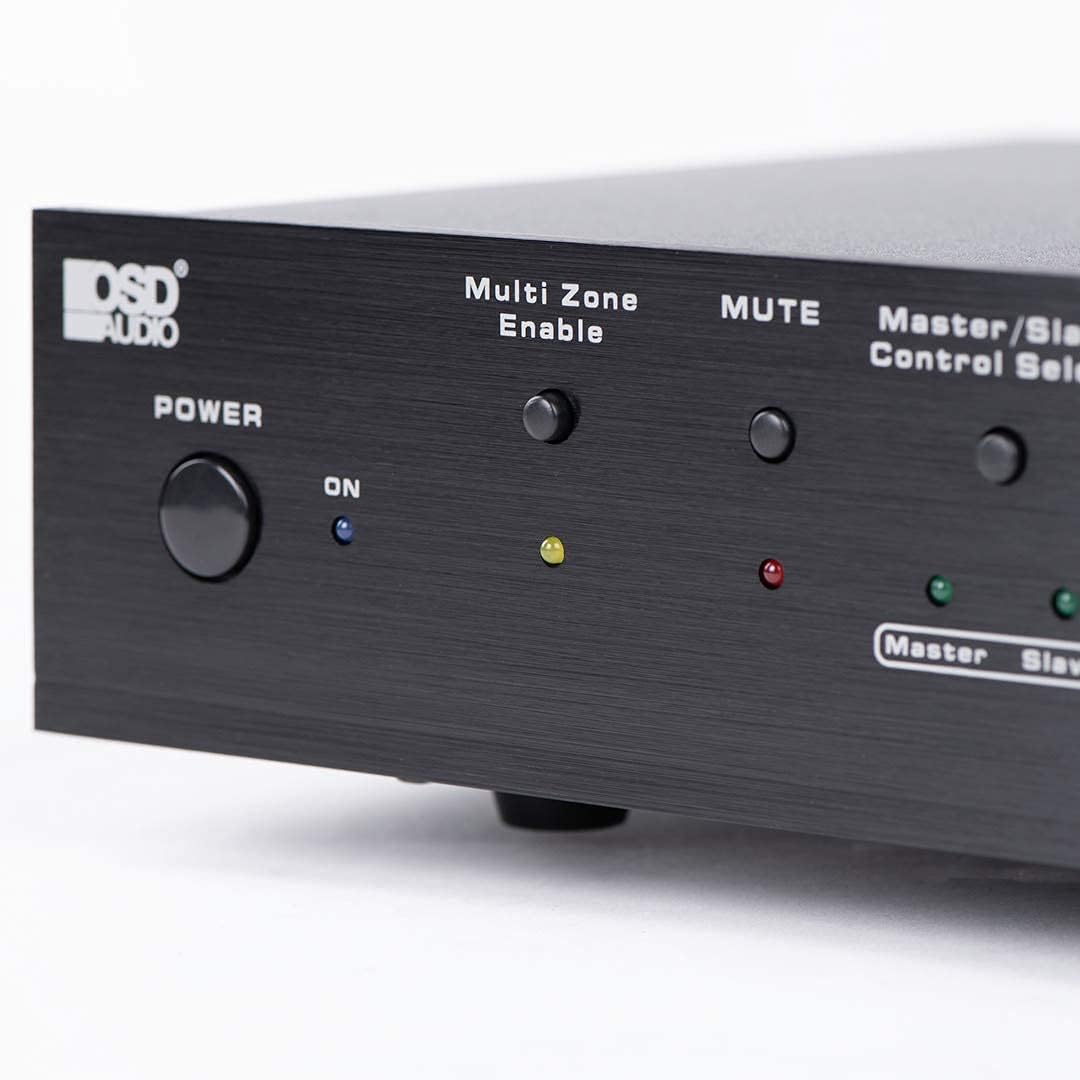
Figure 6.2: Detail of the Power and Multi Zone Enable buttons on the ATM-7 front panel.

Figure 6.3: Detail of the IN/OUT Mode (2 IN / 7 IN) and individual Zone Selector buttons on the ATM-7 front panel.
6.2 comandament a distància IR
The included IR remote control provides full functionality for the ATM-7. Point the remote towards the unit's IR sensor or the external IR receiver.
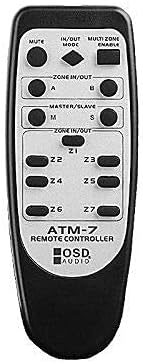
Figure 6.4: The ATM-7 remote control, featuring buttons for mute, input/output mode, master/slave, and individual zone selection.
- MUT: Silencia tota la sortida d'àudio.
- IN/OUT MODE: Toggles between 2-input and 7-input modes.
- MULTI ZONE ENABLE: Activates or deactivates multi-zone operation.
- ZONE IN/OUT (A/B): In 2-input mode, selects between Source A and Source B for the active zones.
- MASTER/SLAVE (M/S): Selects Master or Slave mode for multi-unit configurations.
- Z1-Z7 Buttons: Individually activate or deactivate each of the seven zones.
The remote control has a backup memory function, retaining the last settings even after power cycling the unit. This allows for integration with smart plugs or switched outlets.
7. Manteniment
The OSD Audio ATM-7 requires minimal maintenance. Follow these guidelines to ensure longevity:
- Neteja: Feu servir un drap suau i sec per netejar l'exterior de la unitat. No utilitzeu netejadors líquids ni productes químics abrasius.
- Ventilació: Comproveu periòdicament que les obertures de ventilació estiguin netes de pols i deixalles.
- Connexions: Ensure all speaker wire connections remain secure and free from corrosion.
8. Solució De Problemes
| Problema | Causa possible | Solució |
|---|---|---|
| No audio output from speakers. |
|
|
| El comandament a distància no funciona. |
|
|
| Sound distortion or low volume. |
|
|
9. Especificacions
| Característica | Especificació |
|---|---|
| Número de model | ATM-7 |
| Dimensions del producte | 21.5 x 12 x 5.5 polzades |
| Pes de l'article | 7 lliures |
| Color | Negre |
| Tipus de connector | Speaker Wire (Banana Plugs compatible) |
| Tipus de cable | Cable de l'altaveu |
| Fabricant | Àudio OSD |
| Entrada de potència | DC 12V 1.5A |
| Remote Operating Distance | Fins a 10 metres |
10. Informació de la garantia
Warranty information for the OSD Audio ATM-7 Speaker Selector is typically provided with the product at the time of purchase or can be found on the official OSD Audio website. Please retain your proof of purchase for warranty claims. For detailed terms and conditions, please visit the OSD Audio official weblloc o poseu-vos en contacte amb el seu servei d'atenció al client.
11. Atenció al client
For technical assistance, troubleshooting, or general inquiries regarding your OSD Audio ATM-7, please contact OSD Audio customer support. You can find contact information, FAQs, and additional resources on the official OSD Audio weblloc:


