1. Introducció
The Behringer FEEDBACK DESTROYER FBQ1000 is a high-performance 2-channel feedback destroyer and parametric equalizer designed for professional audio applications. This device automatically detects and suppresses acoustic feedback, ensuring clear and stable sound reinforcement.
Les característiques clau inclouen:
- Ultra-fast response for immediate feedback suppression.
- Integrated parametric EQ functionality.
- Automatic mode that continuously monitors the audio mix and sets filters.
- Ultra-Narrow FBQ filters for effective feedback suppression while maintaining high sonic quality.
2. Producte acabatview
Familiarize yourself with the front and rear panels of the FBQ1000.

Figura 1: Panell frontal view of the Behringer FBQ1000, showing controls and display.
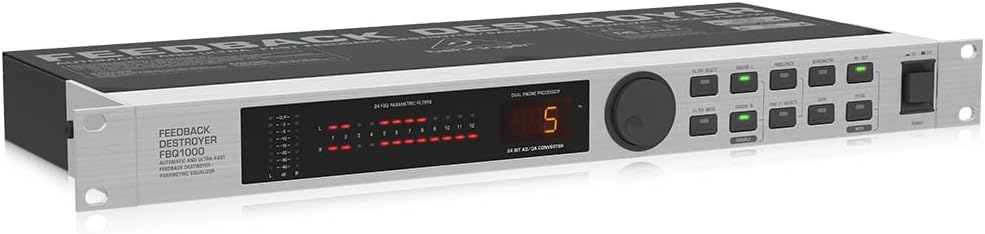
Figura 2: En angle view of the Behringer FBQ1000, illustrating its rack-mountable design.
3. Configuració i connexions
Proper setup is crucial for optimal performance of your FBQ1000. Ensure all connections are secure before powering on the device.
- Connexió d'alimentació: Connect the supplied power cable to the FBQ1000 and then to a suitable AC power outlet.
- Entrada d'àudio: Connecteu la font d'àudio (per exemple, la sortida del mesclador, el previ de micròfonamplifier) to the FBQ1000's input connectors using balanced XLR or 1/4" TRS cables. The FBQ1000 features two independent channels.
- Sortida d'àudio: Connect the FBQ1000's output connectors to your amplifier, powered speakers, or subsequent audio processing equipment using balanced XLR or 1/4" TRS cables.
- Col·locació: Install the FBQ1000 in a standard 19-inch equipment rack or place it on a stable surface, ensuring adequate ventilation.
- Encesa inicial: After all connections are made, power on your audio system components in the correct sequence (source first, then FBQ1000, then amplifiers/speakers).
4. Instruccions de funcionament
The FBQ1000 offers both automatic and manual modes for feedback suppression and parametric equalization.
4.1 Automatic Feedback Suppression
In automatic mode, the FBQ1000 continuously monitors the audio signal and identifies feedback frequencies. It then applies ultra-narrow notch filters to eliminate the feedback without significantly affecting the overall sound quality.
- Engaging Auto Mode: Refer to the device's front panel controls for selecting the automatic operating mode. This typically involves pressing a dedicated 'Auto' button or selecting a preset that utilizes automatic detection.
- Filter Deployment: The unit will automatically detect and apply up to 24 FBQ filters across its two channels. Indicators on the front panel will show which filters are active.
- Seguiment continu: The FBQ1000 adapts to changing acoustic environments, ensuring ongoing feedback protection.
4.2 Parametric Equalization
Beyond feedback suppression, the FBQ1000 can function as a parametric equalizer, allowing precise control over frequency, bandwidth, and gain for sound shaping.
- Control manual: Use the front panel controls (e.g., 'Frequency', 'Bandwidth', 'Gain' knobs/buttons) to manually adjust EQ parameters for specific frequencies.
- Selecció de filtres: Select the desired filter number to adjust its parameters.
- Storing Settings: Custom EQ settings can often be stored as user presets for recall. Consult the full user manual for detailed instructions on saving and recalling presets.
5. Manteniment
To ensure the longevity and reliable operation of your Behringer FBQ1000, follow these maintenance guidelines:
- Neteja: Netegeu regularment l'exterior de la unitat amb un drap suau i sec. Eviteu utilitzar netejadors o dissolvents abrasius.
- Ventilació: Ensure that the ventilation openings are clear and unobstructed to prevent overheating.
- Emmagatzematge: Quan no l'utilitzeu durant períodes prolongats, guardeu la unitat en un lloc fresc i sec, allunyat de la llum solar directa i de temperatures extremes.
- Inspecció del cable: Periodically check all audio and power cables for signs of wear or damage. Replace any faulty cables immediately.
6. Solució De Problemes
If you encounter issues with your FBQ1000, refer to the following common troubleshooting steps:
- Sense energia:
- Comproveu si el cable d'alimentació està connectat correctament tant a la unitat com a la presa de corrent.
- Comproveu que la presa de corrent funcioni.
- Ensure the power switch on the FBQ1000 is in the 'ON' position.
- Sense sortida d'àudio:
- Confirm that the audio input cables are correctly connected and the source is active.
- Check the audio output cables connecting the FBQ1000 to your amplifier/altaveus.
- Ensure the FBQ1000 is not in bypass mode (if applicable) and that its output level is appropriately set.
- Verify that all connected devices (mixer, amplifier) are powered on and functioning correctly.
- Feedback Still Occurs:
- Ensure the FBQ1000 is in an active feedback suppression mode (e.g., Auto mode).
- Check the input gain levels to ensure they are not excessively high, which can overwhelm the unit.
- Verify that the unit's filters are being deployed and indicated on the display.
- Consider the acoustic environment; extreme conditions may require additional measures.
- Unwanted Sound Alteration:
- If using manual parametric EQ, review your settings for frequency, bandwidth, and gain.
- In automatic mode, ensure the unit is not over-filtering. Some modes allow for adjustment of filter aggressiveness.
For more detailed troubleshooting, please refer to the comprehensive user manual available for download from the Behringer weblloc.
7. Especificacions
| Característica | Detall |
|---|---|
| Nom del model | FBQ1000 |
| Característica especial | Automatic Feedback Detection and Suppression |
| Tecnologia de connectivitat | Auxiliar, XLR |
| Mode de sortida d'àudio | Feedback Suppression and Parametric EQ |
| Dimensions del producte | 7.68 "P x 19.02" W x 1.73" H |
| Pes de l'article | 4.19 lliures |
| Color | Negre |
| Font d'alimentació | Elèctric amb cable |
| Mètode de control | Touch (referring to buttons/interface) |
| Usos específics per al producte | Live sound performances, public events, professional audio setups |
| Components inclosos | Automatic Destroyer Parametric (unit itself) |
8. Garantia i Suport
Els productes Behringer estan dissenyats per a la fiabilitat i el rendiment. Per obtenir informació detallada sobre la garantia, consulteu la targeta de garantia inclosa amb el producte o visiteu el lloc web oficial de Behringer. weblloc.
Additional protection plans may be available for purchase, offering extended coverage beyond the standard manufacturer's warranty.
For technical support, service, or to download the complete user manual (PDF), please visit the Behringer support section on their official website. The full user manual provides in-depth information on advanced features, MIDI implementation, and detailed troubleshooting.
You can find the official user manual aquí.


