1. Introducció
The Ohaus EP214C Explorer Pro Analytical Balance is a high-precision instrument designed for demanding industrial and laboratory applications. It offers a maximum weighing capacity of 210 grams with a readability of 0.1 milligrams, ensuring accurate measurements for critical tasks. This balance supports multiple weighing units and various application modes to suit diverse experimental needs.
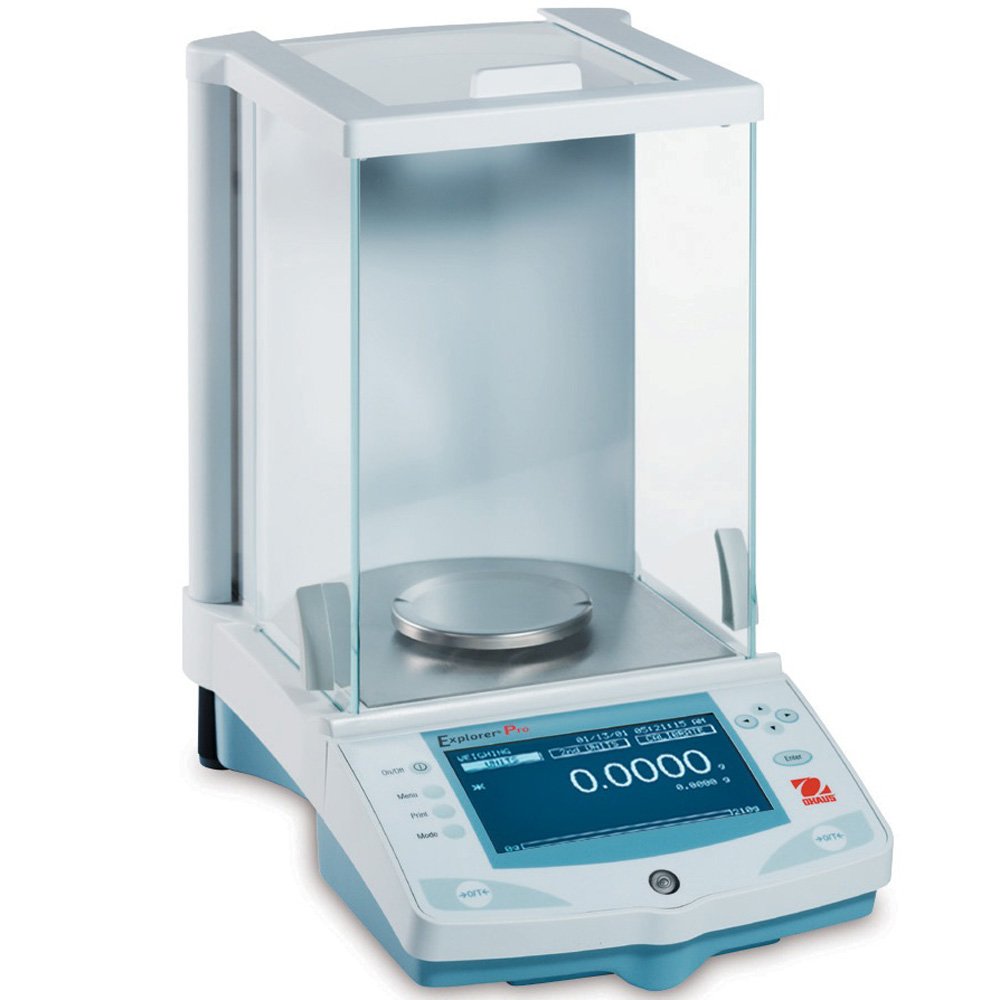
Figure 1: The Ohaus EP214C Explorer Pro Analytical Balance. This image shows the balance unit with its protective draft shield, the weighing pan, and the digital display indicating a zero reading.
2. Informació de seguretat
Please read all safety instructions carefully before operating the balance to ensure safe and proper use. Failure to follow these instructions may result in injury or damage to the instrument.
- Always operate the balance on a stable, level surface free from vibrations.
- Do not expose the balance to extreme temperatures, humidity, or direct sunlight.
- Avoid spilling liquids on the balance. If a spill occurs, disconnect power immediately and clean thoroughly.
- Use only the power adapter supplied with the balance.
- Do not attempt to disassemble or repair the balance yourself. Refer all servicing to qualified personnel.
- Keep the balance clean and free from dust and debris.
3. Desembalatge i configuració
3.1 Contingut del paquet
Verifiqueu que tots els components siguin presents i no estiguin danyats en desembalar-los:
- Ohaus EP214C Explorer Pro Analytical Balance unit
- Draft Shield assembly
- Paella de pesatge
- Power Supply/AC Adapter
- Printed User Manual
3.2 Configuració inicial
- Col·locació: Place the balance on a sturdy, level, and vibration-free surface away from drafts, direct sunlight, and heat sources.
- Assemble Draft Shield: Carefully assemble the glass draft shield around the weighing pan according to the diagrams in the printed manual.
- Connectar l'alimentació: Plug the power supply into the balance and then into a suitable electrical outlet.
- Nivell: Use the adjustable feet at the base of the balance and the integrated level indicator (bubble level) to ensure the balance is perfectly level. Adjust the feet until the bubble is centered within the circle.
- Encesa inicial: Premeu el botó On/Off button to power on the balance. Allow it to warm up for at least 30 minutes for optimal performance.
4. Funcionament
4.1 Pesatge bàsic
- Ensure the balance is level and has completed its warm-up period.
- Premeu el botó On/Off button to turn on the balance.
- Wait for the display to show "0.0000 g" or the selected weighing unit.
- If using a container, place the empty container on the weighing pan. Press the Tara botó per posar a zero la pantalla.
- Carefully place the item to be weighed onto the weighing pan (or into the tared container).
- Allow the reading to stabilize. The stable weight will be displayed.
- Remove the item from the pan.
4.2 Weighing Modes and Units
The Ohaus EP214C Explorer Pro offers multiple weighing units and application modes. Use the Unitats button to cycle through available weighing units (e.g., grams, milligrams, kilograms, ounces, pounds, carats, etc.).
Access various application modes (e.g., Parts Counting, Percent Weighing, Dynamic Weighing, Checkweighing) through the Mode button. Refer to the detailed printed manual for specific instructions on each mode.
4.3 AutoCal™ Internal Calibration
The EP214C balance features Ohaus's AutoCal™ internal calibration system, which automatically calibrates the balance when it detects a temperature change sufficient to affect weighing accuracy, or at pre-set intervals. This ensures consistent and accurate results without manual intervention.
To initiate a manual internal calibration, consult the printed manual for the specific key sequence or menu option. During calibration, ensure no items are on the weighing pan and the draft shield is closed.
5. Manteniment i Neteja
Proper maintenance and regular cleaning will extend the life of your Ohaus EP214C balance and ensure its continued accuracy.
- Neteja: Disconnect the balance from the power supply before cleaning. Use a soft, lint-free cloth dampened with a mild detergent or isopropyl alcohol. Do not use abrasive cleaners, solvents, or harsh chemicals.
- Weighing Pan and Draft Shield: The weighing pan and glass draft shield components can be carefully removed for cleaning. Wash them with mild soap and water, rinse thoroughly, and dry completely before reassembling.
- Atenció general: Keep the area around the balance clean. Avoid dropping objects onto the weighing pan or applying excessive force. Protect the balance from dust when not in use, ideally with a dust cover.
- Calibració: While the balance features AutoCal™, periodic verification with external calibration weights is recommended to confirm accuracy, especially for critical applications.
6. Solució De Problemes
This section provides solutions to common issues you might encounter with your Ohaus EP214C balance.
| Problema | Causa possible | Solució |
|---|---|---|
| Balance does not power on. | No power supply, faulty power adapter, or power outlet issue. | Check power cable connection. Ensure power outlet is functional. Try a different outlet. Verify power adapter is working. |
| Lectures inexactes o inestables. | Balance not level, vibrations, drafts, temperature fluctuations, dirty pan, or need for calibration. | Ensure balance is level. Relocate to a stable, draft-free area. Allow warm-up time. Clean weighing pan. Perform calibration. |
| Display shows "Error" message. | Overload, internal malfunction, or specific error condition. | Remove any excess weight from the pan. Power cycle the balance. Consult the printed manual for specific error codes. If persistent, contact support. |
| Cannot change weighing units or modes. | Balance in a locked mode or incorrect button press. | Refer to the printed manual for correct button sequences. Ensure balance is not in a specific application mode that restricts unit changes. |
If the problem persists after attempting these solutions, please contact Ohaus customer support.
7. Especificacions
| Característica | Detall |
|---|---|
| Número de model | EP214C |
| Fabricant | Ohaus |
| Capacitat màxima | 210 grams |
| Llegibilitat | 0.1 mg |
| Tipus de visualització | LCD |
| Calibració interna | AutoCal™ (Automatic Internal Calibration) |
| Pes del producte | 14 lliures (aprox. 6.35 kg) |
| Dimensions del paquet | 40.64 x 40.64 x 40.64 cm |
8. Garantia i Suport
The Ohaus EP214C Explorer Pro Analytical Balance is guaranteed to be in excellent working condition. For specific warranty terms and conditions, please refer to the documentation included with your purchase or visit the official Ohaus weblloc.
For technical assistance, troubleshooting beyond this manual, or to inquire about service and repairs, please contact Ohaus customer support. Have your model number (EP214C) and serial number (if available, e.g., k080 1127102359 p) ready when contacting support.
You can typically find support contact information on the Ohaus official website or in the printed manual.


