1. Introducció
This manual provides detailed instructions for the installation, configuration, and operation of the D-Link Xstack DGS-3120-48PC Managed L3 Switch. The DGS-3120-48PC is a high-performance Layer 3 managed switch designed for enterprise and campus networks, offering advanced features for network management, security, and quality of service.
2. Característiques clau
- 44 x 10/100/1000BASE-T PoE Ports: Provides power and data over a single Ethernet cable to connected devices.
- 4 x Combo SFP Ports: Offers flexible uplink options using fiber or copper transceivers.
- Layer 3 Management: Supports static routing for efficient network segmentation and traffic management.
- QoS avançada: Prioritza el trànsit de xarxa per garantir un rendiment òptim per a les aplicacions crítiques.
- Característiques de seguretat robustes: Includes access control lists (ACLs), port security, and authentication mechanisms.
- Standard and Enhanced Software Images: Offers different feature sets (SI for basic L2/L3, EI for advanced L3 features like ERPS, Double VLAN, IPv6).
3. Contingut del paquet
Verify the following items are included in your DGS-3120-48PC package:
- D-Link DGS-3120-48PC Switch
- Cable d'alimentació
- Kit de muntatge en rack (suports i cargols)
- Cable de consola (RJ-45 a DB-9)
- Peus de goma (per a la instal·lació d'escriptori)
- Guia d'instal·lació ràpida
If any item is missing or damaged, please contact your local D-Link reseller for assistance.
4. Descripció física
4.1. Tauler frontal
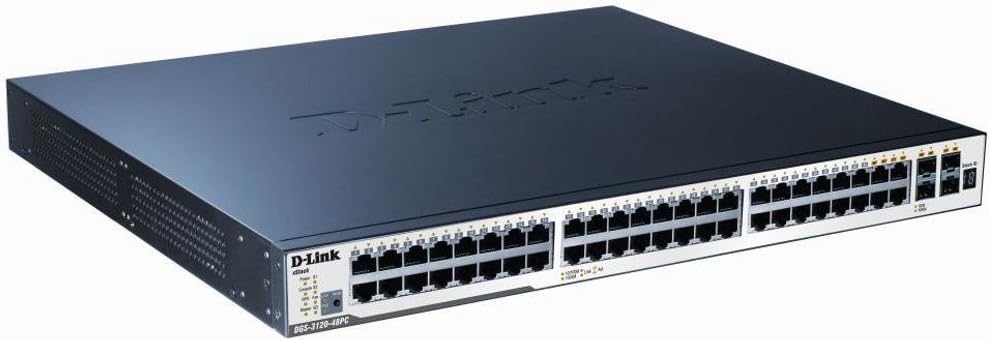
Figure 1: D-Link DGS-3120-48PC Front Panel
The front panel of the DGS-3120-48PC switch features 44 Gigabit Ethernet ports with Power over Ethernet (PoE) capabilities, and 4 additional combo SFP ports for flexible uplink connections. LED indicators provide status information for power, system, and individual port activity.
Indicadors LED:
- LED d'alimentació: Indica l'estat de l'alimentació (Encès/Apagat).
- LED del sistema: Indica l'estat operatiu del sistema.
- Link/Act/Speed LEDs (per port): Indicates link status, activity, and connection speed (10/100/1000 Mbps).
- PoE Status LEDs (per PoE port): Indica l'estat de subministrament d'alimentació PoE.
Ports:
- Ports RJ-45 (1-44): 10/100/1000BASE-T Gigabit Ethernet ports with PoE.
- Combo SFP Ports (45-48): Can be used with SFP transceivers for fiber connections or with corresponding RJ-45 ports for copper connections.
- Port de la consola: RJ-45 port for command-line interface (CLI) management.
4.2. Panell posterior
The rear panel typically includes the AC power inlet, grounding screw, and possibly ventilation openings. Specific details may vary slightly.
- Entrada d'alimentació CA: Connects to the power cord.
- Cargol de presa de terra: For connecting an earth ground cable.
5. Configuració i instal·lació
5.1. Precaucions de seguretat
- Assegureu-vos que la font d'alimentació voltage coincideix amb els requisits del commutador.
- No bloquejar les obertures de ventilació.
- Avoid placing the switch in direct sunlight, near heat sources, or in areas with high humidity.
- Assegureu-vos una correcta connexió a terra per evitar riscos elèctrics.
5.2. Muntatge de l'interruptor
Instal·lació d'escriptori:
- Fixeu els peus de goma inclosos a la part inferior de l'interruptor.
- Col·loqueu l'interruptor sobre una superfície plana i estable amb una ventilació adequada.
Instal·lació del bastidor:
- Attach the two rack-mounting brackets to the sides of the switch using the provided screws.
- Secure the switch in a standard 19-inch equipment rack using appropriate rack screws.
5.3. Potència de connexió
- Connect one end of the AC power cord to the power inlet on the rear panel of the switch.
- Connecteu l'altre extrem del cable d'alimentació a una presa de corrent amb connexió a terra.
- Ensure the Power LED on the front panel illuminates, indicating the switch is receiving power.
5.4. Connexió de dispositius de xarxa
- Connect Ethernet cables from your network devices (e.g., computers, servers, access points) to the RJ-45 ports (1-44) on the switch.
- For fiber uplinks, insert compatible SFP transceivers into the SFP ports (45-48) and connect fiber optic cables.
- Observe the Link/Act/Speed LEDs for each connected port to confirm proper connection and activity.
6. Funcionament de l'interruptor
6.1. Configuració Inicial
The DGS-3120-48PC can be configured via a webinterfície gràfica d'usuari (GUI) basada en o una interfície de línia d'ordres (CLI) a través del port de consola.
WebGUI basada en:
- Connecteu un ordinador a qualsevol dels ports Ethernet del commutador.
- Configureu l'adreça IP de l'ordinador perquè estigui a la mateixa subxarxa que l'adreça IP predeterminada del commutador (consulteu la Guia d'instal·lació ràpida per obtenir la IP predeterminada).
- Obre a web browser and enter the switch's default IP address.
- Log in using the default username and password (refer to documentation).
Command-Line Interface (CLI):
- Connect the console cable from your computer's serial port to the switch's console port.
- Use a terminal emulation program (e.g., PuTTY, Tera Term) with appropriate serial port settings (e.g., 115200 baud, 8 data bits, no parity, 1 stop bit, no flow control).
- Inicieu sessió amb el nom d'usuari i la contrasenya predeterminats.
6.2. Basic Network Configuration
After initial access, it is recommended to:
- Change the default administrator password.
- Configure the switch's IP address, subnet mask, and default gateway.
- Set up system time and NTP synchronization.
6.3. Funcions avançades
The DGS-3120-48PC supports a wide range of advanced features:
- VLAN (xarxes d'àrea local virtuals): Segmenta la teva xarxa per millorar la seguretat i el rendiment.
- Spanning Tree Protocol (STP/RSTP/MSTP): Prevents network loops.
- Agregació d'enllaços (LACP): Increases bandwidth and provides link redundancy.
- Qualitat de servei (QoS): Prioritizes traffic based on various criteria.
- Llistes de control d'accés (ACL): Filters network traffic based on defined rules.
- Gestió de PoE: Control power delivery to connected PoE devices.
- Encaminament estàtic: Configure routes for inter-VLAN or inter-network communication.
Refer to the D-Link DGS-3120 Series User Manual for detailed configuration instructions on these advanced features.
7. Manteniment
7.1. Actualitzacions de firmware
Comproveu regularment el suport de D-Link website for the latest firmware versions. Firmware updates can provide new features, performance improvements, and security patches. Follow the instructions provided with the firmware download carefully.
7.2. Neteja
Per mantenir un rendiment òptim i allargar la vida útil del commutador:
- Ensure the switch is powered off and unplugged before cleaning.
- Feu servir un drap suau i sec per netejar l'exterior de l'interruptor.
- Feu servir aire comprimit per treure la pols de les obertures de ventilació.
- No utilitzeu netejadors líquids o aerosols.
8. Solució De Problemes
This section provides solutions to common issues you may encounter with the DGS-3120-48PC switch.
| Problema | Causa possible | Solució |
|---|---|---|
| Sense indicació LED d'engegada | Power cord not connected; Power outlet faulty; Switch power supply issue. | Ensure power cord is securely connected. Test power outlet with another device. Contact D-Link support if issue persists. |
| No Link/Act LED on connected port | Incorrect cable type; Faulty cable; Connected device is off or faulty; Port configuration issue. | Use appropriate Ethernet cable (Cat5e/6). Replace cable. Ensure connected device is powered on and functioning. Check port status in switch management interface. |
| No es pot accedir web GUI | Incorrect IP address configuration on PC; Switch IP address changed; Network connectivity issue. | Verify PC's IP address is in the same subnet as the switch. Try accessing via console CLI. Check network cable connection. |
| PoE device not receiving power | PoE budget exceeded; Device not PoE compatible; Cable issue; PoE port disabled. | Check PoE budget in switch management. Ensure device is 802.3af/at compliant. Verify cable integrity. Enable PoE on the port if disabled. |
9. Especificacions
| Característica | Descripció |
|---|---|
| Model | DGS-3120-48PC |
| Marca | D-Link |
| Ports | 44 x 10/100/1000BASE-T PoE, 4 x Combo SFP |
| Tipus d'interfície | PoE, SFP |
| Velocitat de transferència de dades | 1 Gigabit per segon (per port) |
| Suport de capes | Capa 3 gestionada |
| Dimensions del producte | 14.96 x 17.32 x 1.73 polzades (38 x 44 x 4.4 cm) |
| Pes de l'article | 19.98 lliures (9.08 quilograms) |
| UPC | 790069344510 |
| Primer disponible | 8 d'agost de 2012 |
10. Garantia i suport tècnic
For information regarding the warranty policy, please refer to the warranty card included with your product or visit the official D-Link website. Technical support resources, including FAQs, documentation, and software downloads, are available on the D-Link support portal. Please have your product model and serial number ready when contacting support.
D-Link Weblloc: www.dlink.com


