Introducció
Gràcies per la compraasing the Sanyo DC-AS 1500 DX Home Cinema 2 (Stereo) System. This manual provides essential information for the safe and efficient operation of your new system. Please read this manual thoroughly before using the product and retain it for future reference.
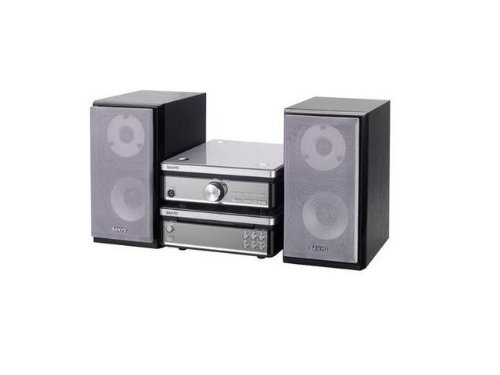
Image: The Sanyo DC-AS 1500 DX Home Cinema System, featuring the main unit and two stereo speakers.
Informació de seguretat
Per garantir un funcionament segur i evitar danys, observeu les precaucions següents:
- Font d'alimentació: Connect the system only to an AC outlet of the voltage especificat a la unitat.
- Ventilació: No bloquegeu les obertures de ventilació. Assegureu-vos que hi hagi prou espai al voltant de la unitat per a un flux d'aire adequat.
- Aigua i humitat: No exposeu la unitat a la pluja, la humitat ni a líquids que gotegen o esquitxen. No col·loqueu objectes plens de líquids, com ara gerros, a sobre de la unitat.
- Calor: Mantingueu la unitat allunyada de fonts de calor com ara radiadors, registres de calor, estufes o altres aparells (inclosos amplificadors) que produeixen calor.
- Neteja: Desendolleu la unitat de la presa de corrent abans de netejar-la. Feu servir només un drap suau i sec. No utilitzeu netejadors líquids ni netejadors en aerosol.
- Manteniment: No intenteu atendre aquest producte vosaltres mateixos. Consulteu tots els serveis a personal de servei qualificat.
Configuració
1. Desembalatge i col·locació
Carefully remove all components from the packaging. Place the main unit on a stable, level surface with good ventilation. Position the two stereo speakers equidistant from your primary listening position for optimal sound.
2. Connexió d'altaveus
- Identify the speaker terminals on the rear of the main unit (typically color-coded or labeled 'L' for Left and 'R' for Right).
- Connect the speaker wires from each speaker to the corresponding terminals on the main unit. Ensure correct polarity (+ to + and - to -) for optimal sound quality.
3. Connexió d'alimentació
After all audio connections are made, plug the power cord of the main unit into a suitable AC wall outlet.
Instruccions de funcionament
1. Basic Playback (CD/DVD/DivX/Video CD)
- Premeu el botó PODER botó per encendre el sistema.
- Premeu el botó OBRIR/TANCAR botó del panell frontal o del comandament a distància per obrir la safata del disc.
- Place a CD, DVD, DivX, or Video CD disc gently into the tray with the label side facing up.
- Premeu el botó OBRIR/TANCAR button again to close the disc tray. The system will automatically begin playback or display a menu.
- Utilitza el REPRODUCCIÓ/PAUSA, STOP, SALTAR (endavant/enrere), i CERCAR buttons on the remote control or front panel to manage playback.
2. Control de volum
Ajusteu el volum amb el botó VOLUM +/- buttons on the remote control or the volume knob on the main unit.
3. Selecció de la font d'entrada
If your system has multiple input options (e.g., AUX, USB), use the FONT or FUNCIÓ button on the remote control or main unit to cycle through available input sources.
Manteniment
1. Neteja de la unitat
Wipe the exterior surfaces of the main unit and speakers with a soft, dry, lint-free cloth. Do not use abrasive cleaners, waxes, or solvents as they may damage the finish. For stubborn stains, lightly dampNetegeu el drap amb aigua i després eixugueu-lo immediatament.
2. Cura del disc
Handle discs by their edges. Keep discs clean and free of scratches. Store discs in their cases when not in use to prevent dust and damage.
Resolució de problemes
If you experience problems with your system, refer to the following common issues and solutions:
- Sense energia:
- Assegureu-vos que el cable d'alimentació estigui ben connectat tant a la unitat com a la presa de corrent.
- Check if the wall outlet is functioning by plugging in another appliance.
- Sense so:
- Verify that the speakers are correctly connected to the main unit with correct polarity.
- Augmenta el nivell de volum.
- Assegureu-vos que s'ha seleccionat la font d'entrada correcta.
- Check if headphones are connected, which might mute the speakers.
- Disc Not Playing / Disc Error:
- Assegureu-vos que el disc estigui net i sense ratllades ni taques. Netegeu-lo suaument des del centre cap a fora amb un drap suau.
- Verify that the disc type (CD, DVD, DivX, Video CD) is supported by the system.
- Try a different disc to determine if the issue is with the disc or the player.
Especificacions
| Característica | Especificació |
|---|---|
| Nom del model | DC-AS 1500 DX |
| Marca | Sanyo |
| Configuració dels altaveus | 2 (estèreo) |
| Wattage | 30 watts |
| Tipus de suports compatibles | CD, DVD, DivX, Video CD |
| ASIN | B0055ZKOBK |
| Primera data disponible | 21 de febrer de 2020 |
Garantia i Suport
Specific warranty details for the Sanyo DC-AS 1500 DX Home Cinema System are not provided in this manual. For warranty information, technical support, or service inquiries, please refer to the warranty card included with your purchase or contact Sanyo customer support directly. Contact information can typically be found on the manufacturer's official weblloc o embalatge del producte.


