1. Informació important de seguretat
Si us plau, llegiu atentament totes les instruccions de seguretat i funcionament abans d'utilitzar aquest producte. Conserveu aquestes instruccions per a futures consultes.
- Font d'alimentació: Operate the TV only from the type of power source indicated on the marking label.
- Ventilació: Assegureu-vos que hi hagi una ventilació adequada. No bloquegeu cap obertura de ventilació.
- Aigua i humitat: Do not expose the TV to rain or moisture. Do not use near water.
- Neteja: Unplug the TV from the wall outlet before cleaning. Use a dry cloth for cleaning.
- Manteniment: No intenteu atendre aquest producte vosaltres mateixos. Consulteu tots els serveis a personal de servei qualificat.
- Advertència de la proposta 65: Aquest producte conté productes químics coneguts per l'estat de Califòrnia per causar càncer i defectes de naixement o altres danys reproductius.
2. Producte acabatview
The Supersonic SC-1312 is a compact 13.3-inch ELED FHD TV designed for versatility, featuring a built-in DVD player and multiple connectivity options. It is suitable for various environments, including RVs, kitchens, and small spaces.

Imatge: Frontal view of the Supersonic SC-1312 13.3-inch ELED FHD TV.
Característiques principals:
- 13.3-inch ELED Full HD (1080p) Display.
- Integrated DVD Player compatible with DVD, CD, CDR, CDRW, DVD+/- R, DVD+/- RW, VCD, and SVCD formats.
- Multiple Inputs: HDMI, USB, VGA, CVBS (RCA), RF (Coaxial).
- Dual Tuners for over-the-air broadcasting.
- Multi-Language On-Screen Display (OSD).
- AC/DC Compatibility for flexible power options.
- Can function as a computer monitor via PC input.
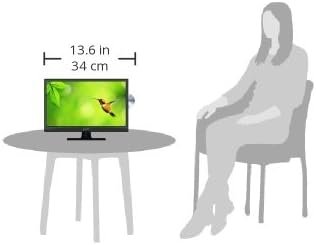
Image: A visual representation of the TV's dimensions (13.6 inches wide) in comparison to a seated person, illustrating its compact size.
3. Contingut del paquet
Verifiqueu que tots els elements siguin presents al paquet:
- Supersonic SC-1312 13.3-Inch ELED FHD TV with Built-in DVD Player
- Control remot
- Adaptador de corrent alterna
- DC Car Adapter (12V)
- Manual d'usuari

Image: The remote control, user manuals, AC power adapter, and DC car adapter included with the Supersonic SC-1312 TV.
4. Product Connections and Controls
Familiarize yourself with the input and output ports located on the rear of the TV.

Image: Rear panel of the TV with labeled ports including Power Input, USB Input, HDMI Input, VGA Input, PC Audio Input, Y/Pb/Pr Input, RF Input, Headphone Output, CVBS/L/R Input, and Coaxial Output.
Connexions del panell posterior:
- Entrada d'alimentació (12 V CC): Connect the provided AC adapter or DC car adapter here.
- Entrada USB: Per connectar dispositius d'emmagatzematge USB per reproduir contingut multimèdia files.
- Entrada HDMI: Connect HDMI-enabled devices such as gaming consoles, streaming sticks, or Blu-ray players.
- Entrada VGA: Connecteu un ordinador per utilitzar-lo com a monitor.
- Entrada d'àudio de PC: For audio when using the VGA input.
- Y/Pb/Pr Input: Component video input for compatible devices.
- Entrada RF: Connecteu una antena o un senyal de televisió per cable.
- Sortida d'auriculars: Connecteu els auriculars per a una escolta privada.
- CVBS/L/R Input: Composite video and stereo audio input (RCA).
- Sortida coaxial: Sortida d'àudio digital.
5. Configuració
5.1 Connexió d'alimentació
- For AC power, connect the AC adapter to the TV's DC 12V input and then plug the adapter into a standard wall outlet.
- For DC power (e.g., in an RV or vehicle), connect the DC car adapter to the TV's DC 12V input and then plug the adapter into a 12V power socket.
5.2 Connexió de dispositius externs
- Dispositius HDMI: Use an HDMI cable to connect your device (e.g., streaming stick, game console) to the HDMI input on the TV.
- Dispositius USB: Insert a USB flash drive into the USB port to access compatible media files.
- VGA (PC) Connection: Connect a VGA cable from your computer to the TV's VGA input. Connect an audio cable from your computer's audio output to the TV's PC Audio Input.
- Analog Devices (CVBS/Y/Pb/Pr): Use appropriate RCA cables to connect older devices to the CVBS or Y/Pb/Pr inputs.
5.3 Connexió de l'antena
Connect a coaxial cable from your antenna or cable TV wall outlet to the RF input on the TV.
5.4 Initial Power-On and Channel Scan
- After connecting power and any desired devices, press the Power button on the TV or remote control to turn it on.
- The TV may display a loading screen for approximately 15 seconds.
- Follow the on-screen prompts to select your preferred language and perform an automatic channel scan for over-the-air broadcasts.
6. Instruccions de funcionament
6.1 Funcions bàsiques del televisor
- Encès/apagat: Premeu el botó d'engegada del comandament a distància o del televisor.
- Control de volum: Use the VOL +/- buttons on the remote or TV.
- Selecció de canals: Use the CH +/- buttons or number pad on the remote.
- Font d'entrada: Press the SOURCE button on the remote to cycle through available inputs (TV, HDMI, USB, VGA, Y/Pb/Pr, AV, DVD).
6.2 DVD Player Operation
The TV features a built-in DVD player. The disc slot is typically located on the side of the TV.

Image: A family watching the Supersonic TV, highlighting its built-in DVD player functionality.
- Insert a DVD or CD into the disc slot with the label facing forward. The TV will automatically switch to DVD mode or you may need to select 'DVD' as the source.
- Playback will usually begin automatically. Use the remote control for playback functions (Play, Pause, Stop, Fast Forward, Rewind, Skip).
- To eject a disc, press the Eject button on the remote control.
- Note that switching to DVD mode or starting a DVD may involve a brief loading screen. The DVD player is designed to resume playback from the last position even after a power cycle.
6.3 Menú de visualització en pantalla (OSD)
Press the MENU button on the remote to access the OSD menu. Use the arrow buttons to navigate and the OK button to confirm selections. Common menu options include:
- Configuració de la imatge: Adjust brightness, contrast, color, sharpness, and picture mode.
- Configuració de so: Adjust volume, bass, treble, balance, and sound mode.
- Configuració del canal: Perform channel scans, edit channels, and set parental controls.
- Configuració de l'hora: Set time, date, and sleep timer.
- Configuració: Change language, aspect ratio, and other system settings.
7. Manteniment
7.1 Neteja del televisor
- Desendolla sempre el televisor abans de netejar-lo.
- Feu servir un drap suau i sec per netejar la pantalla i la carcassa.
- For stubborn marks on the screen, use a screen-cleaning solution specifically designed for electronics, applied to the cloth, not directly to the screen.
- No utilitzeu netejadors abrasius, ceres ni dissolvents.
7.2 Emmagatzematge
If storing the TV for an extended period, ensure it is unplugged, clean, and stored in a cool, dry place away from direct sunlight and extreme temperatures.
8. Solució De Problemes
Consulteu aquesta secció per obtenir solucions a problemes comuns que podeu trobar.
| Problema | Possible causa/solució |
|---|---|
| Sense poder | Ensure the power adapter is securely connected to the TV and a working power outlet. Check the power source (AC or DC). |
| No hi ha imatge, però hi ha so | Check the input source selection. Ensure external devices are properly connected and powered on. Adjust brightness/contrast settings. |
| No hi ha so, però hi ha imatge | Check volume level and mute status. Ensure audio cables are correctly connected for external devices. Check sound settings in the OSD menu. |
| El comandament a distància no funciona | Replace batteries in the remote. Ensure there are no obstructions between the remote and the TV's IR sensor. Point the remote directly at the TV. |
| DVD not playing or ejecting | Ensure the disc is inserted correctly. Try a different disc. Use the Eject button on the remote. Clean the disc if it is dirty or scratched. |
| Bad pixel on screen | Gently rub the affected spot with the ball of your finger (not nail) using a soft cloth. This may resolve the issue. |
| Long loading screen | The TV typically has a 15-second loading screen upon power-on and when switching to DVD mode. This is normal operation. |
9. Especificacions
Technical specifications for the Supersonic SC-1312 TV:
| Característica | Especificació |
|---|---|
| Marca | Supersònic |
| Número de model | SC-1312 |
| Mida de la pantalla | 13.3 polzades |
| Tecnologia de visualització | ELED |
| Resolució | 1080p Full HD |
| Relació d'aspecte | 16:9 |
| Freqüència d'actualització | 480 Hz |
| Tecnologia de connectivitat | HDMI, USB, VGA, RF, CVBS, Y/Pb/Pr |
| Característica especial | Built-in DVD Player, Flat Screen |
| Tipus d'altaveu | Integrat |
| Wattage | 24 watts |
| Dimensions del producte | 13.6 x 4.69 x 11.45 polzades (aprox.) |
| Pes de l'article | 3.8 lliures |
| Color | Negre |
10. Garantia i Suport
For warranty information and technical support, please refer to the documentation included with your product or contact Supersonic customer service directly. Warranty terms may vary based on region and retailer.
Si us plau, conserveu el comprovant de compra per a qualsevol reclamació de garantia.


