1. Introducció
This manual provides comprehensive instructions for the Sigma 105mm F2.8 EX DG OS HSM Macro Lens, designed for Canon SLR cameras. This high-performance lens features a 1:1 magnification ratio, Optical Stabilizer (OS) for handheld photography, and a Hyper Sonic Motor (HSM) for quiet and fast autofocus. It is engineered to deliver exceptional optical performance from infinity to macro distances, making it suitable for a wide range of photographic applications, especially close-up work.
2. Precaucions de seguretat
- Do not look at the sun or strong light sources through the lens, as this can cause permanent vision damage.
- Keep the lens away from direct sunlight when not in use to prevent fire hazards or damage to internal components.
- Avoid exposing the lens to extreme temperatures, high humidity, or corrosive chemicals.
- Do not attempt to disassemble or modify the lens, as this may void the warranty and cause malfunction.
- Mantingueu la lent fora de l'abast dels nens.
3. Contingut del paquet
Verifiqueu que tots els elements següents estiguin inclosos al vostre paquet:
- Sigma 105mm F2.8 EX DG OS HSM Macro Lens
- Parasol de l'objectiu
- Hood Adapter
- Tap de l'objectiu frontal
- Tap de la lent posterior
4. Identificació de peces
Familiarize yourself with the various parts of your Sigma 105mm F2.8 EX DG OS HSM Macro Lens:

This image displays the overall design of the lens, highlighting the focus ring and the distance scale window.
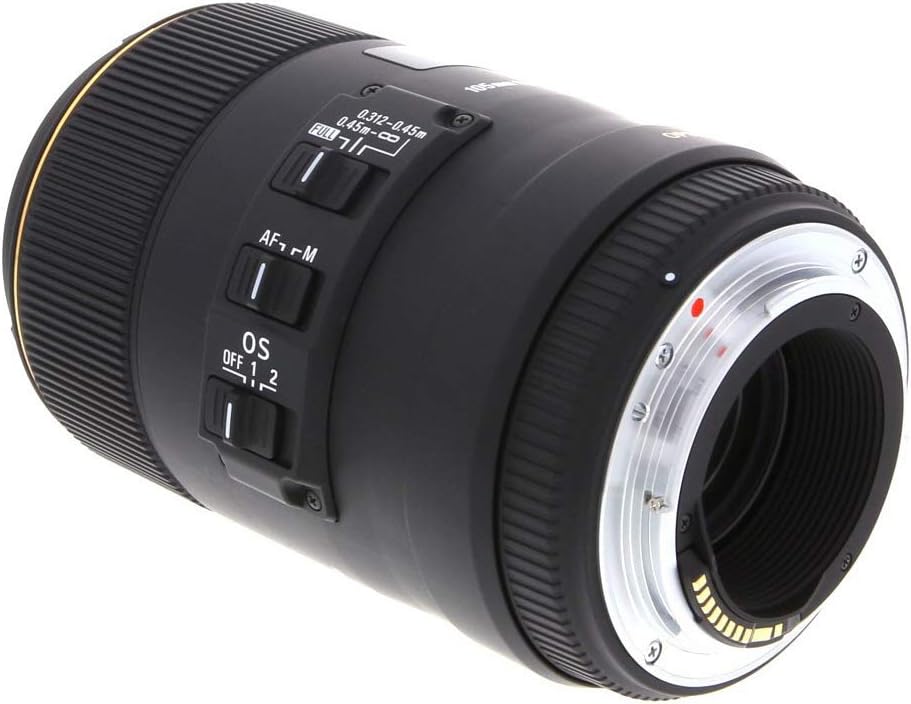
The side of the lens features several important control switches:
- Interruptor AF/MF: Toggles between Autofocus and Manual Focus modes.
- OS Switch: Activates or deactivates the Optical Stabilizer. Some models may have multiple OS modes (e.g., Mode 1 for general photography, Mode 2 for panning shots).
- Focus Limiter Switch: Restricts the autofocus range to improve focusing speed. Common settings include FULL (full range), 0.312-0.45m (for close-up macro), and 0.45m-∞ (for general photography).

This image shows the lens mount, which connects the lens to your Canon SLR camera body.
5. Configuració
5.1 Fixació de la lent
- Assegureu-vos que tant la càmera com l'objectiu estiguin nets i sense pols.
- Align the red index mark on the lens barrel with the corresponding red index mark on your Canon SLR camera body.
- Introduïu l'objectiu a la muntura de la càmera i gireu-lo en sentit horari fins que encaixi al seu lloc.
5.2 Desmuntatge de la lent
- Premeu i manteniu premut el botó d'alliberament de l'objectiu del cos de la càmera.
- Gireu l'objectiu en sentit antihorari fins que es desprengui del suport de la càmera.
- Immediately attach the front and rear lens caps to protect the lens elements.
5.3 Fixació del parasol de l'objectiu
The included lens hood helps to block stray light and protect the front element. Align the hood with the front of the lens and rotate it until it locks securely. Ensure it is properly seated to avoid vignetting.
6. Funcionament de l'objectiu
6.1 Autoenfocament (AF) i enfocament manual (MF)
Use the AF/MF switch on the lens barrel to select your desired focusing mode. In AF mode, the Hyper Sonic Motor (HSM) provides fast and quiet autofocus. This lens also supports full-time manual focus override, allowing you to fine-tune focus manually even when the lens is set to AF.
6.2 Optical Stabilizer (OS)
The Optical Stabilizer (OS) system effectively corrects camera shake, allowing for sharper images, especially in low light or when shooting handheld. The OS system offers approximately 4 stops of correction. The stabilization effect is visible through the viewfinder, aiding in composition and accurate focusing. Note that OS effectiveness may decrease at very short shooting distances.
6.3 Interruptor limitador d'enfocament
The focus limiter switch allows you to restrict the autofocus range, which can significantly speed up focusing when you know your subject is within a certain distance. For macro photography, select the 0.312-0.45m range. For general photography, use the 0.45m-∞ range. For maximum versatility, set it to FULL.
6.4 Macro Photography
This lens excels at macro photography, offering a 1:1 maximum magnification ratio. The 105mm focal length provides a comfortable working distance of 142mm at its closest focusing position, preventing lens shadows from interfering with your subject. This allows for excellent detail capture with beautifully blurred backgrounds due to the large aperture and rounded diaphragm.

This image illustrates the lens's ability to render subjects with a smooth, attractive blur in the out-of-focus areas, a characteristic beneficial for both macro and portrait photography.
7. Manteniment i cura
- Neteja: Use a soft, lint-free cloth to gently wipe dust from the lens surface. For smudges, use a lens cleaning solution and a microfiber cloth. Never use abrasive materials or harsh chemicals.
- Emmagatzematge: When not in use, store the lens with both front and rear caps attached in a cool, dry place, away from direct sunlight and extreme temperatures. Consider using a desiccant to prevent mold growth in humid environments.
- Manipulació: Eviteu deixar caure l'objectiu ni sotmetre-lo a impactes forts.
8. Solució De Problemes
- L'objectiu no enfoca: Ensure the AF/MF switch is set to AF. Check the focus limiter switch setting; adjust it to FULL or the appropriate range for your subject distance. Verify that the lens is securely attached to the camera.
- Les imatges són borroses: Check if the Optical Stabilizer (OS) is turned on, especially for handheld shots. Ensure your shutter speed is appropriate for the lighting conditions. Verify that the lens elements are clean.
- Lent no reconeguda per la càmera: Detach and reattach the lens, ensuring it clicks into place. Clean the electrical contacts on both the lens and camera body with a clean, dry cloth.
9. Especificacions
| Característica | Especificació |
|---|---|
| Construcció de lents | 16 elements en 11 grups |
| Angle de View | 23.3 graus |
| Nombre de fulles de diafragma | 9 Blades (Rounded diaphragm) |
| Obertura mínima | F22 |
| Distància mínima d'enfocament | 31.2 cm / 12.3 polzades. |
| Ampliació màxima | 1:1 |
| Diàmetre de la mida del filtre | 62 mm |
| Dimensions (Diàmetre x Longitud) | 78.3mm x 126.4mm / 3.1in. x 5.0in. |
| Pes | 725 g / 25.6 oz. |
9.1 MTF (Modular Transfer Function)
MTF is a measurement used to evaluate a lens's performance, specifically its contrast and sharpness. The horizontal axis represents the distance from the center of the image towards the edges (in millimeters), while the vertical axis shows the contrast value (with 1 being the highest). Red lines typically indicate the lens's contrast ability (at 10 lines per millimeter), and green lines represent sharpness (at 30 lines per millimeter) when the aperture is wide open. Sagittal (S) lines are parallel to a diagonal from corner to corner, and Meridional (M) lines are vertical to these.
9.2 Distorsió
Distortion refers to the optical aberration that causes straight lines to appear curved in an image. Effective distortion illustrates how a lattice pattern would appear. Relative distortion charts show the extent of distortion (D[%]) as a percentage difference between the actual image height (Y) and the ideal image height (Y0). A negative value indicates barrel distortion (expanded appearance), while a positive value indicates pincushion distortion (recessed appearance). Values close to zero signify minimal distortion.
9.3 Vignetting
Vignetting describes the phenomenon where the corners of an image appear darker than the center due to light fall-off. In a vignetting chart, the horizontal axis represents the image height (distance from the center to the edge in millimeters), and the vertical axis shows the amount of light, with the image center typically set at 100%. A lower peripheral light amount indicates more noticeable vignetting.
10. Garantia i Suport
For warranty information, service, or technical support, please refer to the official Sigma website or contact your local authorized Sigma dealer. You can also find additional resources, including a downloadable PDF version of the user manual, at the following link: Sigma 105mm F2.8 EX DG OS HSM Macro Lens User Manual (PDF)


