Introducció
This manual provides comprehensive instructions for the setup, operation, and maintenance of your AT&T 1040 Corded Four-Line Expandable Telephone. This device is designed for small business environments, offering multi-line capabilities, conferencing, and intercom features to enhance communication efficiency.
Les característiques clau inclouen:
- Four-line operation for managing multiple calls simultaneously.
- Altaveu integrat per a comunicació amb mans lliures.
- 3-party conferencing capability.
- 32-number speed dial for quick access to frequently called numbers.
- Intercom functionality for internal communication.
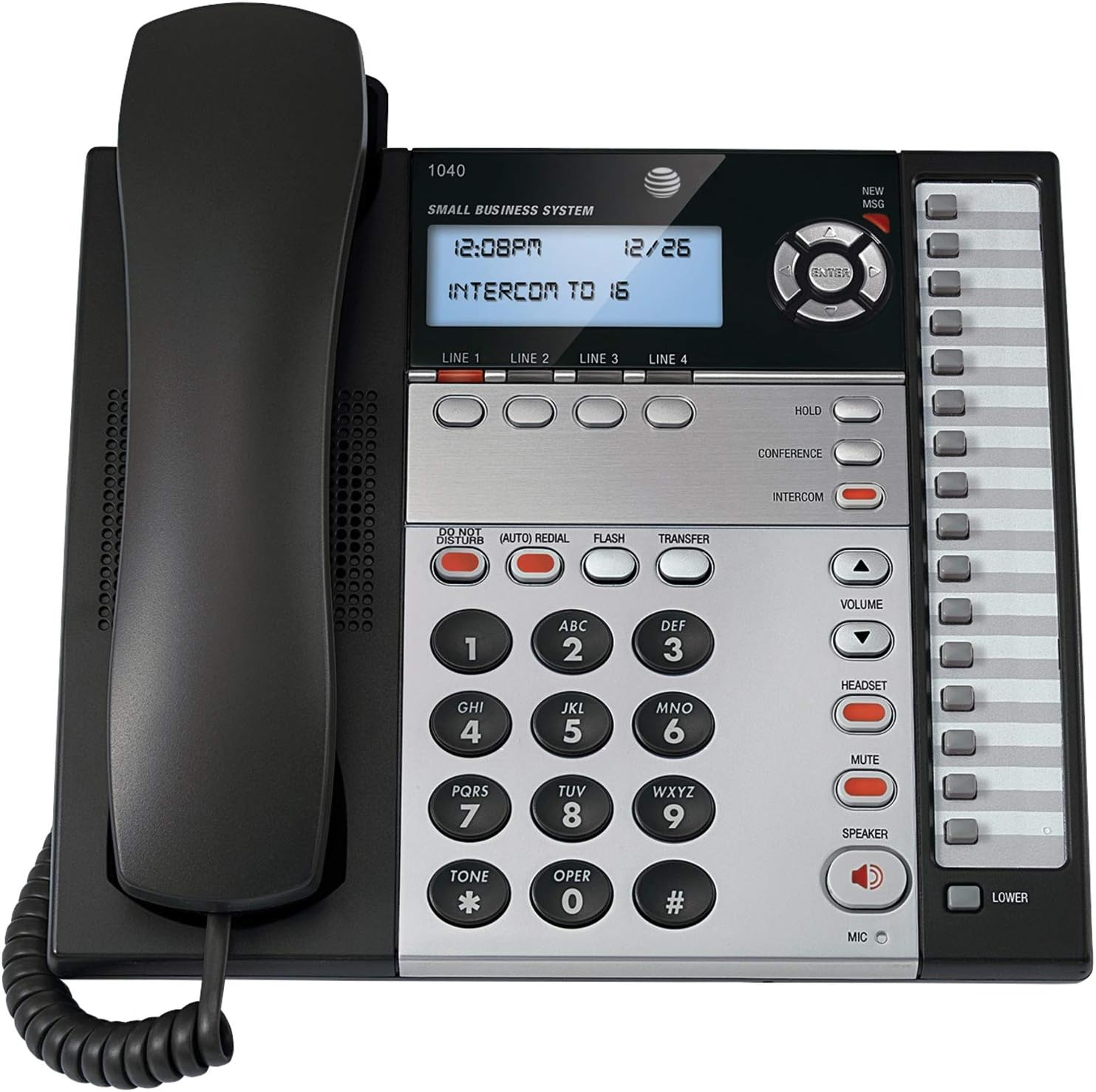
Figura 1: The AT&T 1040 Corded Four-Line Expandable Telephone. This image displays the main unit with its handset resting on the cradle, the digital display showing time and intercom status, the four line buttons, and the full keypad with function buttons like HOLD, CONFERENCE, INTERCOM, VOLUME, HEADSET, MUTE, and SPEAKER.
Configuració
1. Desembalatge i comprovació de components
Abans de començar la instal·lació, assegureu-vos que hi hagi tots els components:
- AT&T 1040 Base Unit
- Telèfon
- Cable enrotllat del telèfon
- Line Cords (up to 4, depending on configuration)
- Adaptador de corrent alterna
- 9V Battery (for backup, typically included or purchased separately)
2. Connecting the Telephone
- Connecteu el telèfon: Plug one end of the coiled handset cord into the handset and the other end into the jack labeled TELECOMPLE on the side of the telephone base.
- Connect the Line Cords: For each telephone line you wish to use, plug one end of a line cord into the jack labeled LÍNIA 1, LÍNIA 2, LÍNIA 3, o LÍNIA 4 on the back of the telephone base. Plug the other end of each line cord into a modular wall jack.
- Instal·leu la bateria de 9 V: Open the battery compartment on the bottom of the telephone base. Insert a 9V battery, observing the correct polarity (+/-). This battery provides backup power for settings during power outages. Close the compartment.
- Connect the AC Power Adapter: Plug the small end of the AC power adapter into the PODER jack on the back of the telephone base. Plug the larger end into a standard electrical outlet.
3. Initial Configuration (Date and Time)
En el primer engegada o després d'una apagadatage (if battery backup is not present or depleted), you may need to set the date and time. Refer to the display and use the navigation buttons (up/down arrows and ENTER) to adjust the settings. Press ENTRAR per confirmar cada configuració.
Instruccions de funcionament
1. Funcions de trucada bàsiques
- Fer una trucada:
- Aixequeu el telèfon o premeu PONENT botó.
- Select an available line by pressing one of the LÍNIA 1-4 botons.
- Marqueu el número de telèfon desitjat.
- Respondre una trucada:
- Quan soni el telèfon, aixequeu l'auricular o premeu la tecla PONENT button. The corresponding line button will flash.
- Finalització d'una trucada:
- Torneu a col·locar l'auricular al suport o premeu la tecla PONENT tornar a prémer el botó si feu servir l'altaveu.
2. Multi-Line Operation
- Selecting a Line: Premeu el desitjat LÍNIA 1-4 button to select an available line for making or receiving calls.
- Switching Between Lines: During an active call on one line, press another LÍNIA button to switch to that line or answer an incoming call on it. The first call will automatically be placed on hold.
3. Altaveu
Per utilitzar l'altaveu, premeu la tecla PONENT button. The indicator light will illuminate. You can then dial or speak hands-free. Press the PONENT button again to end the call or switch to the handset by lifting it.
4. Intèrfon
The intercom feature allows internal communication between connected AT&T 1040 units. To initiate an intercom call:
- Premeu el botó INTERCOMUNICACIÓ botó.
- Dial the extension number of the desired internal unit (e.g., "16" as shown on the display).
- The other unit will ring, and you can speak when answered.
5. Funció Hold
Per posar una trucada activa en espera, premeu el botó MANTENIM button. The line indicator light will flash slowly. To retrieve the call, press the flashing LÍNIA botó.
6. Conferència trucada
To establish a 3-party conference call:
- Establish a call on LÍNIA 1.
- Premeu el botó MANTENIM button to place the first call on hold.
- Select an available line (e.g., LÍNIA 2) and dial the second party.
- Quan la segona part respongui, premeu el botó CONFERÈNCIA button. All three parties will now be connected.
7. Marcatge ràpid
The AT&T 1040 supports 32-number speed dial entries.
- Programming Speed Dial: Consult the full manual for detailed programming steps, typically involving a PROGRAMA or BOTIGA button followed by a memory location and the number.
- Using Speed Dial: Aixequeu l'auricular o premeu PONENT, select a line, then press the speed dial memory location button.
8. Control de volum
Utilitza el VOLUM amunt (▲) i cap avall (▼) buttons to adjust the listening volume during a call (handset or speakerphone). Ringer volume can typically be adjusted via a switch or menu setting on the base unit.
9. Mut
Durant una trucada, premeu el botó MUT button to temporarily disable your microphone. The other party will not hear you, but you can still hear them. Press MUT again to resume speaking.
10. No molestis
Premeu el botó NO MOLTELIS button to silence incoming calls. The indicator light will illuminate. Press it again to deactivate.
11. Remarcació
Premeu el botó (AUTO) REDIAL button to automatically redial the last number called.
12. Flash / Transfer
El FLASH button is used for accessing network features such as call waiting or transferring calls, depending on your telephone service provider. The TRANSFERÈNCIA button is typically used in conjunction with intercom or other system features to transfer an external call to another internal extension.
13. Headset Operation
To use a headset (not included), plug it into the AURICULAR jack on the side of the telephone base. Press the AURICULAR button to activate headset mode. The indicator light will illuminate. Press it again to deactivate or switch to handset/speakerphone.
Manteniment
1. Neteja
Wipe the telephone's exterior with a soft, slightly damp cloth. Do not use cleaning sprays or abrasive cleaners, as these can damage the finish or internal components. Ensure the phone is unplugged from power before cleaning.
2. Substitució de la bateria
The 9V battery provides backup for settings. If the display shows incorrect time/date after a power outage, the battery may need replacement. Open the battery compartment on the bottom of the unit, remove the old battery, and insert a new 9V alkaline battery, observing polarity. Dispose of old batteries responsibly.
3. Atenció general
Avoid exposing the telephone to extreme temperatures, direct sunlight, or moisture. Do not drop the unit or subject it to strong impacts. Keep it away from sources of electrical noise, such as motors or fluorescent lighting fixtures.
Resolució de problemes
| Problema | Solució |
|---|---|
| Sense to de marcatge. |
|
| No es poden fer ni rebre trucades. |
|
| La pantalla està en blanc o il·legible. |
|
| Intercom not working. |
|
Especificacions
- Dimensions del producte: 10.2 x 11.5 x 4.5 polzades
- Pes de l'article: 0.16 unces (4.54 g)
- Tipus de telèfon: Cordat
- Font d'alimentació: Elèctric amb cable
- Tipus de marcador: Teclat únic
- Tipus de contestador: Digital
- Capacitat de trucada de conferència: 3 vies
- Operació multilínia: Multi-Line Operation (Four-Line)
- Speed Dial Capacity: 32 números
- Intercomunicador: Sí
Garantia i Suport
For warranty information and technical support, please refer to the official AT&T product website or contact AT&T customer service. Keep your purchase receipt as proof of purchase for warranty claims.
Online resources may include FAQs, additional troubleshooting guides, and contact information for support.


