Introducció
This manual provides detailed instructions for the installation, operation, and maintenance of your Zmodo PKD-DK4216-500GB H.264 4-Channel DVR System. This system is designed for security surveillance, offering remote access capabilities and night vision cameras. Please read this manual thoroughly before using the product to ensure proper setup and functionality.
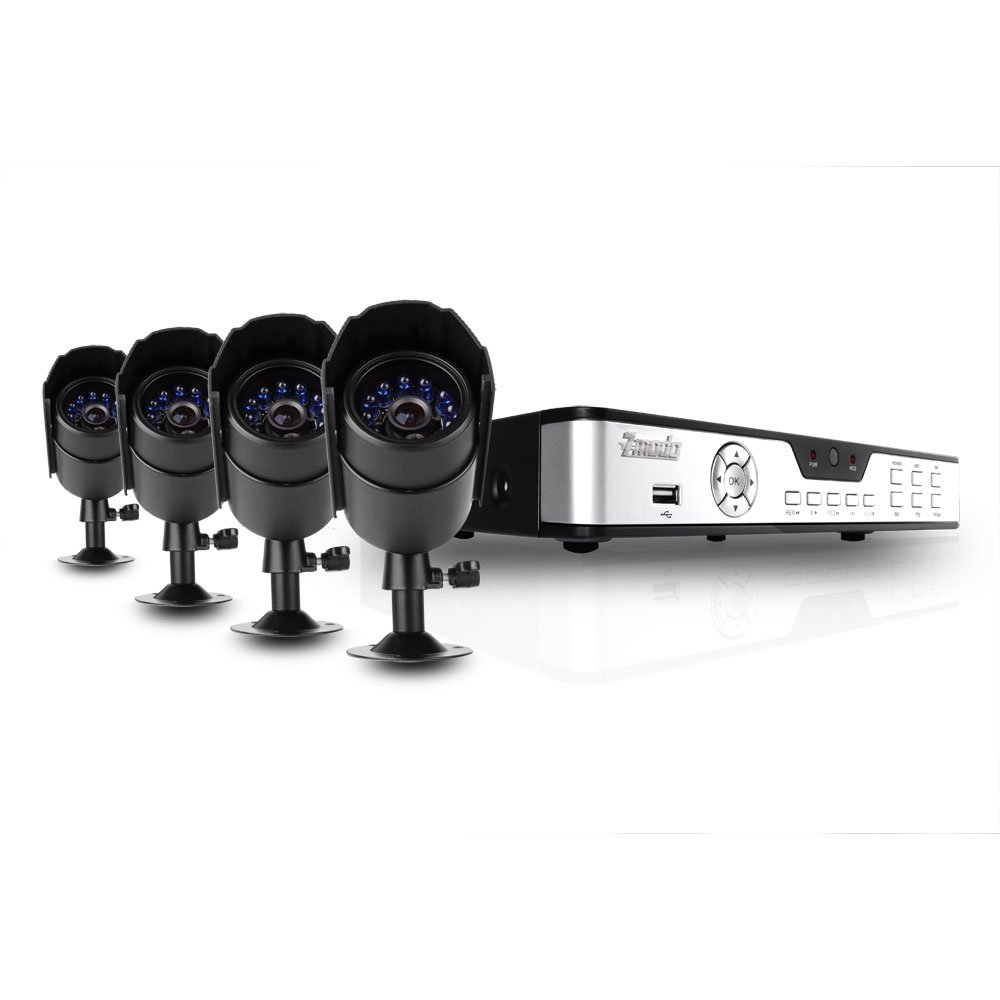
Figure 1: Zmodo PKD-DK4216-500GB DVR System components, including the DVR unit, four night vision cameras, power adapters, cables, a USB mouse, and a remote control.
Configuració i instal·lació
1. Desembalatge i comprovació de components
Desembaleu amb cura tots els components i verifiqueu que hi hagi els elements següents:
- 1 x Zmodo 4-Channel DVR Unit with 500GB Hard Drive
- 4 x Night Vision Security Cameras
- 4 x Camera Power/Video Cables (60ft each)
- 1 x DVR Power Adapter
- 1 x Camera Power Splitter
- 1 x ratolí USB
- 1 x comandament a distància
- 1 x Manual d'usuari (aquest document)
2. DVR Connections
Before powering on the DVR, connect all necessary peripherals.
- Connectar un monitor: Use a VGA or BNC cable to connect your monitor to the corresponding port on the DVR's rear panel.
- Connecteu el ratolí: Connecteu el ratolí USB a un dels ports USB del DVR (frontal o posterior).
- Connectar càmeres: Connect each camera's video cable (BNC connector) to an available video input port on the DVR's rear panel.
- Connect Camera Power: Use the camera power splitter to connect all four cameras to a single power adapter. Plug the power adapter into an electrical outlet.
- Connect DVR Power: Plug the DVR power adapter into the DVR and then into an electrical outlet. The DVR should power on automatically.
- Connexió de xarxa (opcional): Per a comandament a distància viewing, connect an Ethernet cable from your router to the LAN port on the DVR's rear panel.
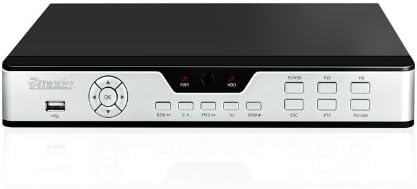
Figure 2: Front panel of the DVR, showing the USB port, navigation buttons, and status indicators.

Figure 3: Rear panel of the DVR, displaying BNC video inputs, VGA output, audio inputs/outputs, LAN port, and power input.
3. Instal·lació de la càmera
Mount the cameras in desired locations, ensuring a clear field of view and protection from direct weather exposure. The cameras are designed for both indoor and outdoor use and feature night vision capabilities.
- Securely mount each camera using the provided hardware.
- Ajusteu l'angle de la càmera per cobrir l'àrea de vigilància desitjada.
- Route the camera cables to the DVR, ensuring they are protected from damage and moisture.

Figura 4: Frontal view of a Zmodo camera, showing the lens and infrared (IR) LEDs for night vision.

Figura 5: lateral view of a Zmodo camera, illustrating its bullet design and adjustable mounting bracket.
4. Initial DVR Configuration
Upon first power-up, the DVR will guide you through initial setup steps, including setting the date, time, and administrator password. Follow the on-screen prompts using the USB mouse.
Instruccions de funcionament
1. Navegació bàsica
The DVR interface is primarily controlled using the USB mouse. Right-click to access the main menu, and left-click to select options and navigate through menus.
2. Modes d'enregistrament
The DVR supports various recording modes:
- Gravació contínua: Registres 24/7.
- Gravació de detecció de moviment: Records only when motion is detected in the camera's view. This conserves hard drive space.
- Enregistrament programat: Registres durant moments específics del dia o de la setmana.
Configure recording settings for each camera through the DVR's main menu under 'Record Settings'.
3. Reproducció de vídeo
Per tornarview foo gravattage:
- From the main menu, select 'Playback'.
- Trieu la data i el canal de la càmera desitjats.
- Use the timeline to navigate through recordings. Motion-triggered events are often marked for easier identification.
4. Remote Access (Internet & 3G Phone)
El DVR admet la funció remota viewing via Internet Explorer on a PC or through dedicated applications on 3G-enabled smartphones (Blackberry, Android, iPhone, iPad).
- Configuració de la xarxa: Ensure the DVR is connected to your router via Ethernet. You may need to configure port forwarding on your router and set up a Dynamic DNS (DDNS) service if you do not have a static IP address. Refer to your router's manual and Zmodo's online support for detailed network setup instructions.
- Accés a l'ordinador: Open Internet Explorer and enter the DVR's IP address. You may be prompted to install an ActiveX control.
- Accés mòbil: Download the appropriate Zmodo application from your smartphone's app store. Follow the in-app instructions to add your DVR using its IP address or DDNS hostname.
Manteniment
1. Gestió del disc dur
The 500GB hard drive will automatically overwrite the oldest recordings when full. Regularly back up important footage to an external USB drive if needed. You can configure hard drive settings and format the drive through the DVR's system menu.
2. Neteja
Periodically clean the camera lenses and the DVR unit with a soft, dry cloth. Avoid using harsh chemicals or abrasive materials that could damage surfaces.
3. Actualitzacions de firmware
Check the Zmodo official website for any available firmware updates for your DVR model. Firmware updates can improve performance, add features, or fix bugs. Follow the instructions provided with the update carefully.
Resolució de problemes
- No image on monitor:
- Ensure the monitor is powered on and correctly connected to the DVR's VGA or BNC output. Verify the DVR is powered on and its power adapter is securely connected.
- Cameras not displaying video:
- Check that all camera power and video cables are securely connected to both the cameras and the DVR. Ensure the camera power adapter is functioning.
- L'accés remot no funciona:
- Verify the DVR is connected to your network. Check your router's port forwarding settings and DDNS configuration. For PC access, ensure ActiveX controls are enabled in Internet Explorer. Consult Zmodo's online support for detailed network troubleshooting guides.
- Mala qualitat de visió nocturna:
- Ensure there are no obstructions directly in front of the camera lens that could reflect the infrared light. The effective night vision range is up to 50 feet; objects beyond this distance may appear less clear.
- DVR not recording:
- Check recording schedules and motion detection settings. Verify the hard drive status in the DVR's system menu. Ensure the hard drive is not full (though it should overwrite automatically).
Especificacions del producte
| Marca | Zmodo |
| Número de model | PKD-DK4216-500GB |
| Tecnologia de connectivitat | Amb cable |
| Nombre de canals | 4 |
| Capacitat d'emmagatzematge de memòria | 500 GB (Hard Drive Installed) |
| Font d'alimentació | Elèctric amb cable |
| Dimensions de l'article (L x A x A) | 17.13 x 11.14 x 6.85 polzades |
| Operating System (Compatible) | Android (for mobile app) |
| Dispositius compatibles | Telèfons intel·ligents |
| Tecnologia de poca llum | Sí |
| Gamma de visió nocturna | 50 peus |
| Velocitat de fotogrames | 30 FPS |
| Mode d'enregistrament | Detecció de moviment contínua |
| Ports USB totals | 1 |
| Interfície del maquinari | Ethernet, BNC, VGA |
Informació de la garantia
This Zmodo product is covered by a manufacturer's warranty. For specific details regarding warranty duration, coverage, and claims procedures, please refer to the warranty card included with your product or visit the official Zmodo weblloc web. Conserveu el rebut de compra com a comprovant de compra.
Atenció al client
For technical assistance, troubleshooting, or further inquiries, please contact Zmodo customer support through their official website. Online resources, FAQs, and support forums may also be available to help resolve common issues.
Zmodo Official Weblloc: www.zmodo.com


