Introducció
Aquest manual proporciona instruccions detallades per a la configuració, el funcionament, el manteniment i la resolució de problemes dels auriculars convertibles POLY Plantronics Savi Office W730. Aquest sistema d'auriculars sense fil està dissenyat per unificar la comunicació entre l'ordinador, el telèfon fix i el telèfon mòbil, oferint mobilitat de mans lliures i àudio d'alta qualitat.
Producte acabatview
El sistema Savi Office W730 inclou uns auriculars convertibles i una base de càrrega per a diversos dispositius. Compta amb un micròfon amb cancel·lació de soroll, processament de so digital i àudio de banda ampla per a PC per a una comunicació clara. El sistema permet canviar sense problemes entre diferents fonts de trucades i ofereix un abast sense fil de fins a 350 metres.

Figura 1: Els auriculars Plantronics Savi Office W730 estan connectats a la seva estació base. L'estació base serveix com a base de càrrega i centre de connectivitat per a PC, telèfon fix i dispositius mòbils.
Configuració
1. Desembalatge i components
Verifiqueu que tots els components siguin presents:
- Auriculars convertibles Savi W730
- Estació base multidispositiu
- Adaptador de corrent alterna
- Cable USB
- Cable d'interfície telefònica
2. Connexió de l'estació base
- Connectar l'alimentació: Connecteu l'adaptador de corrent altern a l'estació base i després a una presa de corrent.
- Connexió al PC: Connecteu un extrem del cable USB al port USB de l'estació base i l'altre extrem a un port USB disponible de l'ordinador.
- Connecta't al telèfon fix:
- Desconnecteu el cable espiral del auricular de la base del telèfon d'escriptori.
- Connecteu el cable d'interfície telefònica al port d'auricular del telèfon fix.
- Connecteu l'altre extrem del cable d'interfície telefònica al port designat de l'estació base.
- Connecteu l'auricular del telèfon fix al cable d'interfície telefònica.
- Emparella amb telèfon mòbil (Bluetooth):
- A l'estació base, premeu i manteniu premut el botó d'emparellament Bluetooth fins que el llum indicador Bluetooth parpellegi en blau i vermell.
- Al telèfon mòbil, activeu el Bluetooth i cerqueu dispositius nous. Seleccioneu "Savi W730" de la llista.
- Si se us demana, introduïu "0000" com a codi d'accés. L'indicador Bluetooth de la base es tornarà blau fix quan estigui emparellat.
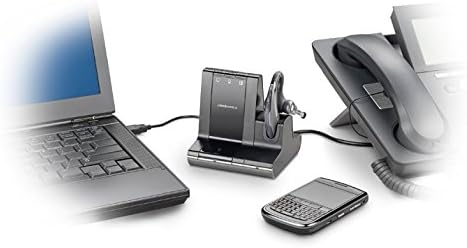
Figura 2: L'estació base Savi Office W730 demostra la seva multiconnectivitat, connectant-se a un ordinador portàtil mitjançant USB, a un telèfon fix mitjançant un cable d'interfície telefònica i a un telèfon mòbil sense fil mitjançant Bluetooth.
3. Càrrega dels auriculars
Col·loqueu els auriculars a la base de càrrega de l'estació base. El llum indicador de càrrega de la base s'il·luminarà per confirmar la càrrega. Espereu aproximadament 3 hores per a una càrrega completa abans del primer ús.
Instruccions de funcionament
1. Fer i respondre trucades
- Respondre/Finalitzar la trucada: Premeu el botó de control de trucades dels auriculars o el botó de telèfon corresponent de l'estació base.
- Fer una trucada: Seleccioneu la font de telèfon desitjada (PC, telèfon fix o mòbil) a l'estació base i, a continuació, marqueu des del dispositiu.
- Canvi de trucades: Durant una trucada activa, premeu el botó d'un altre dispositiu connectat a l'estació base per canviar a aquesta línia.
2. Controls dels auriculars
- Ajust de volum: Feu servir els botons per pujar el volum (+) i baixar el volum (-) dels auriculars.
- Silenciar el micròfon: Premeu el botó Silenciar dels auriculars. Torneu-lo a prémer per activar el so.
- Flash (per a telèfon fix): Premeu breument el botó de control de trucades dels auriculars per posar una trucada en espera o canviar entre trucades al telèfon fix.
3. Abast sense fil
El Savi W730 ofereix un abast sense fil de fins a 350 metres des de l'estació base. Els factors ambientals i els obstacles poden afectar l'abast real.
4. Integració de programari (Plantronics Hub)
Per a funcions avançades, personalització i actualitzacions de firmware, instal·leu el programari Plantronics Hub al vostre ordinador. Aquest programari habilita funcions com el control de trucades per a softphones i actualitzacions d'estat.
Manteniment
1. Cura de la bateria
Els auriculars inclouen una bateria intercanviable en calent, que permet un temps de conversa més llarg amb una bateria de recanvi opcional (es ven per separat). Per maximitzar la durada de la bateria, carregueu completament els auriculars abans del primer ús i acobleu-los regularment a l'estació base quan no els feu servir. Tingueu en compte que, amb el temps, totes les bateries recarregables experimenten una capacitat reduïda.
2. Neteja
Netegeu els auriculars i l'estació base amb un drap suau, sec i sense borrissol. Eviteu utilitzar netejadors líquids o materials abrasius.
Resolució de problemes
| Problema | Possible solució |
|---|---|
| Sense to de marcatge ni àudio |
|
| Mala qualitat d'àudio o estàtica |
|
| Els auriculars no s'aparellen amb el telèfon mòbil |
|
| Durada de la bateria limitada |
|
Especificacions
- Número de model: 83543-01
- Connectivitat: DECT 6.0 (sense fil), USB (PC), RJ-11 (telèfon fix), Bluetooth (telèfon mòbil)
- Interval sense fil: Fins a 350 peus (100 metres)
- Pes dels auriculars: 0.8 unces (aprox.)
- Bateria: 1 bateria de polímer de liti (intercanviable en calent)
- Dimensions del producte: 5.92 x 1.17 x 2.73 polzades (estació base)
- Característiques especials: Micròfon amb cancel·lació de soroll, processament de so digital, àudio de banda ampla per a PC, controls de trucades d'un sol toc.
Garantia i Suport
Per obtenir informació sobre la garantia, assistència tècnica o per comprar accessoris, visiteu el lloc web oficial de POLY. weblloc web o poseu-vos en contacte amb el servei d'atenció al client. Conserveu el comprovant de compra per a reclamacions de garantia.


