1. Introducció
The SteelSeries Sensei Laser Gaming Mouse is designed for precision and customization, catering to both casual and competitive gamers. It features an advanced laser sensor, an ambidextrous design, and extensive customization options through its dedicated software. This manual provides detailed instructions for setup, operation, maintenance, and troubleshooting to ensure optimal performance of your device.

Imatge 1: De dalt a baix view of the SteelSeries Sensei Laser Gaming Mouse, showcasing its sleek grey finish and central scroll wheel.
2. Contingut del paquet
Si us plau, verifiqueu que tots els elements siguin presents al vostre paquet:
- SteelSeries Sensei Laser Gaming Mouse
- Guia d'inici ràpid (si s'inclou)

Image 2: Retail packaging for the SteelSeries Sensei Laser Gaming Mouse, displaying the product name and brand logo.
3. Configuració
3.1 Connexió de maquinari
- Unpack the SteelSeries Sensei Laser Gaming Mouse from its packaging.
- Connect the USB cable of the mouse to an available USB port on your computer. The mouse is plug-and-play compatible, and your operating system should automatically detect and install the necessary basic drivers.
3.2 Software Installation (SteelSeries Engine)
For full customization and advanced features, it is recommended to install the SteelSeries Engine software:
- Visita la pàgina oficial de SteelSeries weblloc (steelseries.com/engine) to download the latest version of the SteelSeries Engine software.
- Seguiu les instruccions a la pantalla per instal·lar el programari.
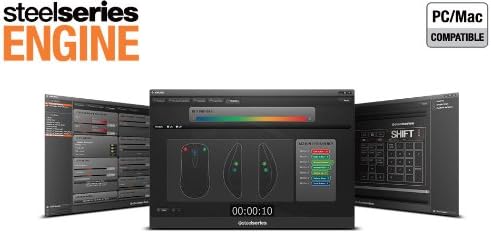
- Once installed, launch the SteelSeries Engine to configure your mouse settings, including CPI, button assignments, macros, and lighting effects.
Imatge 3: Part inferior view of the SteelSeries Sensei Laser Gaming Mouse, showing the laser sensor and product information label.
4. Funcionament del ratolí
4.1 Disseny ambidextre
The Sensei mouse features an ambidextrous shape, making it comfortable for both left-handed and right-handed users. The side buttons are mirrored on both sides to accommodate different grip styles and preferences.
4.2 Botons programables
The mouse is equipped with 7 programmable buttons. These buttons can be customized using the SteelSeries Engine software to perform various functions, including:
- Standard mouse clicks (left, right, middle)
- Keyboard key assignments
- Complex macros
- CPI switching

Imatge 4: Lateral view of the SteelSeries Sensei Laser Gaming Mouse, highlighting the two programmable side buttons.
4.3 CPI Adjustment
The Sensei mouse allows for on-the-fly CPI (Counts Per Inch) adjustment. The dedicated CPI indicator button, typically located behind the scroll wheel, allows you to cycle between two user-defined CPI settings. These settings can be configured within the SteelSeries Engine software to match your preferred sensitivity levels for different tasks or games.
4.4 Il·luminació
The mouse features three-zone illumination: the scroll wheel, the CPI indicator, and the SteelSeries logo. The color and lighting effects (e.g., steady, pulse) for these zones can be customized through the SteelSeries Engine software.
5. Programari del motor SteelSeries
The SteelSeries Engine is a powerful software suite that unlocks the full potential of your Sensei mouse. Key functionalities include:
- Mapa de botons: Assign any function, keyboard key, or macro to any of the 7 programmable buttons.
- CPI Settings: Fine-tune and save multiple CPI profiles per a diferents aplicacions o jocs.
- Editor de macros: Create and manage complex macros for in-game actions or productivity tasks.
- Taxa de votació: Ajusteu la velocitat de sondeig del ratolí per obtenir una resposta òptima.
- Control d'il·luminació: Customize LED colors and effects for the scroll wheel, CPI indicator, and logo.
- Profile Gestió: Crea i desa diversos professionalsfiles, allowing you to switch between different configurations quickly.
- Actualitzacions de firmware: Keep your mouse's firmware up-to-date for improved performance and new features.

Image 5: Screenshot of the SteelSeries Engine software interface, showing options for button mapping, CPI adjustment, and lighting customization.
6. Manteniment
To ensure the longevity and optimal performance of your SteelSeries Sensei mouse, follow these maintenance guidelines:
- Neteja: Feu servir un drap suau i sec per netejar la superfície del ratolí. Per a la brutícia persistent, netegeu lleugerament.amp cloth can be used, but ensure no moisture enters the mouse. Avoid harsh chemicals or abrasive cleaners.
- Cura del sensor: Keep the laser sensor on the bottom of the mouse clean and free from dust or debris. Use a cotton swab or compressed air if necessary.
- Gestió de cables: Eviteu doblegar bruscament o estirar excessivament el cable USB per evitar danys.
7. Solució De Problemes
If you encounter issues with your SteelSeries Sensei mouse, refer to the following common solutions:
- El ratolí no respon:
- Assegureu-vos que el cable USB estigui ben connectat a l'ordinador.
- Prova de connectar el ratolí a un port USB diferent.
- Reinicieu l'ordinador.
- Seguiment inconsistent:
- Clean the laser sensor on the bottom of the mouse.
- Assegureu-vos que feu servir el ratolí sobre una superfície adequada (per exemple, una estora de ratolí).
- Check for dust or debris on your mouse pad.
- Els botons no funcionen:
- Verify button assignments in the SteelSeries Engine software.
- Ensure the software is running correctly and profiles are loaded.
- Problemes de programari:
- Update the SteelSeries Engine software to the latest version.
- Torneu a instal·lar el programari SteelSeries Engine.
- Check for any available firmware updates for your mouse within the software.
8. Especificacions
| Característica | Detall |
|---|---|
| Marca | SteelSeries |
| Número de model | 62150 |
| Tecnologia de detecció de moviment | Làser |
| Tecnologia de connectivitat | USB |
| Color | Gris |
| Plataforma de maquinari | PC |
| Compatibilitat de sistemes operatius | All Major PC Operating Systems |
| Pes de l'article | 14.6 unces |
| Dimensions del producte (LxWxH) | 7.9 x 6.8 x 2.3 polzades |
| Botons programables | 7 |
| Illumination Zones | 3 (Scroll Wheel, CPI Indicator, Logo) |
9. Garantia i Suport
The SteelSeries Sensei Laser Gaming Mouse is covered by a manufacturer's warranty. For detailed information regarding warranty terms, conditions, and duration, please refer to the warranty card included with your product or visit the official SteelSeries website. For technical support, driver downloads, and frequently asked questions, please visit the SteelSeries support page.
Oficial de SteelSeries Weblloc: steelseries.com
SteelSeries Support: support.steelseries.com


