1. Introducció i finalview
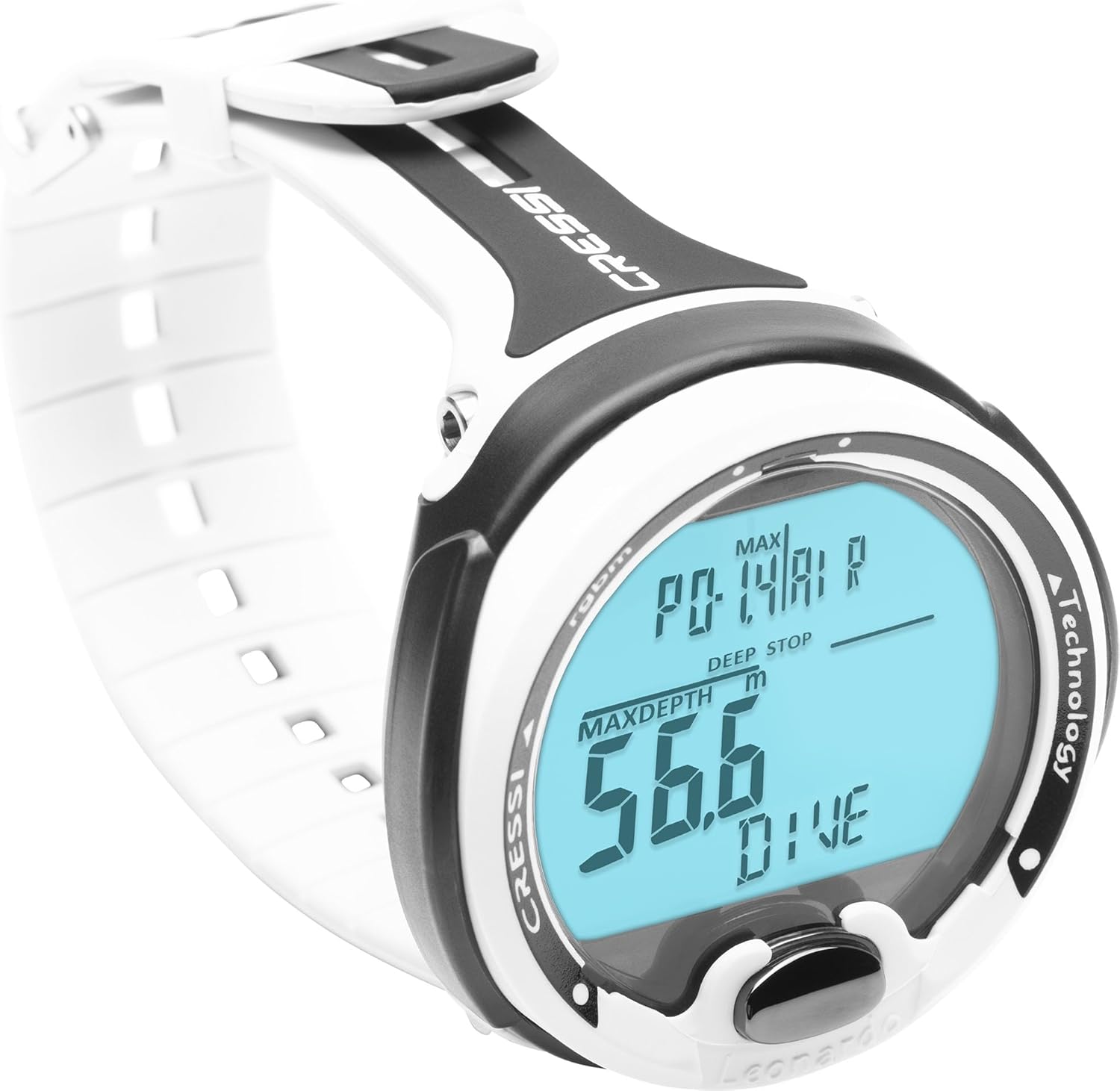
The Cressi Leonardo 2.0 is a modular and rugged single-button dive computer designed for ease of use, suitable for both new and experienced divers. Manufactured in Italy, it features a wide User-Friendly Display System (UFDS) for clear readability of information, even in challenging underwater conditions. This computer offers three primary operating modes: Air, Nitrox, and Gauge, providing essential dive data and safety features.
Key features include comprehensive Nitrox management, a depth gauge mode, and a reset option. The integrated algorithm incorporates RGBM and Deep Stop functionalities for enhanced safety. The intuitive menu and navigation system ensure quick access to information and parameter modification. The display's contrast, proportions, and digit size are optimized for readability, with information separated by light lines. A backlit display can be activated manually or automatically upon alarm activation. The Leonardo 2.0 also boasts extended battery life and can be linked to a smartphone via an optional Bluetooth (BT) Interface for downloading dive sessions and monitoring training.

2. Configuració
The Leonardo 2.0 features a single-button interface for straightforward setup and navigation. Upon initial use or after a full reset, the computer will guide you through basic settings.
2.1 Configuració inicial
- Selecció d'idioma: Trieu el vostre idioma preferit.
- Unitats de mesura: Select between imperial (feet, Fahrenheit) or metric (meters, Celsius) units.
- Hora i data: Estableix l'hora i la data actuals.
- Personal Conservatism: Adjust the safety factor (SF) to increase the safety curve of the algorithm, if desired.
- Altitude Setting: Customize the altitude setting for diving in mountain lakes.
2.2 Battery Installation/Check
The device is powered by a long-lasting CR2430 button battery. While the battery is designed for extended use, it is recommended to have battery changes performed by an authorized Cressi service center to ensure perfect watertightness and proper O-ring status.

3. Modes de funcionament
The Leonardo 2.0 offers three distinct operating modes: Air, Nitrox, and Gauge. Mode selection and navigation are performed using the single button.
3.1 Air Mode
This is the standard mode for diving with regular air. The computer continuously monitors depth, dive time, no-decompression limits (NDL), and ascent rates, providing visual and audible alarms for safety.
3.2 Nitrox Mode
For diving with Nitrox mixtures, this mode allows adjustment of the oxygen percentage (FO2) between 21% and 50%. The partial pressure of oxygen (PO2) can be set between 1.2 bar and 1.6 bar. A CNS oxygen toxicity graphic indicator is provided to monitor oxygen exposure.
3.3 Gauge Mode
In Gauge mode, the computer functions as a precise depth gauge and timer, displaying current depth, maximum depth, and dive time. Decompression calculations are not performed in this mode.
3.4 Navigation and Display
The single-button interface allows for easy scrolling through various screens and adjusting settings. A short press typically navigates through information, while a long press enters or confirms settings. The high-definition screen ensures large numerical displays and clear visibility of all critical information.


Video 1: Official product video demonstrating the key features and ease of use of the Cressi Leonardo dive computer.
4. Manteniment
Proper maintenance ensures the longevity and reliable performance of your Cressi Leonardo 2.0 dive computer.
4.1 Substitució de la bateria
The Leonardo 2.0 uses a CR2430 button battery. For battery replacement, it is crucial to visit an authorized Cressi service center. This ensures that the O-ring status is properly evaluated, cleaned, lubricated, or substituted to maintain perfect watertightness and prevent water entry.
4.2 Atenció general
- Rinse the computer with fresh water after each dive.
- Avoid exposing the computer to direct sunlight for extended periods.
- Store the computer in a cool, dry place when not in use.
- Regularly inspect the strap and casing for any signs of wear or damage.
4.3 Reset Option
The Leonardo 2.0 can be fully reset after each use. This feature is useful if the computer is to be used by another diver, ensuring that previous dive data and settings do not interfere with subsequent dives.
5. Solució De Problemes
This section addresses common issues you might encounter with your Leonardo 2.0 dive computer.
5.1 Display Readability
The Leonardo 2.0 features a high-definition screen with large numerical displays and light lines separating information for optimal clarity. If visibility is poor underwater, activate the backlit display by pressing the single button. The backlight also activates automatically when an alarm sounds.
5.2 Preocupacions sobre la durada de la bateria
The computer is designed with extended battery life, incorporating a battery saver mode when not in use and automatic power-on. A clearly visible battery life indicator provides peace of mind. If the battery drains unexpectedly quickly, ensure the computer is not left in a mode that consumes more power unnecessarily. For persistent issues, consult an authorized Cressi service center.
5.3 Connectivity Issues (Optional BT Interface)
If you are using the optional Bluetooth (BT) Interface to connect to the Cressi app, ensure the interface is correctly attached and within range of your smartphone. Verify that Bluetooth is enabled on your smartphone and that the Cressi app is up to date. The BT Interface communicates via an IR connection to the dive computer.
6. Especificacions
| Característica | Detall |
|---|---|
| Dimensions del paquet de l'article L x W x H | 5.35 x 4.57 x 4.13 polzades |
| Pes del paquet | 0.26 quilos |
| Dimensions de l'article L x W x H | 4 x 4 x 4 polzades |
| Pes de l'article | 200 grams |
| Nom de marca | Cressi |
| País d'origen | Itàlia |
| Nom del model | Leonardo 2.0 |
| Color | Blanc/Negre |
| Material | Altres |
| Usuaris suggerits | unisex-adult |
| Nombre d'articles | 1 |
| Fabricant | Cressi |
| Número de part | KS770150 |
| Any model | 2016 |
| Estil | Blanc/Negre |
| Components inclosos | Scuba dive computer |
| Mida | 4 polzades x polzades 4 x polzades 4 |
| Tipus esportiu | Submarinisme |
| Mida de la pantalla de peu | 44 mil·límetres |
| Tecnologia de connectivitat | USB (via optional BT Interface) |
| Comunicació sense fils estàndard | Infrared (for BT Interface) |
| Composició de les cèl·lules de la bateria | Diòxid de liti i manganès |
| GPS | Sense GPS |
| Forma | Rectangular |
| Mida de la pantalla | 44 mil·límetres |

7. Garantia i Suport
The Cressi Leonardo 2.0 Dive Computer is covered by a 2-year limited warranty. For any warranty claims, technical support, or service, please contact an authorized Cressi service center. They can assist with repairs, battery replacements, and ensure the continued optimal performance and watertight integrity of your device.
For additional resources, including the Cressi app for dive log downloads (available for Android and iOS), please visit the official Cressi website or consult your local authorized dealer.


